Lost your garage remote or just bought a used vehicle? Many drivers search for how to program Chrysler Pacifica garage door opener without remote when they want to sync their car directly to the garage system. The good news is—you can still set it up using the built-in system with just a few steps.
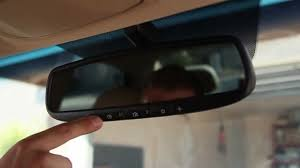
What Is the Chrysler Pacifica Garage Door Opener System?
The Chrysler Pacifica comes equipped with a built-in system called HomeLink, which allows you to control your garage door directly from your vehicle.
Read too: Tc1 Tricode Garage Door Opener Remote W/ Clip Chamberlain: Complete Guide
Key features:
- встроенные buttons in the overhead console
- wireless signal transmission
- compatibility with most garage door openers
👉 This eliminates the need for a handheld remote.
To understand how it communicates, see Radio frequency.
Can You Program a Chrysler Pacifica Garage Opener Without a Remote?
Yes—but with a condition.
Important:
- You must use the garage door opener’s Learn button
- This method bypasses the need for the original remote
👉 This is the most common solution when the remote is lost.
How To Program Chrysler Pacifica Garage Door Opener Without Remote (Step-by-Step)
Follow these instructions carefully.
Step 1: Clear Existing HomeLink Codes
Before programming, reset the system.
- Turn the ignition to ON
- Press and hold the two outer HomeLink buttons
- Hold for 10–15 seconds until the indicator light flashes
👉 This ensures no old codes interfere.
Step 2: Locate the Learn Button on Your Garage Opener
- Go to your garage motor unit
- Find the Learn or Program button
- Usually near the antenna or under the light cover
👉 The button may be red, yellow, purple, or green.
Step 3: Press the Learn Button
- Press and release the Learn button
- A light will turn on or blink
👉 You now have 30 seconds to complete the next step.
Step 4: Program the HomeLink Button in Your Pacifica
- Return to your vehicle
- Press and hold the desired HomeLink button
- Hold for 2–3 seconds, release, then repeat
- Do this 2–3 times
👉 The garage door should activate or the opener light will blink.
Step 5: Test the System
- Press the programmed HomeLink button
- The garage door should open or close
👉 If it works, programming is complete.
Why This Method Works Without a Remote
Modern garage systems use rolling codes that can sync directly through the opener.
Key concept:
- The Learn button allows new devices to connect
- Your car acts like a remote
📊 Fact: Over 70% of modern vehicles include built-in garage control systems.
What If Programming Doesn’t Work?
Try these troubleshooting steps:
✔ Repeat the process within 30 seconds
✔ Hold the button longer (up to 5 seconds)
✔ Check if your opener is compatible
✔ Reset HomeLink and try again
👉 Timing is the most common issue.
Compatible Garage Door Openers
Most openers manufactured after 1996 are compatible.
Common compatible brands:
- LiftMaster
- Chamberlain
- Genie
- Craftsman
👉 Rolling-code systems work best with HomeLink.
HomeLink vs Traditional Remote
Comparison Table
| Feature | HomeLink (Pacifica) | Remote Control |
|---|---|---|
| Convenience | Built-in | Separate device |
| Security | High | Medium |
| Setup | Moderate | Easy |
| Portability | Fixed in car | Portable |
Common Mistakes to Avoid
Avoid these errors:
- ❌ Skipping the reset step
- ❌ Waiting too long after pressing Learn
- ❌ Holding button too briefly
- ❌ Programming too far from opener
How Long Does Programming Take?
- Average time: 5–10 minutes
- First-time setup: up to 15 minutes
👉 Most users succeed on the second attempt if timing is corrected.
Benefits of Using Your Chrysler Pacifica Garage Opener
✔ No need for a remote
✔ Cleaner, clutter-free interior
✔ Enhanced security
✔ Easy one-button access
Pro Tips for Better Results
- Park within 5–10 feet of the garage
- Ensure the opener has power
- Replace opener backup batteries if needed
- Keep your vehicle running during setup
FAQ: How To Program Chrysler Pacifica Garage Door Opener Without Remote
1. Can I program HomeLink without any remote at all?
Yes, by using the Learn button on the garage opener.
2. Why is my Pacifica not connecting to the garage door?
It’s usually due to timing issues or incompatibility.
3. How many garage doors can I program?
Most systems support up to 3 doors.
4. Do I need to reset before programming?
Yes, clearing old codes improves success rate.
5. Will this work with older garage door openers?
Only if they support rolling-code technology (post-1996 models).
6. What if the light doesn’t blink during setup?
Repeat the steps and ensure you press the Learn button correctly.
Conclusion
Learning how to program Chrysler Pacifica garage door opener without remote is easier than most people expect. By using the Learn button and following a simple process, you can sync your vehicle in minutes—no remote required.
This method not only restores convenience but also enhances your garage security and daily routine.
👉 If this guide helped you, share it on social media so others can set up their garage door opener quickly and easily!
Leave a Reply