If you’re searching “How To Program A Universal Chamberlain Garage Door Opener”, you’re likely dealing with a new remote that won’t connect—or replacing an old one. The process can feel confusing at first, but it’s actually very straightforward.
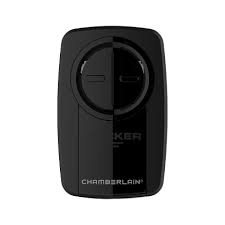
In this guide, you’ll learn exactly how to program your universal Chamberlain remote step-by-step, even if you’ve never done it before.
Read too: Tc1 Tricode Garage Door Opener Remote W/ Clip Chamberlain: Complete Guide
How To Program A Universal Chamberlain Garage Door Opener (Step-by-Step)
Let’s start with the exact process you need to follow.
Step 1: Locate the “Learn” Button
The Learn button is essential for programming.
Where to find it:
- On the motor unit mounted on the ceiling
- Behind the light cover or side panel
Button colors indicate frequency:
- Yellow
- Purple
- Red/orange
- Green
Step 2: Prepare Your Remote
Before programming:
- Insert a fresh battery (usually CR2032)
- Stand within 3–10 feet (1–3 meters) of the opener
Step 3: Enter Programming Mode
- Press the “Learn” button on the opener
- LED light will turn on
- You now have about 30 seconds to program
Step 4: Program the Remote
- Press and hold the button on your remote
- Hold for 2–3 seconds, then release
- Repeat if necessary until:
- The opener light blinks, or
- The garage door moves
✅ This confirms successful pairing.
Step 5: Test the Remote
- Press the remote button
- Ensure the door opens and closes smoothly
What If Programming Doesn’t Work?
Sometimes the process needs troubleshooting.
Common Fixes:
- Replace battery
- Try a different remote button
- Move closer to the opener
- Repeat steps within the 30-second window
What Is a Universal Chamberlain Remote?
A universal remote is designed to work with multiple garage door opener brands—not just one.
Benefits:
- Works across different systems
- Convenient replacement option
- Budget-friendly
Compatibility Guide
Works With:
- Chamberlain
- LiftMaster
- Craftsman
May Require Extra Steps For:
- Older models (pre-1993)
- Non-standard frequencies
Programming Multiple Remotes
You can connect more than one remote to the same opener.
Steps:
- Repeat programming process for each remote
- Ensure each is tested individually
Tip:
Most systems support 3–7 remotes.
Resetting the Opener Before Programming
If you’re having trouble, a full reset can help.
How to Reset:
- Press and hold the Learn button
- Hold for 6–10 seconds
- LED turns off → memory cleared
⚠️ This removes all connected remotes.
How Long Does It Take?
| Task | Time |
|---|---|
| Locate Learn button | 1 minute |
| Program remote | 2–3 minutes |
| Testing | 1 minute |
👉 Total: Under 5 minutes
Expert Insight: How Garage Remotes Work
Garage door remotes use radio frequency signals to communicate with the opener. Modern systems use rolling code encryption for better security.
Learn more here:
https://en.wikipedia.org/wiki/Garage_door_opener
Advantages vs Disadvantages of Universal Remotes
Advantages:
- Compatible with multiple brands
- Affordable
- Easy to replace
Disadvantages:
- Slightly more complex setup
- Not 100% compatible with all models
Common Mistakes to Avoid
1. Waiting Too Long After Pressing Learn
You only have 30 seconds—act quickly.
2. Using Dead Batteries
Always install fresh batteries before programming.
3. Standing Too Far Away
Stay within 10 feet for best signal.
4. Not Holding Button Long Enough
Hold for at least 2–3 seconds.
Real-Life Example
Scenario:
A homeowner buys a universal Chamberlain remote but can’t get it to work.
Solution:
- Press Learn button
- Program within 30 seconds
- Retry twice
Result:
Remote successfully paired in under 5 minutes.
Maintenance Tips
Keep your remote working efficiently:
- Replace batteries every 12–18 months
- Keep remote clean and dry
- Test monthly
- Store safely to avoid damage
FAQ: How To Program A Universal Chamberlain Garage Door Opener
1. Why won’t my Chamberlain remote program?
It may be due to timing issues, weak batteries, or compatibility problems.
2. Do I need to reset my opener first?
Not always, but it helps if previous programming fails.
3. How many remotes can I connect?
Most openers support 3–7 remotes.
4. Can I use one remote for multiple doors?
Yes, if your remote has multiple buttons.
5. What battery does the remote use?
Most use CR2032 coin batteries.
6. Is universal remote as reliable as original?
Yes, if properly programmed and compatible.
Conclusion
Now you know exactly how to program a universal Chamberlain garage door opener—and it’s a quick process that anyone can do. With just a few simple steps, you can restore convenience and control over your garage.
Whether you’re replacing an old remote or adding a new one, this simple setup makes everyday access easier.
If this guide helped you, feel free to share it on social media—someone else might need this quick solution today! 🚪
Leave a Reply