Struggling to figure out How To Program A Toyota Highlander Garage Door Opener can be frustrating, especially when your remote just won’t sync. Many drivers want a quick and reliable way to open their garage directly from their vehicle without multiple remotes.
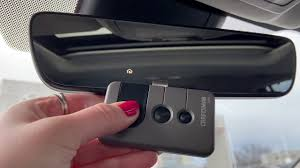
In this guide, you’ll learn a simple step-by-step method to program your Toyota Highlander’s built-in garage door system safely and correctly.
Read too: Tc1 Tricode Garage Door Opener Remote W/ Clip Chamberlain: Complete Guide
What Is the Toyota Highlander Garage Door Opener System?
The Toyota Highlander garage door opener system uses a built-in wireless feature commonly known as HomeLink. This system allows you to connect your car directly to your garage door receiver.
HomeLink technology operates using radio frequency signals, similar to standard garage remotes. According to general automotive electronics principles, these systems typically operate in the 288–433 MHz frequency range depending on region and manufacturer standards. Learn more about the technology behind remote systems here: https://en.wikipedia.org/wiki/Remote_keyless_system
What Do You Need Before Programming?
Before learning How To Program A Toyota Highlander Garage Door Opener, make sure you have:
- A working garage door remote
- A Toyota Highlander with HomeLink buttons (usually on the rearview mirror)
- A functional garage door motor unit
- Fresh batteries in the remote
Pro Tip:
Experts recommend standing within 1–3 feet (30–90 cm) of the garage motor during programming for best signal accuracy.
Step-by-Step: How To Program A Toyota Highlander Garage Door Opener
Follow these steps carefully:
Step 1: Clear Existing Codes (If Needed)
- Press and hold the two outer HomeLink buttons
- Hold for 10–15 seconds until the light flashes rapidly
- This resets previous programming
Step 2: Start Programming Mode
- Turn ignition ON (do not start engine)
- Hold the garage remote 1–3 inches (2–8 cm) from HomeLink buttons
Step 3: Sync Remote With Car
- Press both the remote button and HomeLink button simultaneously
- Hold until the indicator light changes from slow blink to rapid flash (about 20–30 seconds)
Step 4: Test the System
- Press the programmed HomeLink button
- Observe garage door response
If the door does not respond, repeat the process or move closer to the motor unit.
Why HomeLink Sometimes Doesn’t Work
Even when following How To Program A Toyota Highlander Garage Door Opener, issues may occur.
Common Causes:
- Weak remote battery
- Interference from LED lighting or Wi-Fi routers
- Incompatible rolling-code systems
- Incorrect distance during setup
Rolling Code Note:
Many modern garage systems use rolling code technology, which changes the access code each time for security.
Kelebihan vs Kekurangan HomeLink System
| Kelebihan | Kekurangan |
|---|---|
| No need for separate remote | Setup can be tricky initially |
| Built-in convenience | Not compatible with all systems |
| Clean dashboard integration | Requires programming steps |
| Supports multiple doors | May need repeater module |
Expert Insight on Car-Based Garage Systems
Automotive safety studies show that integrated systems like HomeLink reduce driver distraction by minimizing the need for handheld remotes. The National Highway Traffic Safety Administration (NHTSA) emphasizes that reducing in-car device handling improves driving safety and reaction time.
How to Fix Programming Issues Quickly
If programming fails:
1. Reset Everything
- Clear HomeLink memory
- Restart process from Step 1
2. Check Compatibility
- Some older garage motors may require a “learn button” sync
3. Replace Remote Battery
- Use fresh CR2032 or equivalent battery
4. Reposition Remote
- Keep 1–3 inches distance during sync
How Long Does Programming Take?
On average, programming takes:
- 5–10 minutes for standard systems
- 10–20 minutes for rolling-code systems
Most users successfully complete setup on the first or second attempt.
Benefits of Using Toyota Highlander Garage Opener
Once you learn How To Program A Toyota Highlander Garage Door Opener, you get:
- Faster home entry
- No need for physical remotes
- Safer driving experience
- Cleaner interior space
FAQ – How To Program A Toyota Highlander Garage Door Opener
1. Why won’t my Toyota Highlander garage opener program?
It may be due to weak remote batteries, incorrect distance, or rolling-code compatibility issues.
2. Does every Toyota Highlander have HomeLink?
Not all trims include it. It is commonly found in mid to high-level trims.
3. How do I reset my HomeLink system?
Press and hold the two outer HomeLink buttons for 10–15 seconds until the light flashes rapidly.
4. Can I program multiple garage doors?
Yes, most Toyota Highlander systems support up to 3 different garage doors.
5. What if my garage uses rolling code technology?
You may need to press the “Learn” button on the garage motor after initial pairing.
6. Is professional installation required?
No, most users can complete programming in under 10 minutes without professional help.
Conclusion
Learning How To Program A Toyota Highlander Garage Door Opener is a simple but powerful way to improve daily convenience and vehicle functionality. With just a few steps, you can sync your garage system and enjoy seamless, hands-free access.
If this guide helped you, feel free to share it with other Toyota Highlander owners who might be struggling with the same setup process.
Leave a Reply