If you’ve ever struggled with a garage door that won’t open because your keypad isn’t working, you’re not alone. Many homeowners search for how to program a keypad for garage door opener when setting up a new system or fixing a forgotten code. The good news? It’s easier than you think—and you can do it yourself in just a few minutes.
What Is a Garage Door Keypad and Why Use One?
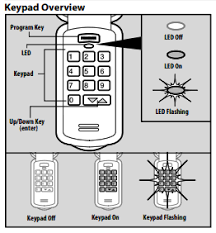
A garage door keypad is a wireless device mounted outside your garage that allows you to open or close the door using a secure PIN code—no remote needed.
Read too: How Do You Change Code On Garage Door Keypad Fast?
Key Benefits:
- Convenience: No need to carry a remote or keys
- Security: Temporary codes for guests or deliveries
- Accessibility: Ideal for families or multiple users
According to home security studies, adding keypad access can significantly reduce lockout incidents and improve controlled access to your property.
For more on access control systems, see this overview on Wikipedia:
https://en.wikipedia.org/wiki/Access_control
How To Program A Keypad For Garage Door Opener (Step-by-Step)
Step 1: Locate the “Learn” Button
First, find the Learn or Program button on your garage door opener unit.
- Usually located on the back or side of the motor unit
- Common colors: red, yellow, purple, or green
- You may need a ladder to reach it
💡 Tip: Check your opener manual if you can’t find it.
Step 2: Press the Learn Button
- Press and release the Learn button
- A small LED light will turn on
- You typically have 30 seconds to complete the next step
Step 3: Enter Your Desired PIN
- Go to your keypad
- Enter a 4-digit PIN code (e.g., 2580)
- Choose something secure but memorable
Step 4: Press the Enter Button
- Press the Enter key
- Wait for the garage light to blink or hear a click
This confirms the keypad has been successfully programmed.
Step 5: Test the Keypad
- Enter your PIN
- Press Enter
- Ensure the garage door opens/closes smoothly
✔️ If it works, you’re done!
❌ If not, repeat the steps carefully.
Common Programming Differences by Brand
Not all garage door openers work exactly the same. Here’s a quick comparison:
| Brand | Learn Button Color | Special Step |
|---|---|---|
| LiftMaster | Yellow/Red | Hold Enter until light blinks |
| Chamberlain | Purple/Green | Press Learn once only |
| Genie | Blue/Black | Use “Program” instead of Learn |
| Craftsman | Red/Orange | Similar to Chamberlain |
💡 Always refer to your specific model for exact instructions.
How to Reset a Garage Door Keypad
If your keypad isn’t working or you forgot your PIN, resetting is the best solution.
Reset Steps:
- Press and hold the Learn button for 6–10 seconds
- Wait until the LED light turns off
- Reprogram your keypad using the steps above
Troubleshooting: Why Your Keypad Isn’t Working
Even after following instructions, issues can happen.
Common Problems and Fixes:
1. Dead Batteries
- Replace with fresh AAA or 9V batteries
2. Out of Range
- Move closer to the garage door
3. Signal Interference
- Nearby electronics may interfere
4. Incorrect PIN Entry
- Reprogram and try again
5. Worn-Out Keypad
- Consider replacing if older than 5–7 years
Security Tips for Garage Door Keypads
Programming your keypad is only the first step—keeping it secure is just as important.
Best Practices:
- Avoid obvious PINs (1234, 0000)
- Change your code every 3–6 months
- Don’t share your PIN publicly
- Use temporary codes for guests
🔒 Did you know? Smart garage systems now allow app-based monitoring and code management, increasing overall home security.
Advantages vs Disadvantages of Garage Keypads
Advantages:
- Easy access without keys
- Multiple user support
- Increased convenience
Disadvantages:
- Requires battery maintenance
- Potential security risks if code is shared
- May need occasional reprogramming
When Should You Reprogram Your Keypad?
You should reprogram your keypad if:
- You move into a new home
- You forget your PIN
- The keypad stops responding
- You suspect unauthorized access
Regular updates ensure your garage remains secure.
FAQ: How To Program A Keypad For Garage Door Opener
1. How long does it take to program a garage keypad?
It usually takes 2–5 minutes, depending on your opener model.
2. Can I program multiple keypads to one garage door?
Yes, most modern garage openers support multiple keypads and remotes.
3. What if my garage opener doesn’t have a Learn button?
Older models may require a wall console or manual programming steps. Check your manufacturer’s guide.
4. Do I need professional help to program a keypad?
No, most homeowners can do it themselves by following simple instructions.
5. Why does my keypad work sometimes but not always?
This could be due to weak batteries, interference, or signal issues.
6. Can I change my PIN without resetting everything?
Yes, many models allow PIN changes without a full reset—check your manual.
Conclusion
Learning how to program a keypad for garage door opener is a simple but powerful way to improve your home’s convenience and security. With just a few steps, you can set up a reliable access system for your garage without needing professional help.
Take a few minutes today to program—or reprogram—your keypad and enjoy hassle-free access. If you found this guide helpful, share it on social media so others can benefit too!
Leave a Reply