Imagine standing in your driveway, rain pouring down, only to realize you’ve locked your keys inside the house. It’s a frustrating scenario that happens to the best of us. Fortunately, knowing how to program a keypad for a garage door opener can save you from this hassle and provide convenient, keyless entry for your family and trusted neighbors. In this comprehensive guide, we will walk you through the exact steps to get your wireless keypad up and running quickly and securely.
Why Use a Garage Door Keypad?
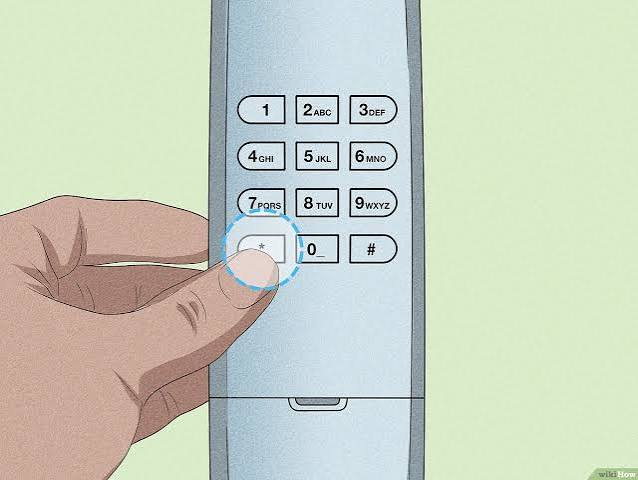
Before diving into the technical steps, it is worth understanding why adding a keypad is one of the smartest upgrades for your home. A wireless keypad eliminates the need to carry physical remotes or dig through your purse for keys. According to home security experts, keyless entry systems also reduce the risk of lost remotes being used by unauthorized individuals.
Furthermore, modern keypads offer temporary PIN codes for guests or service providers, enhancing both convenience and security. Whether you have a brand-new opener or an older model, most systems are compatible with universal or brand-specific keypads.
What You Need Before You Start
Programming a keypad is generally a straightforward process, but preparation is key to avoiding frustration. Ensure you have the following items ready:
- The Wireless Keypad: Ensure it is compatible with your garage door opener brand (e.g., LiftMaster, Chamberlain, Genie).
- A Stable Ladder: You will need access to the motor unit mounted on your garage ceiling.
- Fresh Batteries: Install new batteries in the keypad before starting to prevent connection issues.
- Your Owner’s Manual: While this guide covers general steps, specific models may have unique requirements.
Pro Tip: If you have lost your manual, you can often find digital copies on the manufacturer’s website. For general technical definitions and safety standards regarding garage door openers, you can refer to Wikipedia’s page on Garage Door Openers to understand the underlying technology.
Step-by-Step: How to Program a Keypad for a Garage Door Opener
While brands differ slightly, the core logic remains consistent. Most openers use a “Learn Button” method. Follow these detailed steps to sync your keypad.
Step 1: Locate the Learn Button
Climb your ladder and locate the motor unit of your garage door opener. Look for a small button labeled “Learn,” “Program,” or “Smart.” It is usually located near the antenna wire and may be colored yellow, purple, red, or green depending on the brand.
- Yellow/Learn Button: Common in newer LiftMaster and Chamberlain models.
- Purple/Smart Button: Often found in older Chamberlain units.
- Red/Orange Button: Typical for Genie openers.
Step 2: Clear Old Codes (Optional but Recommended)
If you are reprogramming an existing keypad or buying a used unit, it is wise to clear previous codes. Press and hold the Learn button for about 6–10 seconds until the indicator light turns off. This resets the memory, ensuring no old codes interfere with your new setup.
Step 3: Initiate Programming Mode
Press the Learn button once briefly. The indicator light will either turn on solid or start blinking. This signals that the opener is now in “learning mode” and ready to accept a new signal. You typically have 30 seconds to complete the next step.
Step 4: Enter Your Desired PIN
On your wireless keypad, enter your desired 4-digit PIN. Choose a code that is easy for you to remember but hard for others to guess (avoid 1234 or 0000). After entering the PIN, press and hold the “Enter” or “Send” button.
Step 5: Confirm the Connection
Watch the motor unit’s light. It should blink or flash once to confirm it has received the signal. Release the button on the keypad. Test the system by entering your PIN again and pressing Enter. The garage door should activate immediately.
| Brand | Learn Button Color | Typical Reset Time | Notes |
|---|---|---|---|
| LiftMaster | Yellow/Purple | 6-10 seconds | Supports Security+ 2.0 |
| Chamberlain | Purple/Yellow | 6-10 seconds | Compatible with most LiftMaster keypads |
| Genie | Red/Orange | 10-15 seconds | Uses Intellicode technology |
| Craftsman | Purple/Red | 6-10 seconds | Often rebranded Chamberlain units |
Troubleshooting Common Issues
Even with careful following of instructions, things don’t always go smoothly. Here are solutions to the most common problems users face when learning how to program a keypad for a garage door opener.
The Keypad Won’t Sync
If the light on the motor unit doesn’t blink after you press Enter on the keypad:
- Check Battery Orientation: Ensure batteries are inserted correctly.
- Replace Batteries: Even new batteries can be defective. Try a fresh set.
- Distance Issues: Stand closer to the motor unit while programming. Once synced, you can test it from the driveway.
The Door Moves But Doesn’t Stop
This is a safety sensor issue, not a programming error. Check the photo-eye sensors near the floor of your garage tracks. Ensure they are aligned and clean. If the green light on the sensor is blinking, something is blocking the beam.
Intermittent Connectivity
If the keypad works sometimes but not others, interference might be the culprit. LED light bulbs in your garage can emit frequency interference. Try switching to incandescent bulbs or RF-shielded LED bulbs to see if performance improves.
Security Best Practices for Your Keypad
Programming the keypad is just the first step. Maintaining security is crucial to protect your home.
- Change Default Codes: Never leave the factory default code (often 1234 or 0000) active.
- Use Unique PINs: Do not use your birth year, address number, or phone number as your PIN.
- Regular Updates: Change your PIN every 6–12 months, especially if you’ve shared it with contractors or previous homeowners.
- Disable Unused Features: If your keypad has a “vacation mode” or temporary code feature, learn how to use it. This allows you to give access to a dog walker or cleaner without revealing your main PIN.
Frequently Asked Questions (FAQ)
1. Can I program a universal keypad to any garage door opener?
Most universal keypads are designed to work with major brands like LiftMaster, Chamberlain, Genie, and Craftsman. However, compatibility depends on the frequency (usually 315 MHz or 390 MHz) and the security protocol (rolling code vs. fixed code). Always check the packaging of the keypad for a list of compatible models.
2. How do I know if my opener uses rolling code technology?
Rolling code technology changes the access code every time you use the remote, preventing hackers from capturing and replaying the signal. If your opener was manufactured after 1993, it likely uses rolling codes. You can verify this by checking the model number online or looking for terms like “Security+” or “Intellicode” on the motor unit.
3. What should I do if I forget my keypad PIN?
If you forget your PIN, you cannot retrieve it from the keypad itself. You must reset the system. Clear the memory by holding the Learn button on the motor unit, then reprogram the keypad with a new PIN following the steps outlined above. It is a good idea to store your PIN in a secure password manager.
4. Can I program multiple keypads to one garage door opener?
Yes, most modern garage door openers can store up to 8–10 different remote controls and keypads. Simply repeat the programming steps for each additional keypad. Each device will have its own unique identity in the opener’s memory.
5. Why does my keypad work close up but not from the driveway?
This is usually a range issue caused by weak batteries, interference, or a damaged antenna on the motor unit. First, replace the batteries. If that doesn’t work, ensure the antenna wire on the motor unit is hanging down freely and not tucked inside the housing. If problems persist, you may need a signal repeater.
Conclusion
Learning how to program a keypad for a garage door opener is a simple yet impactful DIY project that enhances both the convenience and security of your home. By following the step-by-step instructions above, you can avoid costly service calls and enjoy seamless keyless entry. Remember to prioritize security by choosing strong PINs and keeping your system updated.
Did you find this guide helpful? Share it with your friends and family on social media to help them master their garage door setups too! If you have any questions or tips of your own, leave a comment below—we love hearing from our readers.
Leave a Reply