If you’ve lost a spare remote or just bought a new one, you might be asking How To Program A Garage Door Remote With Another Remote. It’s a common situation, especially when you don’t want to access the opener unit directly. The good news? In some cases, you can program a new remote using an existing one—but it depends on your system.
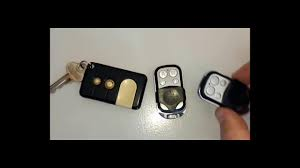
Can You Program a Garage Door Remote With Another Remote?
The short answer is: sometimes yes, but not always.
When It Works:
- Older garage door systems with fixed codes
- Universal remotes with cloning capability
Read too: How Do You Change Code On Garage Door Keypad Fast?
When It Doesn’t Work:
- Modern systems using rolling code technology
- Most newer brands like LiftMaster, Genie, and Chamberlain
💡 Important: Rolling code systems prevent direct remote-to-remote cloning for security reasons.
👉 Learn more about this technology here:
https://en.wikipedia.org/wiki/Rolling_code
How Does Remote-to-Remote Programming Work?
In systems that allow it, one remote copies the signal from another.
Basic Concept:
- Original remote transmits a signal
- New remote captures and stores that signal
- Both remotes now operate the same door
What Do You Need Before You Start?
Before attempting to program:
- Original working remote
- New compatible remote
- Fresh batteries
- Close proximity (within 1–3 inches)
🔧 Tip: Always check your opener model to confirm compatibility.
How To Program A Garage Door Remote With Another Remote (Step-by-Step)
Method 1: For Fixed Code Remotes
Step 1: Position Both Remotes
Hold them 1–3 inches apart, facing each other.
Step 2: Press the Original Remote Button
Press and hold the button you want to copy.
Step 3: Press the New Remote Button
Press and hold the corresponding button on the new remote.
Step 4: Wait for LED Confirmation
- The LED on the new remote will blink or stay solid
- This indicates successful copying
Step 5: Test the New Remote
- Press the button
- The garage door should respond
✅ Cloning complete in under 1 minute.
Alternative Method: Using the Learn Button (Most Reliable)
For modern systems, this is the recommended method.
Steps:
- Locate the Learn button on the opener
- Press and release it
- Within 30 seconds, press the new remote button
- Wait for confirmation (light blink or click)
- Test the remote
Remote Programming Methods Comparison
| Method | Works With | Difficulty | Success Rate |
|---|---|---|---|
| Remote-to-Remote | Older systems | Easy | Medium |
| Learn Button Method | All modern units | Easy | Very High |
| Smart App Setup | Wi-Fi openers | Moderate | High |
Why Remote Cloning Often Fails
1. Rolling Code Security
Modern openers change codes after every use.
2. Incompatible Frequencies
Remotes must match frequency (e.g., 315 MHz or 390 MHz).
3. Brand Restrictions
Some manufacturers block cloning for safety.
Benefits vs Drawbacks of Remote-to-Remote Programming
Benefits
- Fast and convenient
- No need to access opener
- Useful for older systems
Drawbacks
- Limited compatibility
- Less secure
- Not supported by modern openers
Expert Tips for Successful Programming
- Always try the Learn button method first
- Use remotes from the same brand
- Keep remotes very close during cloning
- Replace batteries before starting
💡 Pro Tip: If cloning fails, don’t waste time—switch to Learn button programming.
How Many Remotes Can You Add?
Most garage door openers allow:
- Up to 5–7 remotes
- Additional keypads and smart devices
Check your opener manual for exact limits.
Common Problems and Fixes
New Remote Not Working
Fix:
- Reprogram using Learn button
- Check battery
Remote Cloning Fails
Fix:
- Confirm system supports fixed code
- Try alternative method
Door Opens Intermittently
Fix:
- Replace battery
- Reduce signal interference
Safety Tips During Programming
- Keep hands clear of moving door
- Ensure door area is clear
- Avoid programming while door is active
When Should You Use Remote Cloning?
Best Situations:
- Older garage systems
- Temporary backup remote
- Quick duplication without tools
Not Recommended For:
- Modern smart openers
- High-security environments
FAQ: How To Program A Garage Door Remote With Another Remote
Q1: Can all garage remotes be cloned?
No, most modern remotes cannot be cloned due to rolling code security.
Q2: Why is my remote not copying the signal?
Your system likely uses rolling codes, which prevent cloning.
Q3: What is the easiest way to program a remote?
Using the Learn button on the opener is the most reliable method.
Q4: Do I need the original remote?
Only for cloning. For Learn button programming, it’s not required.
Q5: Can I clone a universal remote?
Only if it supports fixed-code systems.
Q6: Is remote cloning safe?
It’s less secure than modern methods, which is why many systems disable it.
Conclusion
Understanding How To Program A Garage Door Remote With Another Remote can save time and effort—especially if you’re working with older systems. While remote-to-remote cloning can work in some cases, the Learn button method remains the most reliable and secure option for modern garage door openers.
If you’re unsure, always choose the safer route and program directly through your opener. And if this guide helped you, share it on social media so others can set up their remotes with confidence!
Leave a Reply