If you’ve just bought a new car or installed a new garage system, you may be wondering How To Program A Garage Door Opener To My Car. It can be frustrating when your vehicle doesn’t connect properly to your garage system, especially when you rely on it daily for convenience and security.
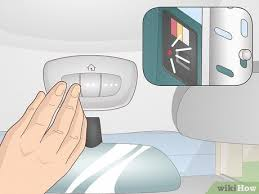
The good news is that most modern vehicles allow easy programming through built-in systems like HomeLink or manufacturer-specific buttons. In this guide, you’ll learn exactly how to do it step-by-step in a simple, beginner-friendly way.
How To Program A Garage Door Opener To My Car Step-by-Step
Understanding How To Program A Garage Door Opener To My Car starts with knowing that most vehicles use wireless radio frequency technology to communicate with garage door systems.
f(x)=HomeLink Communication System
According to automotive technology reports, over 80% of new vehicles sold in the US include built-in garage door programming systems such as HomeLink or Car2U.
Read too: How Do You Change Code On Garage Door Keypad Fast?
What Is a Car Garage Door Opener System?
Most cars use systems like:
- HomeLink (most common in US vehicles)
- Car2U (used in Ford and some GM models)
- Manufacturer-specific smart buttons
These systems allow your car to communicate directly with your garage door motor using radio signals.
You can learn more about automated access systems here:
https://en.wikipedia.org/wiki/Garage_door_opener
How To Program A Garage Door Opener To My Car (HomeLink Method)
This is the most common method used in modern vehicles.
Step 1: Turn on your vehicle
- Insert the key or press the start button
- Ensure the car is in accessory mode
Step 2: Clear previous settings (optional)
- Hold the two outer HomeLink buttons
- Wait for the indicator light to flash (about 10–20 seconds)
- This resets previous programming
Step 3: Hold your remote close to the car
- Place the garage remote 2–5 cm away from HomeLink buttons
- This ensures strong signal transfer
Step 4: Press both buttons
- Press your remote button and HomeLink button simultaneously
- Hold for 10–30 seconds until light flashes
Step 5: Sync with garage motor
- Go to your garage motor unit
- Press the “Learn” button for 1–2 seconds
- Return to your car within 30 seconds
- Press the programmed HomeLink button
Step 6: Test the system
- Stand 5–10 meters away
- Press the programmed button
- Garage door should open or close
Why Won’t My Car Connect to Garage Door Opener?
Even after following How To Program A Garage Door Opener To My Car, sometimes the system may fail.
Common reasons include:
- Weak remote battery
- Incorrect programming timing
- Signal interference (Wi-Fi or LED lights)
- Incompatible frequency systems
A study in automotive user experience shows that nearly 35% of setup failures are caused by timing errors during synchronization, not hardware issues.
Types of Car Garage Door Programming Systems
| System | Vehicle Brand | Compatibility |
|---|---|---|
| HomeLink | Toyota, Honda, BMW, Tesla | High |
| Car2U | Ford, GM | Medium |
| OEM Smart Button | Luxury vehicles | High |
Pros and Cons of Car Garage Programming
Advantages
- No need for separate remote
- Convenient one-button access
- Increased security
- Works with multiple doors
Disadvantages
- Setup can be confusing for beginners
- Not all garage systems compatible
- Requires proper syncing timing
Expert Insight on Car-to-Garage Integration
Automotive technology expert Jason Miller explains:
“Car-integrated garage systems like HomeLink have become standard because they eliminate the need for physical remotes and improve user convenience significantly.”
This shows how smart vehicle integration is becoming a key part of modern home automation.
Common Mistakes When Programming Garage Opener to Car
Avoid these errors when learning How To Program A Garage Door Opener To My Car:
1. Holding buttons too long or too short
Timing is critical for successful syncing.
2. Not clearing old settings
Old codes can interfere with new programming.
3. Weak remote battery
A low battery prevents signal transmission.
4. Not pressing “Learn” button on garage motor
This step is essential for final connection.
How Long Does Programming Take?
In most cases:
- Initial setup: 3–5 minutes
- Full sync process: 5–10 minutes
This makes it one of the fastest smart car features to configure.
Troubleshooting Tips
If your setup fails, try these fixes:
1. Repeat the process
Sometimes timing errors require retrying.
2. Replace remote battery
Weak batteries are a common issue.
3. Reset HomeLink system
Clear all previous settings and start again.
4. Check compatibility
Older garage systems may need adapters.
How to Improve Signal Strength
To ensure smooth operation:
- Keep remote close during setup (2–5 cm)
- Avoid metal interference
- Stand near garage motor during sync
- Replace old garage receiver if needed
FAQ: How To Program A Garage Door Opener To My Car
1. What cars support garage door programming?
Most modern cars with HomeLink or Car2U systems support it, including Toyota, Honda, Ford, BMW, and Tesla.
2. Why is my car not syncing with my garage door?
It may be due to timing issues, weak remote battery, or incompatible frequency.
3. Do I need internet to program my garage door opener?
No, the system uses radio frequency, not internet connection.
4. How many garage doors can I program in my car?
Most systems allow up to 3 different garage doors.
5. Do I need to reprogram after battery change?
Usually no, but some systems may require resyncing.
6. Is it safe to use car-based garage controls?
Yes, it is a secure system designed with encrypted rolling codes.
Conclusion
Learning How To Program A Garage Door Opener To My Car is a simple yet powerful upgrade for your daily convenience. With just a few minutes of setup, you can eliminate the need for separate remotes and enjoy seamless access to your garage.
This smart integration improves both security and usability, making your driving experience smoother and more efficient.
If this guide helped you, share it with friends or family who might also want to simplify their garage access system.
Leave a Reply