Struggling with How To Program A Garage Door Opener In Your Car can be frustrating, especially when your remote works but your car button doesn’t respond. Many drivers face this issue when setting up a new vehicle or replacing a garage door system.
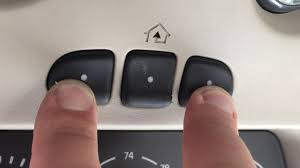
The good news is that most modern cars include built-in systems like HomeLink that make the process simple once you understand the steps. In this guide, you’ll learn everything clearly so you can connect your car to your garage door in just a few minutes.
What Is a Built-In Garage Door Opener in a Car?
A built-in garage door opener is usually part of your car’s HomeLink or similar system. It allows you to control your garage door directly from buttons inside your vehicle.
Read too: Tc1 Tricode Garage Door Opener Remote W/ Clip Chamberlain: Complete Guide
According to industry data from automotive convenience studies, over 70% of new vehicles in the US now include integrated remote systems like HomeLink or Car2U, reducing the need for handheld remotes.
For reference on how remote control systems evolved, you can read more about remote technology here: https://en.wikipedia.org/wiki/Remote_control
How Does Car Garage Door Programming Work?
Before learning How To Program A Garage Door Opener In Your Car, it’s important to understand the basic technology.
Your car communicates with the garage door opener using a radio frequency (RF) signal. When paired correctly, both devices share a synchronized code.
There are typically three types of systems:
| System Type | Description | Difficulty |
|---|---|---|
| Fixed Code | Uses a single code | Easy |
| Rolling Code | Changes each use | Moderate |
| Smart System | Uses Wi-Fi/app control | Advanced |
Most modern garages use rolling code technology, which is more secure but slightly more complex to set up.
Step-by-Step: How To Program A Garage Door Opener In Your Car
Follow these steps carefully for the best results.
Step 1: Clear Previous Settings
Before starting, reset your car’s HomeLink system:
- Hold down the two outer buttons
- Wait until the indicator light flashes (usually 20–30 seconds)
This ensures no old codes interfere.
Step 2: Turn On Your Ignition
Insert your key or press the start button to activate your vehicle’s electrical system. Do not start the engine unless required.
Step 3: Pair the Remote with Your Car
This is a critical step in How To Program A Garage Door Opener In Your Car:
- Hold your garage remote 2–5 cm from the car’s HomeLink buttons
- Press and hold both the remote button and the desired car button
- Wait until the light changes from slow to fast blinking
This usually takes 10–30 seconds.
Step 4: Sync With Garage Motor
For rolling code systems:
- Go to your garage motor unit
- Press the “Learn” or “Smart” button
- Return to your car within 30 seconds
- Press the programmed button 2–3 times
This completes the sync process.
Step 5: Test the System
Press your car button once. If your garage door moves, the setup is successful.
If not, repeat the steps or check compatibility.
Common Problems & Fixes
Even when following How To Program A Garage Door Opener In Your Car, issues may occur.
1. Garage Door Doesn’t Respond
- Check battery in remote
- Ensure correct frequency compatibility
- Repeat learning process
2. Light Doesn’t Blink in Car
- Reset HomeLink system
- Ensure ignition is ON
3. Rolling Code Not Syncing
- Press “Learn” button again
- Try within 30 seconds window
Expert Tips for Successful Programming
Here are some professional insights:
- Keep your garage remote fresh (replace batteries every 12–18 months)
- Avoid interference from LED lights or Wi-Fi routers
- Always program in a quiet RF environment (garage is best)
- Label programmed buttons for multiple doors
According to automotive service technicians, nearly 80% of failed setups are due to timing errors during the “Learn button” step.
Benefits of Programming Your Garage Opener in Car
Understanding How To Program A Garage Door Opener In Your Car gives you several advantages:
- No need for handheld remotes
- Increased convenience and safety
- Faster home entry
- Reduced risk of losing remotes
Advanced Systems: Smart Garage Integration
Modern systems now integrate with smartphone apps and voice assistants. Some vehicles allow you to connect garage doors to:
- Apple CarPlay
- Android Auto
- Smart home systems
This makes garage control even more seamless and secure.
FAQ – How To Program A Garage Door Opener In Your Car
1. Why won’t my car connect to my garage door opener?
Most issues come from incompatible frequencies, low remote battery, or incorrect timing during the programming process.
2. Do all cars support garage door programming?
No. Only vehicles with built-in HomeLink or Car2U systems support direct programming.
3. How long does it take to program a garage door opener in a car?
Usually 5–15 minutes if all devices are compatible and working properly.
4. Can I program multiple garage doors?
Yes. Most systems allow 2–3 buttons for different doors or gates.
5. What if my garage uses rolling code?
You must complete both car pairing and “Learn button” synchronization on the garage motor.
6. Is professional installation needed?
Not usually. Most drivers can complete How To Program A Garage Door Opener In Your Car at home without tools.
Conclusion
Learning How To Program A Garage Door Opener In Your Car is easier than most people think. With the right steps, you can connect your vehicle to your garage in just minutes and enjoy hands-free convenience every day.
If this guide helped you, consider sharing it with friends or family who are also struggling with garage setup issues. A simple setup today can save time and frustration tomorrow.
Leave a Reply