If you’ve just installed a keypad or need to reset your code, you’re likely wondering how to program a Clicker keypad garage door opener. It might seem technical at first, but the process is actually simple and takes only a few minutes. With the right steps, you can securely control your garage without a remote.
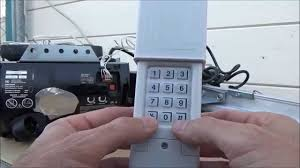
How To Program a Clicker Keypad Garage Door Opener (Quick Answer)
To program your Clicker keypad:
- Enter a new 4-digit PIN
- Press and hold the Enter button
- Press the Learn button on your garage opener
- Enter your PIN again and press Enter
Read too: Tc1 Tricode Garage Door Opener Remote W/ Clip Chamberlain: Complete Guide
Your keypad should now control the garage door.
What Is a Clicker Keypad Garage Door Opener?
A Clicker keypad is a wireless entry system that allows you to open your garage using a PIN code instead of a remote.
Key Features:
- Keyless entry
- Compatible with most major brands
- Easy DIY setup
- Secure rolling code technology
Modern systems rely on rolling codes, as explained in https://en.wikipedia.org/wiki/Garage_door_opener, which change the signal each time for added security.
Where Is the Learn Button on Your Garage Door Opener?
Before programming, you need to locate the Learn button.
Common Locations:
- Back or side of the motor unit
- Under the light cover
- Near the antenna wire
What It Looks Like:
- Small square or round button
- Often labeled “Learn”
- Paired with an LED indicator
Step-by-Step: How To Program a Clicker Keypad Garage Door Opener
Follow this detailed guide carefully:
Step 1: Choose Your PIN Code
- Select a 4-digit code
- Avoid simple combinations like “1234”
- Write it down for reference
Step 2: Enter Programming Mode on the Keypad
- Enter your chosen PIN
- Press and hold the Enter button
- Keep holding until the light blinks
Step 3: Press the Learn Button on the Opener
- Go to your garage motor unit
- Press the Learn button once
- LED light will turn on or blink
⏱️ You now have 30 seconds to complete the next step.
Step 4: Sync the Keypad
- Return to the keypad
- Enter your PIN again
- Press the Enter button
Step 5: Test the Keypad
- Wait for confirmation (light blink or door movement)
- Enter your PIN and press Enter
- Door should open or close
How Long Does Programming Take?
Typical Time:
- Setup: 1–2 minutes
- Programming: 2–3 minutes
- Testing: 1 minute
Total: Under 5 minutes
Common Problems and Fixes
1. Keypad Not Working After Programming
- Check battery (usually 9V)
- Repeat programming steps
2. Learn Button Not Responding
- Ensure opener has power
- Press button firmly
3. Keypad Light Doesn’t Blink
- Replace battery
- Reset keypad
4. Door Doesn’t Move
- Repeat sync process
- Press Enter multiple times
How To Reset a Clicker Keypad
If something goes wrong, reset the keypad:
Reset Steps:
- Remove battery
- Press and hold any button for 10 seconds
- Reinsert battery
- Reprogram from scratch
Compatibility Guide
Clicker keypads are designed to work with most brands.
Compatible With:
- Chamberlain
- LiftMaster
- Craftsman
- Genie
May Not Work With:
- Very old dip-switch systems
Pros vs Cons of Using a Clicker Keypad
Advantages
✔ Keyless convenience
✔ No need for remote
✔ Easy to share access
✔ Quick installation
Disadvantages
✘ Requires battery replacement
✘ Needs reprogramming occasionally
✘ PIN can be forgotten
Expert Insight: Why Keypads Are Popular
Home security experts report that over 60% of homeowners prefer keypad access for convenience and security. It reduces reliance on remotes and allows controlled access for family members.
Tips for Successful Programming
- Use a fresh battery before starting
- Stay within 5–10 feet of the opener
- Complete steps within the 30-second window
- Avoid pressing buttons repeatedly
- Double-check your PIN
How Secure Is a Garage Keypad?
Modern keypads use rolling code technology, making them highly secure.
Security Benefits:
- Changes code signal each use
- Prevents hacking attempts
- Supports multiple users
Comparison: Keypad vs Remote Control
| Feature | Keypad | Remote |
|---|---|---|
| Convenience | High | Medium |
| Security | High | Medium |
| Portability | Fixed | Portable |
| Access Sharing | Easy | Limited |
FAQ: Clicker Keypad Programming
Q1: How to program a Clicker keypad garage door opener?
A: Enter a PIN, press Enter, press Learn button, then enter PIN again to sync.
Q2: Why is my Clicker keypad not working?
A: Common causes include dead battery or incorrect programming steps.
Q3: Can I change my PIN anytime?
A: Yes, simply reprogram the keypad with a new code.
Q4: How many digits should my PIN be?
A: Most systems use a 4-digit PIN.
Q5: Do I need tools to program the keypad?
A: No tools are required.
Q6: How often should I replace the battery?
A: Typically every 6–12 months.
Conclusion
Now you know exactly how to program a Clicker keypad garage door opener—and it’s a quick, beginner-friendly process. With just a few simple steps, you can enjoy secure, keyless access to your garage.
If this guide helped you, consider sharing it with friends or family who might be setting up their own garage keypad. A small upgrade like this can make everyday life much easier!
Leave a Reply