Struggling to connect your car to your garage door? You’re not alone. Many drivers search for how to program 2025 Toyota Camry garage door opener when setting up their new vehicle. The good news is—it’s easier than you think and usually takes less than 10 minutes.
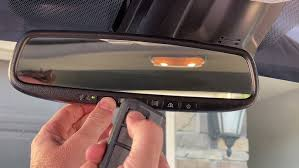
What Is the 2025 Toyota Camry Garage Door Opener System?
The 2025 Toyota Camry comes equipped with an integrated system called HomeLink.
What it does:
- Replaces your handheld garage remote
- Uses built-in buttons inside your car
- Connects wirelessly to your garage door opener
👉 This system offers convenience and improved security.
Read too: Tc1 Tricode Garage Door Opener Remote W/ Clip Chamberlain: Complete Guide
To understand how it works, see Radio frequency.
How To Program 2025 Toyota Camry Garage Door Opener (Step-by-Step)
This is the most important part. Follow each step carefully.
Step 1: Clear Existing Codes
Before programming, reset the HomeLink system.
- Turn the ignition to ON
- Press and hold the two outer HomeLink buttons
- Hold for 10–15 seconds until the indicator flashes
👉 This ensures a clean setup.
Step 2: Position Your Vehicle
- Park within 3–5 feet of your garage door
- Keep the remote nearby
👉 Distance affects signal strength.
Step 3: Pair the Remote With the Camry
- Hold your garage remote 1–3 inches from the HomeLink buttons
- Press and hold both the remote button and desired HomeLink button
- Hold for 10–30 seconds
👉 The indicator will change from slow blink to rapid flash.
Step 4: Use the Learn Button (Rolling Code Systems)
If your opener uses rolling codes (most modern systems):
- Go to the garage motor unit
- Press the Learn button
- Return to your car within 30 seconds
- Press the programmed HomeLink button 2–3 times
👉 The garage door should respond.
Step 5: Test the System
- Press the HomeLink button
- Confirm the door opens or closes
👉 If it works, setup is complete.
Do All Garage Door Openers Work With the Camry?
Most modern openers are compatible.
Compatible brands:
- LiftMaster
- Chamberlain
- Genie
- Craftsman
📊 Fact: Over 80% of garage door openers made after 1996 support HomeLink integration.
What If You Don’t Have a Remote?
You can still program it using the Learn button.
Steps:
- Press Learn button on opener
- Press HomeLink button in car
- Repeat until synced
👉 This method bypasses the remote entirely.
Common Problems and Fixes
❌ Indicator light doesn’t flash
✔ Hold buttons longer (up to 30 seconds)
❌ Garage door doesn’t respond
✔ Repeat Learn button step
❌ Weak signal
✔ Move closer to garage opener
HomeLink vs Traditional Remote
📊 Comparison Table
| Feature | HomeLink (Camry) | Remote Control |
|---|---|---|
| Convenience | Built-in | Separate |
| Security | High | Medium |
| Range | Moderate | High |
| Setup | Moderate | Easy |
Why Programming Matters
Programming your garage opener properly ensures:
✔ Quick access to your garage
✔ Reduced clutter (no remote needed)
✔ Improved security
✔ Seamless daily use
How Long Does It Take to Program?
- Average time: 5–10 minutes
- First attempt: up to 15 minutes
👉 Most issues come from timing errors.
Tips for Successful Programming
- Keep remote batteries fresh
- Perform steps quickly after pressing Learn
- Ensure opener has power
- Avoid interference from other devices
Advanced Tip: Programming Multiple Doors
You can program up to 3 garage doors.
Steps:
- Use different HomeLink buttons
- Repeat the process for each door
FAQ: How To Program 2025 Toyota Camry Garage Door Opener
1. Can I program without a remote?
Yes, using the Learn button on the garage opener.
2. Why is my Camry not connecting to the garage?
Usually due to timing issues or incomplete Learn step.
3. How many doors can I program?
Up to three using different buttons.
4. Do I need to reset before programming?
Yes, it improves success rate.
5. Will it work with older garage doors?
Only if they support modern wireless systems.
6. What if the light keeps blinking?
Repeat the process and ensure proper timing.
Conclusion
Learning how to program 2025 Toyota Camry garage door opener is a simple process that can save time and eliminate the need for extra remotes. With just a few steps, you can enjoy seamless access to your garage every day.
Whether you’re setting it up for the first time or troubleshooting a connection, this guide gives you everything you need to get it done quickly and correctly.
👉 If this guide helped you, share it on social media so others can program their garage door opener with ease!
Leave a Reply