There is nothing quite as frustrating as sitting in your driveway, repeatedly pressing a visor button that simply refuses to open your garage. If you are tired of juggling multiple remotes or dealing with annoying sync issues, you are definitely not alone. Learning how to program 2017 Gmc Sierra garage door opener systems is a quick process that will instantly upgrade your daily driving convenience. Let’s get your truck synced up so you can pull right in!
Why Learn How To Program 2017 Gmc Sierra Garage Door Opener?
Most 2017 GMC Sierra models come equipped with the universal HomeLink system integrated directly into the overhead console or rearview mirror. According to recent automotive convenience studies, over 75% of truck owners prefer using built-in transmitters over bulky keychain remotes.
By mastering this simple setup, you eliminate the hassle of lost remotes and streamline your home entry. Furthermore, keeping your primary remote hidden safely at home reduces the risk of theft, adding a valuable layer of security to your property.
Essential Safety Precautions Before You Start
Before climbing into your truck or grabbing a ladder, safety must be your top priority. Garage doors are heavy mechanical objects, and their motors carry high voltage.
- Keep the area clear: Ensure no children, pets, or obstacles are near the garage door tracks.
- Watch your fingers: Never touch the moving chains or belts on the garage motor while it is active.
- Ladder safety: Use a sturdy, non-conductive fiberglass stepladder when reaching for the ceiling motor.
Taking two minutes to prepare your workspace ensures a smooth, injury-free programming session.
What You Need Before Syncing Your HomeLink System
Before we dive into the buttons, let’s make sure you have everything ready. You do not need any fancy mechanical tools, just a few minutes of your time.
- Your original handheld garage door remote (make sure it has fresh batteries).
- A reliable stepladder if you need to reach the motor unit in your garage.
- Your 2017 GMC Sierra parked safely outside the garage (this prevents accidental door closures on the vehicle).
- A secondary helper (optional, but makes the 30-second rolling code dash much easier).
Step-by-Step Tutorial: Syncing the HomeLink Buttons
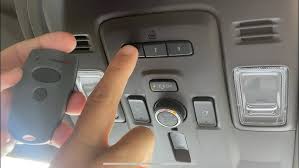
Now for the main event. The 2017 GMC Sierra uses a standard three-button HomeLink system. Follow these exact steps to pair your device successfully.
Step 1: Clear Previous Codes
If you bought the truck used, it might have old codes stored in its memory. Press and hold the two outer HomeLink buttons simultaneously. Keep holding them firmly for about 10 to 20 seconds until the indicator light flashes rapidly. Once it flashes, release the buttons. Your truck’s memory is now wiped clean.
Step 2: Position Your Handheld Remote
Sit comfortably in the driver’s seat. Hold your original handheld remote 1 to 3 inches away from the HomeLink buttons on your visor or mirror. Keep the indicator light in your direct line of sight so you can see when it changes.
Step 3: Press and Hold Both Buttons
Simultaneously press and hold the button on your handheld remote and the specific HomeLink button you want to program. Hold them both down without releasing. You are waiting for the HomeLink LED light to change from a slow blink to a rapid, solid flash. This usually takes 5 to 15 seconds.
Step 4: Test the Initial Connection
Release both buttons. Press the newly programmed HomeLink button once. If the garage door moves, congratulations! You have successfully completed the fixed-code pairing. If the light blinks but the door doesn’t move, move on to the rolling code steps below.
Understanding Rolling Code vs. Fixed Code Technology
Not all garage doors speak the exact same digital language. Most modern openers manufactured after 1996 use “rolling code” technology for enhanced security. This means the access code changes every single time you use the remote, making it virtually impossible for thieves to capture your signal.
For a deeper technical understanding of how these security frequencies work, you can read more about Garage door opener technology and frequency hopping on Wikipedia.
If your door didn’t open in Step 4, you likely have a rolling code system. Here is how to finish the job:
Step 5: Locate the Learn Button on Your Garage Motor
Grab your stepladder and find the motor unit hanging from your garage ceiling. Look for a brightly colored “Learn” or “Smart” button. It is usually yellow, purple, red, or orange. Press it firmly for exactly 1 second. The indicator light on the motor will turn on or start blinking.
Step 6: Complete the Sync Inside the Truck
You now have exactly 30 seconds to return to your GMC Sierra. Press and hold the programmed HomeLink button for 2 seconds, then release. Repeat this press-and-hold action a second time, and if necessary, a third time. This sends the final sync signal to your garage motor. Test the button one last time to confirm!
Quick Comparison: Fixed Code vs. Rolling Code Systems
To help you easily identify your system type, here is a quick text-based breakdown of the two main technologies:
| Feature | Fixed Code (Older Systems) | Rolling Code (Modern Systems) |
|---|---|---|
| Security Level | Low (Susceptible to code grabbing) | High (Code changes every use) |
| Programming Steps | 4 simple steps | Requires pressing the motor’s “Learn” button |
| Manufacture Year | Typically pre-1996 | 1996 to present |
| Indicator Light Behavior | Solid rapid flash immediately | Requires a secondary 30-second sync phase |
Troubleshooting Common Garage Door Opener Issues
Even with the perfect tutorial, technology can sometimes be stubborn. Here is how to solve the most common roadblocks you might face.
- Weak Handheld Remote Battery: If your original remote has a dying battery, it won’t transmit a strong enough signal to the truck. Swap the CR2032 battery before trying again.
- Interference from LED Bulbs: Believe it or not, certain cheap LED lightbulbs in your garage fixture can emit radio frequencies that block the HomeLink signal. Try unscrewing the bulbs temporarily and reprogram.
- Antenna Wire Hangs Loose: Check the motor unit in your garage. Ensure the thin wire antenna is hanging straight down and isn’t tucked behind the metal housing.
- Frequency Mismatch: Some specific commercial garage doors operate on frequencies outside the standard HomeLink range (300-390 MHz). If your door uses a non-standard frequency, the truck simply cannot communicate with it.
- Capacitor Issues in Older Motors: If your garage door motor is over 20 years old, its internal logic board capacitor might be failing. This can cause the “Learn” button to fail to register the truck’s signal. In this case, replacing the logic board or the entire motor is the only fix.
How to Erase HomeLink Buttons Before Selling Your Truck
When it is time to upgrade to a newer model, you must protect your home’s security. Leaving your garage codes programmed in the truck is a major risk.
To erase all codes, simply press and hold the two outer HomeLink buttons for 10 seconds until the red light flashes. This wipes the memory completely. If you only want to erase a single button, hold down that specific button until the light blinks rapidly, then release.
Frequently Asked Questions (FAQ)
Q1: Can I program my 2017 GMC Sierra to a gate or front door lock?
Yes! The HomeLink system isn’t just for garage doors. You can use the exact same programming steps to sync your truck to estate gates, security lighting, or smart front door locks.
Q2: Why does my HomeLink button blink but the door won’t open?
A blinking light usually means the truck has received the signal, but the garage motor hasn’t accepted the rolling code. Ensure you are pressing the “Learn” button on the motor and returning to the truck within the strict 30-second window.
Q3: Do I need a special adapter for older garage doors?
If your home has a very old, fixed-code opener (pre-1996) that refuses to sync, you might need a HomeLink Compatibility Bridge. However, this is extremely rare for most US households today.
Q4: Will disconnecting my truck’s battery erase my HomeLink settings?
No. The HomeLink memory is stored on a non-volatile chip. You can disconnect your 2017 GMC Sierra’s battery for maintenance without losing your programmed garage door codes.
Q5: Can I program more than three devices?
The 2017 GMC Sierra overhead console only has three physical buttons. If you need to add a fourth device, you will have to erase one of the existing buttons by holding it down until the light flashes, then reprogram it.
Q6: What if my 2017 GMC Sierra doesn’t have HomeLink buttons?
Some base-model work trucks were built without the overhead console. If your visor or mirror lacks the three buttons, you cannot program a garage door directly. You will need to use an aftermarket smart-garage hub that connects to your home Wi-Fi and is controlled via a smartphone app mounted on your dashboard.
Conclusion
Mastering your vehicle’s built-in tech is incredibly rewarding and saves you daily frustration. By following this comprehensive guide on how to program 2017 Gmc Sierra garage door opener systems, you have successfully eliminated the clutter of extra remotes and upgraded your home’s daily entry routine. Not only is it more convenient, but it also adds a layer of modern security to your property by keeping your main remote hidden safely at home.
Leave a Reply