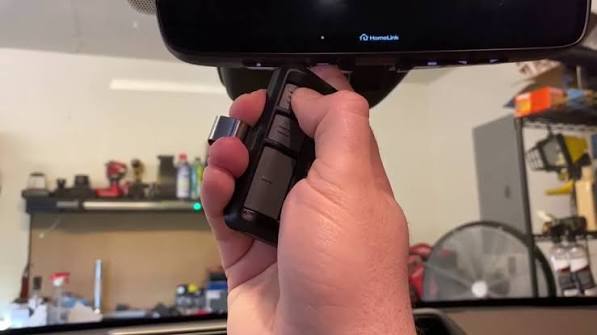
Struggling to sync your car’s built-in remote with your home system? Learning how to program 2016 Toyota Highlander garage door opener buttons is actually much simpler than you might think. We are here to walk you through the exact steps so you can pull into your driveway and glide right in without fumbling for a separate clicker.
How To Program 2016 Toyota Highlander Garage Door Opener: What You Need First
Before we dive into the actual programming, let us gather everything you need. Having the right tools and the right environment makes a massive difference in ensuring a smooth setup.
- Your 2016 Toyota Highlander parked directly in front of the garage.
- The original handheld garage door remote (with fresh batteries).
- A sturdy ladder (if you need to reach the “Learn” button on the motor head).
- About 10 minutes of uninterrupted time.
Note: Ensure your car’s ignition is turned to the “ON” or “ACC” position. The engine does not necessarily need to be running, but the car’s electrical system must be active.
Does the 2016 Toyota Highlander Have a Built-in Garage Door Opener?
Yes, most trim levels of the 2016 Highlander come equipped with the integrated HomeLink system. This built-in transceiver is usually located on the bottom of the rearview mirror.
According to automotive industry data, over 30 million vehicles on the road today utilize this exact technology to provide seamless home access. It completely replaces the need for bulky, battery-draining visor clips, giving your car’s interior a much cleaner and more modern look.
Step-by-Step Guide: Programming Your First Button
Let us get straight to the core of how to program 2016 Toyota Highlander garage door opener systems. Follow these concrete steps carefully to ensure a successful sync.
Step 1: Clear the Existing Memory (Highly Recommended)
To avoid signal conflicts, it is always best to start fresh. Locate the two outer buttons (usually 1 and 3) on your HomeLink mirror. Press and hold both buttons simultaneously for about 20 seconds. Release them only when the red indicator light begins to flash rapidly. This confirms the memory is completely erased.
Step 2: Position Your Vehicle Properly
Park your Highlander directly in front of your garage door. Keep the distance between the car’s mirror and the garage motor under 10 feet for the strongest signal transmission. Turn the ignition to the “ON” position.
Step 3: Initiate the Learning Mode
Hold your original handheld garage door remote 1 to 3 inches away from the HomeLink buttons. Press and hold the button on your handheld remote. Simultaneously, press and hold the desired HomeLink button (1, 2, or 3) in your car.
Step 4: Sync the Signals
Keep holding both buttons and watch the LED indicator on the HomeLink mirror closely.
- Slow flash: The system is still learning. Keep holding the buttons.
- Rapid flash: The signal has been successfully captured! This usually takes about 20 to 30 seconds.
Release both buttons once the rapid flashing occurs.
Step 5: Test the Connection
Press and release the newly programmed HomeLink button. If the garage door activates, congratulations! You have successfully synced the system.
How to Handle “Rolling Code” Technology
Modern garage door openers use a security feature called rolling code technology to prevent code grabbing and unauthorized access. If your door did not activate in Step 5, you likely have a rolling code opener. Here is how to finish the process:
- Locate the “Learn” or “Smart” button on your actual garage door motor unit (usually hanging from the ceiling). It is often yellow, red, orange, green, or purple.
- Press and release the “Learn” button on the motor. The indicator light next to it will illuminate or blink for 30 seconds.
- Within that 30-second window, return to your Highlander immediately.
- Firmly press and release the programmed HomeLink button twice.
- On the third press, hold it down for a couple of seconds. Your garage door should now operate perfectly.
Essential Safety Tips for Garage Door Programming
While programming your vehicle is straightforward, safety should always come first.
- Never stand directly under the garage door while testing the programming.
- Keep the garage door in your line of sight at all times to ensure it closes completely and safely.
- Check your sensors: Ensure the auto-reverse safety sensors (the little eyes near the floor) are clean and aligned before you begin. If they are blocked, the door will not close, which can cause confusion during testing.
Pros and Cons of Using the Built-in Opener
To give you a complete picture, here is a quick comparison of using your Highlander’s integrated system versus a traditional remote.
| Feature | Built-in HomeLink System | Traditional Handheld Remote |
|---|---|---|
| Convenience | High (Always in the car) | Medium (Easy to lose) |
| Battery Life | Infinite (Powered by car) | Limited (Needs replacements) |
| Aesthetics | Sleek, integrated into mirror | Bulky, cluttered visor |
| Transferability | Harder to switch between cars | Very easy to swap vehicles |
Troubleshooting: Why Won’t My 2016 Highlander Sync?
Even with the best instructions, hiccups happen. Here are the most common issues and how to fix them:
- Distance is too great: Ensure you are within 10 feet of the motor during initial programming. Walls and metal can block the radio frequency.
- Radio Interference: Certain LED bulbs in your garage can sometimes emit radio frequency interference. Try turning off the garage lights during programming.
- Dead remote battery: If your handheld remote’s battery is weak, it cannot transmit a strong enough signal for the car to learn. Replace the battery first.
- Skipped the rolling code step: If you have a newer opener (manufactured after 1996), you must press the “Learn” button on the motor unit to sync the security code.
Frequently Asked Questions (FAQ)
Q1: How do I clear the memory on my 2016 Toyota Highlander HomeLink? A: To clear the memory, simply press and hold the two outer HomeLink buttons (1 and 3) for about 20 seconds until the red indicator light flashes rapidly. This erases all previously programmed devices and gives you a clean slate.
Q2: What if my garage door opener uses rolling codes? A: If your opener uses rolling codes, you must locate the “Learn” button on the actual garage motor unit in your ceiling. Press it, then immediately press the programmed HomeLink button in your car to sync the new security code within 30 seconds.
Q3: Can I program a gate opener to my 2016 Highlander? A: Yes, the HomeLink system is not just for garage doors. You can program it to operate community gates, entry doors, and even certain home lighting systems, provided they operate on compatible radio frequencies (usually between 288 and 390 MHz).
Q4: How many devices can the 2016 Highlander HomeLink store? A: The 2016 Toyota Highlander HomeLink system features three distinct buttons. This means you can program and store up to three different devices, such as a main garage door, a side gate, and a neighbor’s door or outdoor lights.
Q5: Why does the HomeLink light flash but the door does not move? A: This usually means the car learned the signal, but the garage motor rejected it due to a rolling code mismatch. You need to press the “Learn” button on your garage motor and then press the HomeLink button in the car to complete the sync.
Conclusion
Mastering how to program 2016 Toyota Highlander garage door opener functions is a fantastic way to upgrade your daily driving routine. Not only does it eliminate the annoyance of dead batteries and lost remotes, but it also adds a sleek, modern convenience to your vehicle. By following these straightforward steps, you can seamlessly integrate your car with your home in just a few minutes.
Leave a Reply