Introduction
Are you struggling to sync your 2015 Toyota Highlander’s built-in garage door opener with your home garage? You’re not alone—thousands of Toyota owners face this same challenge every year. Learning how to program 2015 Toyota Highlander garage door opener doesn’t have to be complicated or frustrating. In this comprehensive guide, we’ll walk you through every step with clear instructions that even first-time users can follow easily.
The HomeLink system in your 2015 Highlander is designed to replace up to three separate remote controls, giving you the convenience of opening your garage door directly from your vehicle. Whether you’ve just purchased a used Highlander or recently moved to a new home, getting this feature working properly will save you countless trips back inside to grab your handheld remote.
What Is HomeLink and Why Does Your 2015 Highlander Have It?
HomeLink is a universal transceiver system integrated into many modern vehicles, including the 2015 Toyota Highlander. This technology allows your car to communicate with various radio-controlled devices such as garage door openers, gate operators, and even home lighting systems.
According to Wikipedia, HomeLink was first introduced in 1992 and has since become one of the most widely adopted vehicle-based control systems in North America. The system operates on multiple frequencies (typically 315 MHz, 390 MHz, and 433 MHz), making it compatible with approximately 95% of all garage door openers manufactured since 1982.
Key Benefits of Using HomeLink in Your Highlander
- Convenience: No more searching for lost remotes
- Security: Encrypted signals protect against unauthorized access
- Versatility: Control up to three different devices
- Clean Dashboard: Eliminates clutter from hanging remotes
Before You Begin: Essential Preparation Steps
Successful programming requires proper preparation. Follow these checklist items before starting the process:
Gather Necessary Information
- Identify your garage door opener brand and model – Check the motor unit mounted on your garage ceiling
- Locate the “Learn” or “Smart” button on your garage door opener motor
- Ensure your Highlander’s battery is fully charged – A weak battery can interrupt the programming sequence
- Park your vehicle outside the garage – Maintain clear line-of-sight to the garage door opener motor
Important Safety Considerations
- Keep children and pets away from the garage door during programming
- Ensure the garage door path is clear of obstacles
- Have a helper available if possible to assist with testing
Step-by-Step Guide: How to Program 2015 Toyota Highlander Garage Door Opener
Step 1: Clear Existing HomeLink Memory (If Necessary)
If your HomeLink buttons were previously programmed, you should clear them first:
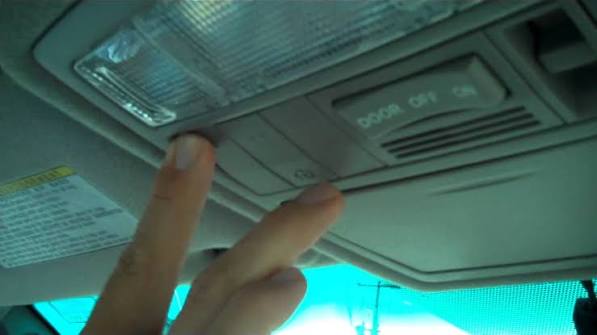
- Press and hold the two outer HomeLink buttons simultaneously
- Continue holding for approximately 20 seconds
- Release when the indicator light begins flashing rapidly
- All three buttons are now reset and ready for new programming
Step 2: Position Your Vehicle Correctly
Proper positioning ensures strong signal transmission:
- Park your Highlander 6-10 feet away from the garage door opener motor
- Turn the ignition to the “ON” position (engine can be off)
- Ensure all doors and windows are closed to minimize interference
Step 3: Initiate Programming Mode
- Choose which HomeLink button you want to program (Button 1, 2, or 3)
- Press and hold your chosen HomeLink button
- While holding the HomeLink button, bring your original garage door remote within 1-3 inches of the HomeLink buttons
- Press and hold the button on your original remote that operates the garage door
- Continue holding both buttons until the HomeLink indicator light changes from slow blinking to rapid blinking (this may take 20-30 seconds)
- Release both buttons once rapid blinking occurs
Step 4: Program the Garage Door Opener Motor
This critical step establishes communication between your Highlander and the garage door opener:
- Locate the “Learn,” “Smart,” or “Program” button on your garage door opener motor unit
- Press and release this button (you typically have 30 seconds to complete the next step)
- Return to your Highlander within the vehicle
- Press and hold the programmed HomeLink button for 2-3 seconds
- Release the button
- Test by pressing the HomeLink button again – the garage door should activate
Step 5: Test and Verify Functionality
Perform these tests to confirm successful programming:
- Test 1: Press the HomeLink button – garage door should open/close
- Test 2: Drive away and return – verify consistent operation
- Test 3: Test from different distances (5 feet, 15 feet, 30 feet)
Troubleshooting Common Programming Issues
Even with careful following of instructions, problems can occur. Here are solutions to frequent issues:
| Problem | Possible Cause | Solution |
|---|---|---|
| HomeLink light won’t blink | Weak vehicle battery | Charge or replace battery |
| Rapid blinking never occurs | Wrong frequency match | Try different HomeLink button |
| Garage door doesn’t respond | Missed timing window | Repeat Step 4 quickly |
| Intermittent operation | Signal interference | Reposition vehicle closer |
| Only works at very close range | Rolling code issue | May require professional assistance |
Rolling Code Technology Challenges
Many modern garage door openers use rolling code security technology, which changes the access code with each use. If your opener uses this technology (most units manufactured after 1995 do), you may need to perform additional steps:
- After completing Step 4 above, press and hold the HomeLink button for 2 seconds, then release
- Press and hold again for 2 seconds, then release
- Repeat this cycle 3-4 times
- Test the garage door operation
This “training” process helps the HomeLink system learn the rolling code pattern.
Alternative Programming Methods for Different Opener Types
For Chamberlain/LiftMaster Openers
These popular brands sometimes require specific procedures:
- Complete standard programming Steps 1-3
- Press the purple “Learn” button on the motor unit
- Within 30 seconds, press the HomeLink button twice
- Wait for the motor unit light to flash, confirming acceptance
For Genie Openers
Genie systems may need this variation:
- Follow standard Steps 1-3
- Press the round “Program” button on the motor
- Immediately press the HomeLink button in your Highlander
- Hold for 5 seconds, then test
For Older Fixed-Code Systems
If you have an older opener (pre-1995) with DIP switches:
- Match the DIP switch positions on your original remote
- Set identical positions on the HomeLink system (if applicable)
- Some older systems may require a compatibility bridge kit
Frequently Asked Questions
Q1: How long does it take to program the 2015 Toyota Highlander garage door opener?
A: The entire process typically takes 5-15 minutes for first-time users. Once you’re familiar with the steps, subsequent programming can be completed in under 5 minutes. Factors affecting timing include your garage door opener type and whether you encounter any troubleshooting issues.
Q2: Can I program multiple garage doors to my 2015 Highlander?
A: Yes! The HomeLink system in your 2015 Highlander can store up to three different devices. Simply repeat the programming process for each additional garage door or gate operator, using a different HomeLink button (1, 2, or 3) for each device.
Q3: What should I do if the HomeLink button stops working after initial success?
A: First, check your vehicle’s battery strength, as low power can affect HomeLink performance. Next, verify that your garage door opener hasn’t been reset or reprogrammed. If problems persist, try clearing the HomeLink memory and reprogramming from scratch. Some users report success by repositioning their vehicle closer to the garage during use.
Q4: Is it safe to use HomeLink instead of my original remote?
A: Absolutely. HomeLink uses encrypted signals comparable to modern remote controls. In fact, HomeLink may offer enhanced security because it’s integrated into your vehicle, reducing the risk of losing or having your remote stolen. The system meets FCC regulations and industry security standards.
Q5: Will programming HomeLink void my garage door opener warranty?
A: No, programming your vehicle’s HomeLink system does not void your garage door opener warranty. HomeLink is designed to work with existing openers without modifying them. However, always consult your garage door opener manual for specific manufacturer guidelines.
Q6: Can I erase just one HomeLink button without clearing all three?
A: Unfortunately, the 2015 Toyota Highlander HomeLink system requires clearing all three buttons simultaneously. There’s no way to selectively erase individual buttons. After clearing, you’ll need to reprogram any devices you wish to keep using.
Conclusion
Learning how to program 2015 Toyota Highlander garage door opener transforms your daily routine by eliminating the hassle of juggling multiple remotes. With the HomeLink system properly configured, you’ll enjoy seamless access to your garage while maintaining the security and convenience that modern technology provides.
Remember that patience and attention to detail are key to successful programming. Take your time through each step, ensure proper vehicle positioning, and don’t hesitate to repeat the process if needed. Most users achieve success on their first or second attempt.
If you found this guide helpful, please share it with fellow Toyota owners on social media platforms like Facebook, Twitter, or Reddit’s Toyota community. Your experience might help someone else overcome their programming challenges. Have questions or success stories? Drop them in the comments below—we love hearing from our readers!
Leave a Reply