Introduction
There is nothing quite as frustrating as pulling into your driveway after a long day, only to realize your truck’s built-in remote won’t open the garage. You are left standing in the rain or heat, fumbling for a handheld clicker that might not even be in your pocket. If you are wondering how to program 2013 GMC Sierra garage door opener, you are not alone. This is a common hurdle for many owners of this reliable pickup, but the good news is that the solution is simpler than you think.
The 2013 GMC Sierra comes equipped with the HomeLink system, a universal transceiver designed to replace up to three separate remote controls. However, because every garage door motor brand (Chamberlain, LiftMaster, Genie, etc.) operates slightly differently, the pairing process can feel tricky. In this guide, we will walk you through the exact steps to get your Sierra talking to your garage door again, ensuring convenience and security for your home.
Understanding Your 2013 GMC Sierra’s HomeLink System
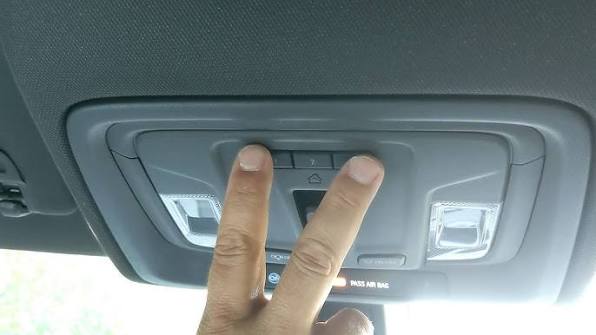
Before diving into the buttons, it helps to understand what you are working with. The HomeLink system in your 2013 Sierra is located on the overhead console, near the rearview mirror. It typically features three buttons and two indicator lights.
Unlike older mechanical remotes, HomeLink uses radio frequencies to mimic the signal of your original garage door opener. According to HomeLink’s official compatibility guide, the system is compatible with over 95% of garage door openers manufactured since 1982. This high compatibility rate means that if your garage door isn’t ancient, your Sierra can likely control it.
Key Components to Identify
- The Buttons: Usually labeled I, II, and III.
- The Indicator Light: A small LED that changes color or blinks to indicate status.
- The “Learn” Button: This is not in your truck; it is on your garage door motor unit inside the garage.
Step-by-Step: How to Program 2013 GMC Sierra Garage Door Opener
Programming your vehicle involves two main phases: clearing old codes (if necessary) and training the new signal. Follow these instructions precisely for the best results.
Phase 1: Clearing Previous Codes (If Needed)
If you bought the truck used, or if the buttons were previously programmed and aren’t working, you must reset them.
- Turn your ignition to the “ON” position (or start the engine).
- Press and hold the two outer HomeLink buttons (I and III) simultaneously.
- Keep holding them for about 20 seconds until the indicator light begins to flash rapidly.
- Release the buttons. The memory is now cleared.
Phase 2: Training the HomeLink Transmitter
This is the core process where your truck learns the frequency of your garage door.
- Position Your Vehicle: Park your GMC Sierra outside the garage, facing the door. Ensure you are within range (usually 10–20 feet). Keep the engine running to prevent battery drain.
- Select a Button: Choose which HomeLink button you want to use (e.g., Button I).
- Initiate Learning Mode: Press and hold the chosen HomeLink button. Do not release it yet.
- Bring in the Original Remote: Take your original handheld garage door remote and hold it 1–3 inches away from the HomeLink buttons in your truck.
- Sync the Signals: While still holding the HomeLink button, press and hold the button on your handheld remote.
- Watch the Light: Keep both buttons pressed. The HomeLink indicator light will start slow, then flash rapidly. Once it flashes rapidly, the signal has been learned.
- Release Both Buttons.
Phase 3: Testing the Connection
Now that the truck has learned the signal, you need to test if it actually opens the door.
- Press the programmed HomeLink button in your Sierra firmly.
- Observe the garage door.
- If it opens: Congratulations! You are done.
- If it does not open: You likely have a “rolling code” system (common in LiftMaster and Chamberlain units made after 1993). Proceed to Phase 4.
Troubleshooting Rolling Code Systems
Most modern garage doors use rolling codes for security. This means the code changes every time you press the button. If Phase 3 failed, you must sync the rolling code at the motor unit.
Locating the “Learn” Button
Go inside your garage and look at the motor head unit hanging from the ceiling. Look for a small button, often colored yellow, purple, orange, or red. It may be labeled “Learn,” “Smart,” or “Program.”
The Sync Process
- Press the “Learn” button on the garage motor unit. The indicator light on the motor will usually turn on or blink. You typically have 30 seconds to complete the next step.
- Return to your GMC Sierra quickly.
- Press and hold the programmed HomeLink button for two seconds, then release.
- Repeat this “press-hold-release” cycle three times.
- Test the button again. The door should now operate smoothly.
Pro Tip: If you have a Chamberlain or LiftMaster opener with a yellow learn button, you may need to press the HomeLink button once firmly instead of three times. Consult your garage door manual for specific brand nuances.
Common Issues and Solutions
Even with careful following, things can go wrong. Here is a breakdown of common hurdles.
| Issue | Possible Cause | Solution |
|---|---|---|
| Light flashes slowly then stops | Signal not received | Move closer to the garage door; ensure batteries in handheld remote are fresh. |
| Door moves partially then stops | Safety sensors blocked | Check the infrared sensors at the bottom of your garage door tracks for dirt or obstruction. |
| HomeLink won’t clear | Ignition off | Ensure the vehicle is in “On” or “Run” mode, not just accessory mode. |
| Interference from LED bulbs | Frequency noise | Some LED garage door opener bulbs cause interference. Try switching back to incandescent bulbs temporarily during programming. |
Expert Tips for Long-Term Success
To ensure your 2013 GMC Sierra continues to open your garage reliably, consider these professional insights:
- Battery Health: A weak car battery can reduce the transmission power of the HomeLink system. If your truck is older, check the battery voltage.
- Avoid Metal Obstructions: When programming, ensure there are no large metal objects between the truck and the garage door sensor, as metal can block radio frequencies.
- Re-programming After Battery Change: If you disconnect your truck’s battery for maintenance, you generally do not need to reprogram HomeLink, as it is stored in non-volatile memory. However, if the settings reset, simply repeat Phase 2.
FAQ Section
1. Can I program more than one garage door to my 2013 GMC Sierra?
Yes. The HomeLink system in the 2013 Sierra has three distinct buttons. You can program each button to a different device, such as your home garage, a vacation home gate, or a community pool entrance.
2. What if I lost my original handheld remote?
You cannot program HomeLink without an existing working remote or access to the “Learn” button on the motor unit. If you lost the remote, you will need to buy a universal replacement remote compatible with your garage door brand, program that first, and then use it to train your Sierra.
3. Does the engine need to be running?
It is highly recommended to have the engine running or the ignition in the “On” position. Programming draws power, and if the voltage drops too low during the process, the signal transmission may fail.
4. Why does my garage door close immediately after opening?
This is usually a safety feature issue, not a programming error. Check the alignment of the safety eyes (sensors) near the floor of your garage. If they are misaligned or dirty, the door will reverse direction to prevent injury.
5. Is HomeLink compatible with all garage door brands?
While HomeLink covers over 95% of brands, some older or proprietary systems (like certain Wayne-Dalton or Stanley models) may require a compatibility bridge or kit. You can check the HomeLink website for specific compatibility lists.
6. How do I know if my garage door uses rolling codes?
If your garage door was manufactured after 1993, it almost certainly uses rolling codes. Additionally, if the “Learn” button on your motor unit is colored (yellow, purple, orange) rather than black or white, it is a rolling code system.
Conclusion
Learning how to program 2013 GMC Sierra garage door opener doesn’t have to be a headache. By understanding the difference between standard and rolling code systems, and following the step-by-step synchronization process, you can regain the convenience of hands-free garage access. Remember, patience is key—especially when syncing with the motor unit’s “Learn” button
Leave a Reply