There is nothing quite as frustrating as pulling into your driveway after a long day, only to realize your truck’s built-in garage door opener has stopped working or was never set up correctly. If you are staring at your ceiling-mounted motor and wondering how to program 2012 Ford F150 garage door opener systems without calling a technician, you are in the right place. This guide will walk you through the process with clarity and ease, ensuring you get back to the convenience of hands-free entry.
Understanding the HomeLink System in Your 2012 F-150
Before diving into the buttons and lights, it is helpful to understand what you are working with. The 2012 Ford F-150 utilizes a system called HomeLink. This is a universal transceiver that replaces your standard handheld remote controls. It operates on radio frequencies similar to your original garage door remote, allowing you to open and close your garage door directly from your vehicle’s rearview mirror or overhead console.
According to Wikipedia, HomeLink is one of the most widely used integrated transmitter systems in the automotive industry, compatible with over 95% of garage door openers manufactured since 1982. This high compatibility rate means that regardless of whether you have a Chamberlain, LiftMaster, Genie, or Craftsman opener, your Ford likely supports it.
Why Reprogramming Might Be Necessary
You may need to go through this programming process for several reasons:
- You recently purchased a used 2012 F-150 and the previous owner’s codes are still active.
- You replaced your garage door motor unit.
- The existing programming has become corrupted or unresponsive.
- You want to add a second garage door or gate operator.
Preparation: What You Need Before Starting
Success in programming your garage door opener relies heavily on preparation. Rushing this process often leads to errors and frustration. Ensure you have the following items ready before you sit in your driver’s seat.
- Your Original Handheld Remote: You must have a working handheld remote control for your garage door. If you have lost all your remotes, you cannot program the HomeLink system using the standard method.
- A Step Ladder (Optional): If your garage door motor unit is mounted high on the ceiling, you may need a ladder to reach the “Learn” or “Smart” button on the motor itself.
- Clear Garage Area: Ensure no people, pets, or objects are in the path of the garage door during testing.
- Patience: The process involves precise timing. Do not rush the button presses.
Step-by-Step Guide: How to Program 2012 Ford F150 Garage Door Opener
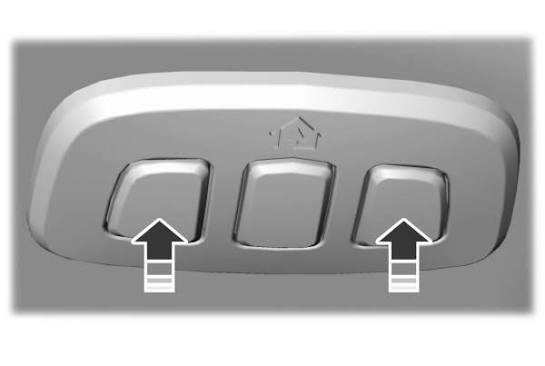
The 2012 Ford F-150 typically features three HomeLink buttons located in the overhead console near the rearview mirror. Follow these steps carefully to sync your truck with your garage door.
Phase 1: Clearing Existing Codes (If Necessary)
If this is a used vehicle, or if you suspect old codes are interfering, start with a clean slate.
- Turn your ignition to the “On” position. You do not need to start the engine, but the electrical systems must be active.
- Press and hold the two outer HomeLink buttons simultaneously.
- Keep holding them for about 10–20 seconds until the indicator light begins to flash rapidly.
- Release the buttons. The memory is now cleared.
Phase 2: Programming the New Code
This is the core phase where you teach your Ford F-150 the signal from your garage door.
- Position Your Vehicle: Park your F-150 outside your garage, facing the door. Keep the engine running or the ignition in the “On” position. Ensure you have a clear line of sight to the garage door motor unit.
- Select a Button: Choose which of the three HomeLink buttons you wish to use for this specific garage door.
- Initiate Learning Mode: Press and hold the chosen HomeLink button. Do not release it yet.
- Sync with Remote: While continuing to hold the HomeLink button, bring your handheld garage door remote within 1–3 inches of the HomeLink buttons. Press and hold the button on your handheld remote.
- Watch the Light: Keep both buttons held down. The HomeLink indicator light will initially glow steadily, then begin to flash slowly, and finally flash rapidly.
- Release Buttons: Once the light flashes rapidly, release both the HomeLink button and the handheld remote button. This indicates that the frequency has been learned.
Phase 3: Testing and Rolling Code Adjustment
Most modern garage door openers use “rolling code” technology for security. This means the code changes every time you press the button. Your Ford F-150 needs to complete a handshake with the motor unit to recognize this security feature.
- Test the Button: Press the programmed HomeLink button in your truck. Observe the garage door.
- If the door moves: You are done! Test it twice more to ensure consistency.
- If the door does not move: You likely have a rolling code opener. Proceed to the next step.
- Locate the Learn Button: Find the “Learn,” “Smart,” or “Program” button on your garage door motor unit hanging from the ceiling. It is usually colored yellow, purple, orange, or red.
- Press the Learn Button: Briefly press and release the Learn button on the motor unit. The indicator light on the motor will usually blink or turn on. You typically have 30 seconds to complete the next step.
- Finalize Sync: Return to your Ford F-150. Press and hold the programmed HomeLink button for two seconds, then release it. Repeat this “press-hold-release” cycle up to three times.
- Confirm Operation: The garage door should now activate. If it does, your programming is complete.
Troubleshooting Common Issues
Even with careful adherence to instructions, technology can sometimes be finicky. Here is a breakdown of common issues and their solutions.
| Issue | Possible Cause | Solution |
|---|---|---|
| Light flashes rapidly but door doesn’t move | Rolling code security feature active | Perform the “Learn Button” sync procedure described in Phase 3. |
| Indicator light does not flash | Battery issue or incorrect procedure | Check your handheld remote batteries. Ensure you are holding both buttons simultaneously. |
| Door moves partially then stops | Safety sensors blocked | Check the photo-eye sensors at the bottom of your garage door tracks for obstructions or dirt. |
| Interference from other devices | Frequency conflict | Try reprogramming away from other electronic devices. Ensure LED bulbs in your garage are not causing signal interference. |
A Note on LED Bulbs
Recent studies suggest that certain LED light bulbs installed in garage door opener units can emit radio frequency interference that blocks signals from remotes and HomeLink systems. If you have recently switched to LED bulbs and your programming fails, try temporarily replacing them with incandescent bulbs to test if the signal improves.
Frequently Asked Questions (FAQ)
1. Can I program my 2012 Ford F-150 HomeLink without a handheld remote?
Generally, no. The standard programming method requires a working handheld remote to transmit the signal to the truck. If you have lost all your remotes, you will need to purchase a universal remote compatible with your garage door opener brand and use that to program the HomeLink system.
2. How many garage doors can I program into my 2012 F-150?
The 2012 Ford F-150 HomeLink system has three distinct buttons. This means you can program up to three different devices, such as two garage doors and a gate, or three separate garage doors.
3. Why does my garage door close immediately after opening via HomeLink?
This is a common safety feature issue. It usually indicates that the “force settings” on your garage door motor are not calibrated correctly, or the safety sensors are misaligned. Check the sensors first; if they are aligned, you may need to adjust the force limits on the motor unit itself according to the manufacturer’s manual.
4. Is the HomeLink system secure?
Yes, HomeLink uses encrypted rolling code technology, which is the same security standard used by most modern handheld remotes. Each time you press the button, a new code is sent, making it extremely difficult for thieves to intercept and replicate the signal.
5. What should I do if the HomeLink light stays solid and never flashes?
A solid light usually indicates that the button is already programmed with a code. If you are trying to overwrite it, you must first clear the memory by holding the two outer buttons until the light flashes rapidly, as described in Phase 1 of this guide.
Conclusion
Learning how to program 2012 Ford F150 garage door opener systems is a straightforward task that restores significant convenience to your daily routine. By understanding the difference between fixed-code and rolling-code systems, and by following the precise steps of clearing memory, syncing frequencies, and finalizing the handshake with the motor unit, you can ensure reliable operation.
Remember, patience is key. If the first attempt does not work, double-check your handheld remote’s batteries and ensure you are pressing the “Learn” button on the motor unit within the 30-second window. With your F-150 now synced, you can enjoy the seamless experience of arriving home and entering your garage with the simple press of a button.
Leave a Reply