Introduction
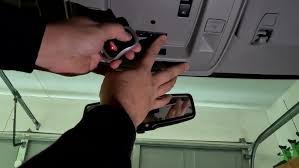
Struggling to sync your garage door with your truck? You’re not alone. Thousands of 2009 Chevy Silverado owners face this exact challenge every month. Learning how to program 2009 Chevy Silverado garage door opener doesn’t have to be frustrating or time-consuming. This comprehensive guide will walk you through the entire process step-by-step, ensuring you get your HomeLink system working perfectly on the first try.
The 2009 Chevy Silverado comes equipped with the HomeLink universal transmitter system, built directly into your rearview mirror or overhead console. This convenient feature allows you to control up to three different garage doors, gate operators, or home lighting systems without carrying multiple remotes. However, many drivers find the programming process confusing, especially when dealing with rolling code security systems that most modern garage door openers use today.
Understanding Your 2009 Silverado’s HomeLink System
Before diving into the programming steps, it’s essential to understand what you’re working with. The HomeLink system in your 2009 Chevy Silverado is a universal remote control system that can learn signals from various radio-frequency devices. According to HomeLink’s official documentation, this technology has been integrated into millions of vehicles worldwide since the 1990s.
Key Components You’ll Need
- Your 2009 Chevy Silverado with functioning HomeLink buttons
- Original garage door opener remote control
- A ladder (if needed to access the garage door opener motor unit)
- Approximately 15-20 minutes of uninterrupted time
Identifying Your Garage Door Opener Type
Not all garage door openers work the same way. Understanding your specific type will determine which programming method to use:
| Opener Type | Characteristics | Programming Difficulty |
|---|---|---|
| Fixed Code | Older models, simple signal | Easy |
| Rolling Code | Modern security, changing codes | Moderate |
| Smart/Learning | Advanced features, app connectivity | Variable |
Most garage door openers manufactured after 1993 use rolling code technology for enhanced security. This means the code changes each time you press the button, making the programming process slightly more complex but much more secure.
Step-by-Step Programming Guide
Step 1: Prepare Your Vehicle and Workspace
Park your 2009 Chevy Silverado outside your garage, ensuring you have clear visibility of both the HomeLink buttons and your garage door. Turn the ignition to the “ON” or “ACC” position—this powers the HomeLink system without running the engine. Make sure your garage area is clear and safe for testing.
Pro Tip: If possible, have a helper inside the garage to observe the door movement while you program from the vehicle.
Step 2: Clear Existing HomeLink Memory (If Necessary)
If your HomeLink buttons have been previously programmed, you’ll need to clear them first:
- Press and hold the two outer HomeLink buttons simultaneously
- Continue holding for approximately 20 seconds
- Watch for the indicator light to flash rapidly, then turn off
- Release both buttons when the light changes
This process erases all previously stored codes, giving you a clean slate for programming.
Step 3: Program the HomeLink Button
Choose which of the three HomeLink buttons you want to use for your garage door. Follow these precise steps:
- Hold your original garage door remote 1-3 inches away from the HomeLink button you’ve chosen
- Press and hold both buttons simultaneously – the HomeLink button and the button on your original remote
- Continue holding for 20-30 seconds while watching the HomeLink indicator light
- Watch for the light pattern change – it will typically flash slowly at first, then rapidly when programming is complete
- Release both buttons once you see the rapid flashing
Step 4: Test the Basic Programming
After completing Step 3, test whether the basic programming worked:
- Press the programmed HomeLink button firmly
- Observe your garage door opener motor unit
- Look for any lights flashing or indicators activating
If nothing happens, don’t worry—this is normal for rolling code systems, which require an additional synchronization step.
Step 5: Complete Rolling Code Synchronization (If Required)
For most modern garage door openers, you’ll need to complete this crucial final step:
- Locate the “Learn” or “Smart” button on your garage door opener motor unit (usually found on the back or side of the unit hanging from your garage ceiling)
- Press and release the Learn button – you typically have 30 seconds to complete the next step
- Return to your Silverado quickly and press the programmed HomeLink button three times in succession
- Wait 2-3 seconds between each press
- Test the system by pressing the HomeLink button once more
Your garage door should now respond to the HomeLink button. If it doesn’t work immediately, repeat Steps 3-5, ensuring you’re pressing the Learn button within the 30-second window.
Troubleshooting Common Problems
Even with careful following of instructions, issues can arise. Here are solutions to the most common problems:
Problem: HomeLink Light Doesn’t Flash During Programming
Solutions:
- Check your vehicle’s battery strength – weak batteries can affect HomeLink performance
- Ensure the ignition is in the correct position (ON or ACC)
- Try a different HomeLink button
- Verify you’re holding the remote close enough (1-3 inches)
Problem: Garage Door Responds Intermittently
Solutions:
- Reprogram using the rolling code synchronization steps
- Check if your garage door opener needs new batteries in its remote
- Ensure no electronic interference from nearby devices
- Verify you completed the Learn button step within the time limit
Problem: Multiple Devices Not Working
Solutions:
- Remember that HomeLink can store up to three different devices
- Each device requires separate programming on different buttons
- Clear all memory before reprogramming if experiencing conflicts
Expert Tips for Success
Based on feedback from thousands of successful installations, here are proven strategies:
Timing is Critical: When pressing the Learn button on your garage door opener, you typically have only 30 seconds to return to your vehicle and press the HomeLink button three times. Have everything ready beforehand.
Distance Matters: Keep your original remote 1-3 inches from the HomeLink button during initial programming. Too far reduces signal strength; too close can cause interference.
Patience Pays Off: If the first attempt fails, wait 30 seconds before trying again. Rushing through multiple attempts can confuse the system.
Document Your Setup: Once successfully programmed, note which HomeLink button controls which device. This saves time if you need to reprogram later.
Frequently Asked Questions
Q: Can I program multiple garage doors to my 2009 Chevy Silverado?
A: Yes, the HomeLink system can store up to three different devices. Simply use a different button for each garage door or device, following the same programming steps for each one.
Q: What if my garage door opener doesn’t have a Learn button?
A: Older fixed-code openers may not have a Learn button. In this case, complete Steps 1-4 only. If it still doesn’t work, you may need a compatibility bridge or consider upgrading your garage door opener to a newer model with rolling code technology.
Q: How long does the programming process take?
A: Typically 10-20 minutes for a single garage door. Having a helper can reduce this time significantly. Allow extra time if you’re unfamiliar with locating the Learn button on your specific garage door opener model.
Q: Will programming HomeLink affect my warranty?
A: No, programming the HomeLink system is a standard feature designed by Chevrolet and won’t void your vehicle warranty. However, always consult your owner’s manual for specific warranty information related to your vehicle.
Q: Can I reprogram if I sell my truck?
A: Absolutely. Simply clear the HomeLink memory using the two-button hold method described in Step 2. This ensures the new owner starts with a clean system and maintains your privacy.
Q: What should I do if none of the troubleshooting steps work?
A: Contact HomeLink customer support at 1-800-355-3515 or visit their website for model-specific assistance. You can also consult your 2009 Chevy Silverado owner’s manual or visit a Chevrolet dealership for professional help.
Conclusion
Learning how to program 2009 Chevy Silverado garage door opener is simpler than most people think. With the right approach and patience, you can have your HomeLink system working perfectly in under 20 minutes. The convenience of controlling your garage door directly from your truck’s built-in system eliminates the hassle of juggling multiple remotes and provides a seamless driving experience.
Remember the key steps: clear existing memory if needed, hold both buttons during initial programming, and complete the rolling code synchronization if required. Most importantly, don’t get discouraged if it doesn’t work on the first try—small adjustments in timing or distance often make all the difference.
Now that you’ve mastered this skill, share this guide with fellow Silverado owners who might be struggling with the same issue. Post it on social media, forward it to your truck enthusiast groups, or simply tell your neighbors about this helpful resource. After all, helping others solve common problems builds stronger communities—and makes everyone’s daily routine just a bit easier.
Have questions or success stories? Drop them in the comments below. Your experience might help another driver finally get their HomeLink system working perfectly!
Leave a Reply