Tired of juggling a handheld remote every time you pull into your driveway? If you’re searching How To Pair Chamberlain Garage Door Opener To Car, you’re looking for a cleaner, more convenient solution. The good news is that most modern vehicles and Chamberlain openers can sync in just a few minutes using built-in systems like HomeLink.
How To Pair Chamberlain Garage Door Opener To Car (Step-by-Step Guide)
Follow this proven method to connect your car to your Chamberlain opener:
Step 1: Clear Existing HomeLink Codes
Before pairing:
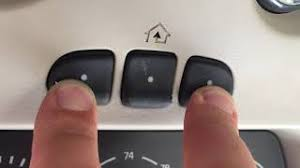
- Turn your car ignition to ON
- Press and hold the two outer HomeLink buttons
- Hold for 10–15 seconds until the indicator light flashes rapidly
✔️ This resets the system.
Read too: Tc1 Tricode Garage Door Opener Remote W/ Clip Chamberlain: Complete Guide
Step 2: Position the Remote Correctly
- Hold your Chamberlain remote 1–3 inches (2–7 cm) from the HomeLink buttons
- Sit inside your vehicle
Step 3: Press and Hold Both Buttons
- Press the desired HomeLink button in your car
- Simultaneously press the remote button
👉 Hold for 15–30 seconds
✔️ The indicator light will change from slow to rapid blinking.
Step 4: Test the Connection
- Press the programmed HomeLink button
- If the garage door moves, setup is complete
If not, proceed to Step 5.
Step 5: Sync Rolling Code (Important)
Most Chamberlain systems use rolling code technology.
- Locate the “Learn” button on your garage opener motor
- Press it (you have 30 seconds)
- Return to your car
- Press the HomeLink button 2–3 times
✔️ The garage door should activate.
Step 6: Final Test
- Press the button again
- Confirm smooth operation
What Is HomeLink and Why Is It Used?
HomeLink is a built-in wireless system in many vehicles that allows you to control garage doors, gates, and lighting.
Key Benefits:
- Eliminates handheld remotes
- Provides secure signal transmission
- Works with most modern openers
For more details, visit:
https://en.wikipedia.org/wiki/HomeLink
How Long Does Pairing Take?
| Step | Time |
|---|---|
| Reset system | 15 seconds |
| Pair remote | 30 seconds |
| Rolling code sync | 1–2 minutes |
👉 Total: 2–5 minutes
Why Won’t My Chamberlain Opener Pair With My Car?
Common Problems & Fixes
1. Weak Remote Battery
- Replace battery before pairing
2. Skipping Rolling Code Step
- Always press the Learn button
3. Incorrect Distance
- Keep remote within 1–3 inches
4. Signal Interference
- Move away from LED lights or electronics
Compatibility: Will It Work With Your Car?
Most vehicles with HomeLink are compatible:
| Vehicle Feature | Compatibility |
|---|---|
| Built-in HomeLink | Yes |
| Aftermarket system | Yes |
| Older vehicles | Limited |
Chamberlain Opener Compatibility
| Opener Type | Works with Car |
|---|---|
| Chain drive | Yes |
| Belt drive | Yes |
| Smart openers | Yes |
| Pre-1993 models | No |
👉 Most Chamberlain models after 1993 are fully compatible.
Benefits of Pairing Your Car With Garage Door
Pros:
- Convenience: No remote needed
- Security: Reduced theft risk
- Clutter-free: Cleaner interior
- Quick access: One-button control
Cons:
- Initial setup required
- May need reprogramming
- Limited compatibility with very old systems
Real-Life Example
A homeowner replaced their handheld remote with HomeLink:
Results:
- Faster entry during bad weather
- No more lost remotes
- Improved daily convenience
Advanced Tips for Better Pairing
- Program multiple buttons for different doors
- Label buttons mentally (left/right)
- Reprogram after replacing opener
- Test monthly for reliability
Safety Tips
- Keep garage door area clear during testing
- Avoid standing under moving door
- Ensure sensors are working properly
Troubleshooting Table
| Problem | Cause | Solution |
|---|---|---|
| No light flash | Not holding long enough | Hold 30 seconds |
| Door not responding | Missed Learn step | Repeat process |
| Weak signal | Dead battery | Replace battery |
| Intermittent use | Interference | Adjust position |
Cost Overview
| Item | Cost |
|---|---|
| DIY pairing | Free |
| Professional help | $50 – $150 |
FAQ Section
Q1: How to pair Chamberlain garage door opener to car without a remote?
A: Most systems require the original remote for initial pairing.
Q2: Why is my HomeLink not working after pairing?
A: You likely need to complete the rolling code synchronization.
Q3: Can I program multiple garage doors?
A: Yes, most HomeLink systems support up to three devices.
Q4: Do I need to reprogram after changing car battery?
A: Usually no, but some systems may reset.
Q5: Is Chamberlain compatible with all cars?
A: It works with most vehicles that have HomeLink.
Q6: How long does pairing take?
A: Typically 2–5 minutes.
Conclusion
Learning How To Pair Chamberlain Garage Door Opener To Car is one of the easiest ways to upgrade your daily routine. With just a few simple steps, you can eliminate the need for a separate remote and enjoy seamless, secure access to your garage.
By following this guide and troubleshooting tips, you’ll have your system working perfectly in no time.
If this guide helped you, share it with friends or family who want a smarter, more convenient garage setup! 🚗🚪
Leave a Reply