Introduction
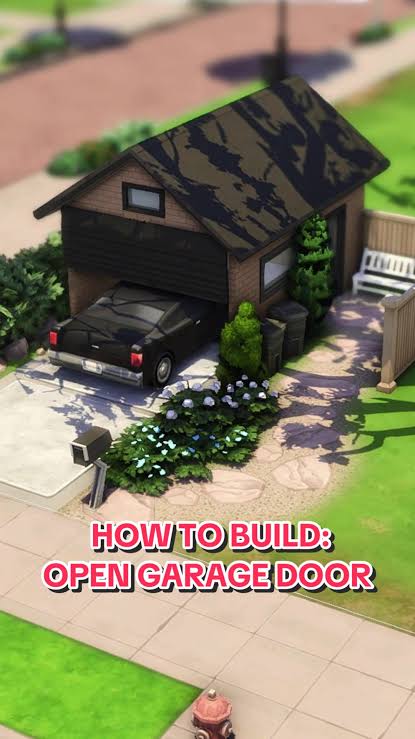
Have you ever spent hours designing the perfect suburban home in The Sims 4, only to realize there’s no actual functional garage door? You’re not alone. Thousands of players struggle with this common building challenge when trying to create realistic homes. Learning how to make a garage door in Sims 4 can transform your builds from good to exceptional, adding that authentic touch every simulation enthusiast craves.
While The Sims 4 doesn’t offer a dedicated “garage door” object out of the box, creative builders have developed several effective workarounds. This comprehensive guide will walk you through every method, from simple build mode tricks to advanced custom content solutions.
Understanding the Garage Door Challenge in Sims 4
Before diving into solutions, it’s important to understand why garage doors are tricky in The Sims 4. Unlike real life, the game doesn’t include animated garage doors as standard objects. This limitation has frustrated many players who want to create authentic suburban or modern homes.
According to EA’s official forums, garage-related builds remain one of the most requested features since the game’s launch in 2014. The absence of functional garage doors means players must get creative with available tools and resources.
Why Garage Doors Matter in Your Builds
- Realism: Adds authenticity to suburban and contemporary home designs
- Functionality: Creates proper vehicle storage spaces
- Aesthetics: Completes the exterior facade of residential lots
- Gameplay immersion: Enhances role-playing scenarios involving cars and maintenance
Method 1: Using Build Mode Walls and Fences
The simplest approach to creating a garage door appearance involves manipulating basic build mode elements. This method requires no downloads or additional content.
Step-by-Step Instructions
Step 1: Plan Your Garage Space
- Decide on garage dimensions (standard is 10×10 or 12×12 squares)
- Ensure adequate space for at least one vehicle
- Consider ceiling height (use half-walls or full walls based on preference)
Step 2: Create the Opening
- Build three solid walls for your garage structure
- Leave the front completely open (no wall)
- Use the room tool to define the garage space properly
Step 3: Add Visual Garage Door Elements
- Place fence pieces across the opening
- Use half-walls or low barriers to simulate door panels
- Apply appropriate wall patterns or textures for visual cohesion
Step 4: Enhance Realism
- Add lighting fixtures above the opening
- Place decorative elements like house numbers or plaques
- Use terrain paint to create a driveway leading to the garage
Pros and Cons of This Method
| Advantages | Disadvantages |
|---|---|
| No downloads required | Not truly functional |
| Works on all platforms | Limited visual appeal |
| Easy to implement | Doesn’t animate |
| Completely free | May look unrealistic up close |
Method 2: Utilizing Custom Content (CC) Garage Doors
For players seeking more realistic results, custom content offers the best solution. The Sims 4 modding community has created numerous high-quality garage door options.
Finding Quality Garage Door CC
Several reputable creators specialize in architectural custom content:
- Sims Community Hub: Features curated collections of building CC
- Mod The Sims: Long-standing repository with user ratings
- The Sims Resource: Premium and free options available
- Creator-specific websites: Many designers maintain personal portfolios
When downloading CC, always verify compatibility with your current game version. Most garage door CC works across all expansion packs, but some may require specific stuff packs for textures.
Installation Process
Step 1: Download Files
- Obtain .package files from trusted sources
- Check file descriptions for requirements
- Read installation instructions carefully
Step 2: Place Files Correctly
- Navigate to Documents > Electronic Arts > The Sims 4 > Mods
- Create subfolders for organization (optional but recommended)
- Ensure mods are enabled in game settings
Step 3: Locate in Build Mode
- Open build/buy mode
- Search using keywords like “garage,” “door,” or creator names
- Use the search filter to narrow results
Step 4: Implement in Your Build
- Place the garage door object at your desired location
- Adjust sizing if the CC allows customization
- Blend with surrounding architecture using matching colors
Pro Tip: According to Wikipedia’s article on The Sims 4 modding community, custom content has become integral to extending gameplay longevity, with thousands of creators contributing regularly.
Method 3: Creative Object Placement Techniques
Sometimes the best garage door isn’t a door at all. Strategic object placement can create convincing illusions.
Effective Object Combinations
Shutter Method:
- Use window shutters placed side-by-side
- Rotate and resize to fill garage opening
- Apply uniform color for seamless appearance
Bookshelf Trick:
- Stack bookshelves horizontally
- Remove books using debug mode if desired
- Creates panel-like appearance resembling sectional doors
Cabinet Approach:
- Line up kitchen or bathroom cabinets
- Choose styles with minimal handles
- Works particularly well for modern minimalist homes
Advanced Techniques
For experienced builders, combining multiple methods yields superior results:
- Create structural framework using walls
- Overlay decorative elements for texture
- Use terrain tools for ground integration
- Add lighting for nighttime visibility
- Incorporate landscaping to frame the entrance
Common Mistakes to Avoid
Even seasoned builders encounter pitfalls when attempting garage doors. Here are frequent errors and their solutions:
Mistake 1: Ignoring Scale Proportions Garage doors should match your home’s overall aesthetic. A massive door on a cottage looks awkward, while a tiny door on a mansion appears comical.
Mistake 2: Forgetting Functionality Ensure Sims can actually enter and exit the garage. Test pathfinding before finalizing your design.
Mistake 3: Neglecting Lighting Dark garages feel incomplete. Always add overhead lights or wall sconces for practicality and ambiance.
Mistake 4: Overlooking Driveway Integration A garage door without a proper driveway looks disconnected. Use terrain paint or pathway tools to create smooth transitions.
FAQ Section
Q1: Can garage doors in Sims 4 actually open and close?
A: Native garage doors cannot animate. However, some custom content creators have developed semi-functional options using script mods. These require additional software like Script Extender and may impact game performance. For most players, static visual representations provide sufficient realism without complications.
Q2: Do I need any expansion packs to create garage doors?
A: No expansion packs are strictly necessary. Basic garage structures can be built using base game items. However, certain expansions like Get Together or City Living offer additional architectural elements that enhance garage aesthetics. Custom content works independently of expansion ownership.
Q3: Will custom content garage doors work on console versions?
A: Unfortunately, custom content is only available on PC and Mac versions. Console players (PlayStation, Xbox) must rely on build mode techniques using standard game objects. The wall and fence method described earlier works perfectly on all platforms.
Q4: How can I make my garage door look more realistic?
A: Focus on these details:
- Match materials to your home’s exterior
- Add weathering effects using terrain paints
- Include functional elements like mailboxes or doorbells nearby
- Use appropriate lighting temperatures (warm for traditional, cool for modern)
- Integrate landscaping elements like planters or small trees
Q5: Are there any performance issues with garage door custom content?
A: Well-made CC typically causes minimal performance impact. Problems arise when:
- Downloading poorly optimized files
- Installing excessive amounts of CC simultaneously
- Using outdated content incompatible with current patches
Always download from reputable sources and keep your CC updated. Monitor game performance after adding new items.
Q6: Can I sell houses with custom content garage doors?
A: Yes, but with caveats. Houses uploaded to the Gallery with CC will display warnings for downloaders who lack those specific files. The garage door may appear missing or replaced with default objects. Consider creating CC-free versions for broader accessibility, or clearly label uploads with required downloads.
Conclusion
Learning how to make a garage door in Sims 4 opens endless possibilities for creating authentic, immersive homes. Whether you choose simple build mode tricks, invest time in finding quality custom content, or experiment with creative object placement, each method offers unique advantages.
Remember that great building isn’t about perfection—it’s about creativity and problem-solving. Start with basic techniques, gradually incorporate advanced methods as you gain confidence, and don’t hesitate to share your creations with the vibrant Sims community.
Ready to build your dream garage? Share your favorite garage door technique in the comments below, or post your creations on social media using #Sims4GarageGoals. Happy building!
Leave a Reply