If you’re wondering “How To Link My Garage Door Opener To My Car”, you’re not alone. Many modern vehicles come with built-in garage controls, but setting them up can feel confusing at first.
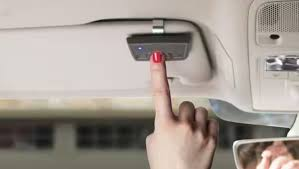
The good news? Once you understand the process, linking your car to your garage door opener takes just a few minutes—and makes daily life much more convenient.
How To Link My Garage Door Opener To My Car (Step-by-Step)
Let’s walk through the exact process to connect your garage door opener to your vehicle’s built-in system (often called HomeLink).
Read too: Tc1 Tricode Garage Door Opener Remote W/ Clip Chamberlain: Complete Guide
Step 1: Locate the Garage Control Buttons in Your Car
Most cars have built-in buttons located:
- On the overhead console
- Near the rearview mirror
- On the sun visor
These buttons will be used to program your garage door opener.
Step 2: Clear Existing Codes (Recommended)
Before linking, reset the system:
- Press and hold the first and third buttons
- Hold for 10–20 seconds
- Wait for the indicator light to flash rapidly
✅ This ensures a clean setup.
Step 3: Put Your Garage Opener in “Learn Mode”
Go to your garage door opener unit:
- Locate the “Learn” button
- Press it once
- A light will turn on (you have ~30 seconds)
Step 4: Program Your Car Button
Return to your car:
- Press and hold the desired button
- Hold for 2–3 seconds, release
- Repeat until:
- The garage door moves, or
- The opener light blinks
Step 5: Test the Connection
- Press the programmed button
- Ensure the door opens and closes smoothly
🎉 You’re done!
What Is HomeLink and How Does It Work?
HomeLink is the system inside your car that communicates with your garage door opener using radio signals.
Key Features:
- Wireless connection
- Supports multiple devices
- Uses secure rolling codes
To understand the technology, visit:
https://en.wikipedia.org/wiki/Garage_door_opener
Why Link Your Garage Door Opener to Your Car?
Benefits:
- No need for a handheld remote
- Cleaner, clutter-free interior
- Increased convenience
- Improved security
Compatibility: Will It Work With Your Garage Door?
Works With Most Brands:
- Chamberlain
- LiftMaster
- Craftsman
May Require Extra Steps:
- Older openers (pre-1993)
- Non-rolling code systems
Common Problems and How to Fix Them
1. Car Won’t Connect to Opener
Fix:
- Re-enter Learn mode
- Repeat programming steps
2. Door Doesn’t Respond
Fix:
- Move closer (within 3–10 feet / 1–3 meters)
- Check opener power
3. Programming Times Out
Fix:
- Restart process quickly within 30 seconds
4. Weak Signal
Fix:
- Replace car system battery (if applicable)
- Reduce interference
Linking Without a Learn Button
Some older systems require manual syncing.
Alternative Method:
- Hold remote close to car buttons
- Press both buttons simultaneously
- Wait for light to flash rapidly
How Long Does It Take?
| Task | Time |
|---|---|
| Locate buttons | 1 minute |
| Reset system | 20 seconds |
| Programming | 2–3 minutes |
| Testing | 1 minute |
👉 Total: Under 5 minutes
Real-Life Example
Scenario:
A homeowner wants to stop using a handheld remote.
Solution:
- Clear HomeLink system
- Sync with opener
Result:
Garage opens directly from car dashboard.
Advantages vs Disadvantages
Advantages:
- Convenient access
- Fewer devices to manage
- Enhanced security
Disadvantages:
- Setup may vary by car
- Requires reprogramming after reset
Safety Tips When Linking Your Opener
- Always test door reversal function
- Keep children away during setup
- Avoid programming while driving
- Ensure door area is clear
Maintenance Tips
- Reprogram after battery replacement
- Test monthly
- Reset system when selling your car
- Keep opener firmware updated (if smart system)
FAQ: How To Link My Garage Door Opener To My Car
1. Do all cars support garage door linking?
No, only vehicles with built-in systems like HomeLink support it.
2. Can I link multiple garage doors?
Yes, most systems allow 2–3 different doors.
3. Why won’t my car connect to the opener?
It could be timing, compatibility, or signal issues.
4. Do I need the original remote?
Sometimes yes, especially for older systems.
5. Will linking erase my existing remotes?
No, it only adds your car as a new control.
6. Is it safe to use HomeLink?
Yes, modern systems use rolling codes for security.
Conclusion
Now you know exactly how to link my garage door opener to my car—and as you’ve seen, it’s a simple process that can be completed in just minutes. Once connected, you’ll enjoy a more convenient and streamlined way to access your garage every day.
Take a few minutes to set it up today—you’ll wonder why you didn’t do it sooner.
If this guide helped you, feel free to share it on social media so others can benefit from this easy setup! 🚗🚪
Leave a Reply