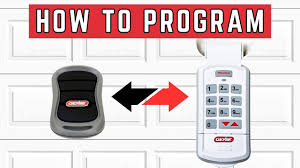
If you’re concerned about garage security or need to update access for family or roommates, knowing how to change the code on Genie garage door opener is essential. A new code prevents unauthorized entry and ensures your home remains safe. This guide provides a clear, step-by-step process to update your Genie opener code efficiently.
Why Changing the Code Is Important
Updating your garage door code is more than convenience—it’s a security measure.
Benefits:
- Prevents unauthorized access
- Resets codes after lost or stolen remotes
- Allows you to manage who can operate the garage door
- Maintains compliance with modern security practices
Read too: Tc1 Tricode Garage Door Opener Remote W/ Clip Chamberlain: Complete Guide
Statistic: Home security surveys show that 35% of break-ins involve entry through unsecured garage doors.
Understanding Genie Garage Door Opener Codes
Genie openers use either keypads, remote transmitters, or both.
Key Points:
- Most Genie keypads support up to 8 user codes
- Remote transmitters are usually pre-coded but can be reprogrammed
- Codes are stored in the motor unit’s memory
- Only a “Learn” button or keypad programming sequence can change the code
Tip: Always keep a record of codes securely in case of emergencies.
Step-by-Step Guide: How To Change The Code
Changing the code involves accessing either the keypad or the motor unit’s “Learn” button.
Materials Needed:
- Genie keypad or remote
- Ladder (if keypad is mounted high)
- Fresh 9V battery for keypad
Steps:
- Power Off (Optional but Safe) – Disconnect the garage opener from the main power to prevent accidental door movement.
- Locate the “Learn” Button – Usually on the back or side of the Genie opener motor. The button may be red, yellow, or purple depending on the model.
- Clear Existing Codes – Press and hold the Learn button for 6–10 seconds until the LED light turns off or blinks, erasing old codes.
- Program New Code on Keypad:
- Press the “Program” button on the keypad
- Enter your desired 4-digit code
- Press and hold the ENTER key until the keypad LED flashes
- Program Remote (Optional):
- Press the Learn button on the motor briefly
- Press a button on the remote to synchronize
- Test the door to confirm the new code works
Pro Tip: Always test multiple times to ensure the new code functions properly before closing the garage.
Troubleshooting Common Issues
Even with a step-by-step process, you may encounter minor setbacks.
Problem Checklist:
| Issue | Cause | Solution |
|---|---|---|
| Keypad doesn’t respond | Dead battery | Replace battery with fresh one |
| Door doesn’t activate | Incorrect code entry | Re-enter code carefully |
| LED on motor won’t blink | Power issue | Check outlet and motor unit power |
| Remote fails | Not synchronized | Repeat programming sequence |
Safety Considerations
Changing codes is simple, but safety should always come first.
- Disconnect power before programming
- Keep children and pets away
- Do not use default or easily guessed codes
- Test safety sensors after programming
Expert Advice: Always verify that all users who need access have the updated code.
Tips To Maintain Your Genie Code System
Proper maintenance keeps your codes secure and your opener functional.
Recommended Practices:
- Replace keypad batteries annually
- Keep keypad clean and sheltered from moisture
- Periodically review and update codes for security
- Test keypad and remote at least twice a year
FAQ: How To Change The Code On Genie Garage Door Opener
1. Can I change the code without a keypad?
Yes, using the Learn button on the motor unit and reprogramming remote transmitters.
2. How often should I change my Genie code?
Every 6–12 months, or after lost remotes or security concerns.
3. Will changing the code affect the remote controls?
Yes, you may need to reprogram all remotes after clearing old codes.
4. What if the LED on the motor doesn’t flash?
Ensure the opener is powered, and the Learn button is held long enough. If still unresponsive, check motor unit or wiring.
5. How many codes can a Genie keypad store?
Most keypads can store up to 8 unique 4-digit codes for multiple users.
Conclusion
Knowing how to change the code on Genie garage door opener enhances home security and ensures only authorized users have access. Regular code updates, careful programming, and keypad maintenance prevent lockouts and unauthorized entry. Share this guide with friends or family to help them secure their garages safely and efficiently. 🚪
Leave a Reply