If you’ve recently moved, lost a remote, or simply want better security, updating your garage access code is a smart move. Many homeowners delay this step, not realizing how easy it is. In this guide, you’ll learn How To Change The Code For Garage Door Opener quickly and safely—no technical skills required.
What Does Changing the Code on a Garage Door Opener Do?
Changing your garage door opener code updates the access credentials used by keypads and sometimes remotes.
Read too: How Do You Change Code On Garage Door Keypad Fast?
Why It’s Important:
- Prevents unauthorized access
- Resets old or shared codes
- Improves home security instantly
- Ensures only trusted users can enter
Modern systems often use rolling codes for remotes, but keypad codes must be manually updated for full protection.
How To Change The Code For Garage Door Opener (Step-by-Step)
This is the core solution. Follow each step carefully.
Step 1: Locate the Learn Button
- Find the garage door opener motor unit on the ceiling
- Look for the “Learn” button
- Usually near the antenna wire
- Common colors: yellow, purple, red/orange, green
📍 This button is essential for programming.
Step 2: Activate Programming Mode
- Press and release the Learn button
- A small LED light will turn on
- You now have 30 seconds to proceed
⏱ Timing is critical—move quickly to the next step.
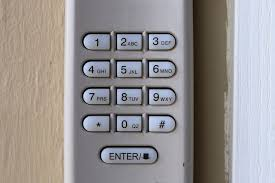
Step 3: Enter a New Code on the Keypad
- Go to your outdoor keypad
- Enter a new 4-digit code (example: 4829)
- Press and hold the Enter button
🔐 Avoid simple codes like “1234” or “0000”.
Step 4: Confirm the Code
- Wait for the opener light to blink or click
- This confirms successful programming
✅ Your new code is now active.
Step 5: Test the New Code
- Enter the code on the keypad
- Press Enter
- The garage door should respond immediately
✔️ If it works, the process is complete.
How Do You Reset a Garage Door Opener Completely?
If you want to erase all existing codes and start fresh:
Full Reset Instructions:
- Press and hold the Learn button for 6–10 seconds
- Wait until the LED light turns off
- All remotes and keypads will be erased
- Reprogram everything from scratch
⚠️ This is useful if you suspect unauthorized access.
Why Should You Change Your Garage Code Regularly?
Security experts recommend updating access codes periodically.
Best Times to Change Your Code:
- After moving into a new home
- When a remote is lost or stolen
- After giving access to contractors
- Every 6–12 months
📊 According to home security studies, garages are a common entry point for intrusions—making code updates essential.
Common Mistakes to Avoid
Even simple steps can go wrong if overlooked.
❌ Avoid These Errors:
- Waiting longer than 30 seconds after pressing Learn
- Using weak or predictable codes
- Not testing the new code
- Forgetting to remove old remotes
Types of Garage Door Openers and Code Methods
Different models may vary slightly.
Comparison Table:
| Type | Code Method | Difficulty |
|---|---|---|
| Modern Openers | Learn button + keypad | Easy |
| Older Models | DIP switches | Moderate |
| Smart Openers | Mobile app | Very Easy |
💡 Newer systems are faster and more secure due to digital programming.
Advantages vs Disadvantages of Changing Code Yourself
Pros and Cons
| Advantages | Disadvantages |
|---|---|
| Saves money | Requires attention to steps |
| Takes under 10 minutes | Easy to forget new code |
| Improves security instantly | May require reprogramming remotes |
What If the New Code Doesn’t Work?
If your garage door doesn’t respond, try these fixes:
Troubleshooting Steps:
- Check Keypad Battery
Replace if weak or dead. - Repeat Programming Steps
Ensure you act within the 30-second window. - Reset the System
Perform a full reset and try again. - Inspect Keypad Buttons
Worn buttons may not register input.
How Secure Are Garage Door Opener Codes?
Modern garage door openers include advanced security features:
Security Highlights:
- Rolling code technology
- Billions of possible combinations
- Reduced risk of signal duplication
To learn more about how these systems function, visit:
https://en.wikipedia.org/wiki/Garage_door_opener
Expert Insight: Why This Simple Step Matters
Home security professionals agree that updating your garage code is one of the easiest ways to reduce risk.
A compromised garage can provide direct access to your home. Taking just a few minutes to update your code significantly improves safety.
Maintenance Tips After Changing the Code
Keep your system working smoothly:
- Update your code every 6–12 months
- Avoid writing codes in visible places
- Test your keypad monthly
- Keep the opener clean and dust-free
Signs You Should Change Your Code Immediately
Watch for these warning signs:
- Missing remote control
- Unusual garage activity
- Keypad responding inconsistently
- Recently shared access with others
FAQ: How To Change The Code For Garage Door Opener
Q1: How long does it take to change the code?
Answer: Usually less than 5–10 minutes.
Q2: Can I change the code without the Learn button?
Answer: Most modern systems require the Learn button for programming.
Q3: What is the safest code to use?
Answer: A unique 4-digit code that is not easy to guess.
Q4: Does changing the code affect remote controls?
Answer: No, unless you perform a full reset.
Q5: How often should I update my garage code?
Answer: Every 6–12 months or whenever security is a concern.
Q6: What should I do if I forget my new code?
Answer: Reset the system and create a new code.
Conclusion
Learning How To Change The Code For Garage Door Opener is a simple but powerful way to protect your home. With just a few steps, you can prevent unauthorized access, improve safety, and maintain full control over your garage system.
Take a few minutes today to update your code—it’s one of the easiest upgrades you can make for your home security. If this guide helped you, share it on social media so others can benefit too!
Leave a Reply