Locked out of your own garage or just moved into a new home and worried about security? You are not alone, and figuring out how to change code on garage door opener Chamberlain units is actually much simpler than you might think. In just a few minutes, you can easily update your PIN and keep your property safe from unwanted access.
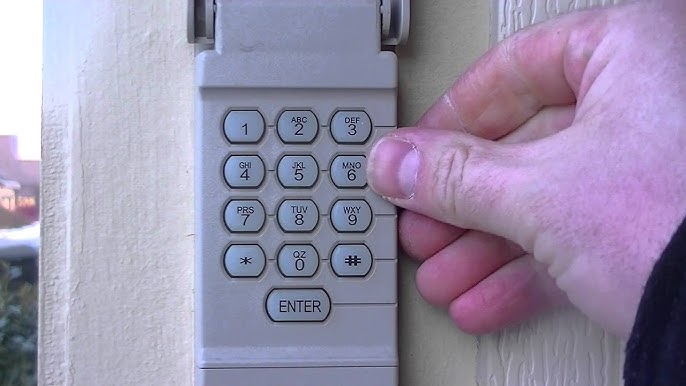
How To Change Code On Garage Door Opener Chamberlain
Let us dive right into the process. Whether you have an older model or a brand-new smart-enabled unit, the basic principles remain the same.
We will break this down into easy, actionable steps so you can get your garage secured without calling an expensive technician.
Why Should You Change Your Garage Door Code?
Before we grab the ladder, let us talk about why this matters. According to the International Association of Certified Home Inspectors (InterNACHI), over 60% of homeowners use the same garage door code for more than five years.
This significantly increases the risk of unauthorized entry.
Furthermore, a study by the American Society of Home Inspectors notes that updating your access codes is the number one recommended DIY security upgrade. Changing your code ensures that former residents, old contractors, or neighbors who borrowed your code can no longer enter your home.
It is a simple habit that provides massive peace of mind.
Step-by-Step Guide: Changing the Code on Your Keypad
Before starting, ensure your garage door is completely closed. You will need a sturdy step ladder if your motor unit is mounted high.
Here is the exact process to reset and change your code.
1. Locate the Learn Button
Open your garage door and look at the motor unit hanging from the ceiling. Find the “Learn” button. It is usually located above the hanging antenna wire.
The button is typically colored yellow, red, purple, orange, or green.
2. Clear the Old Memory (Optional but Recommended)
If you want to wipe all previous codes for maximum security, press and hold the Learn button for about 6 to 10 seconds. Wait until the indicator LED next to it turns off.
Note: This erases all previously programmed remotes and keypads. You will need to reprogram your car remotes after this step!
3. Enter Your New PIN
Walk over to your external wireless keypad. Enter your desired 4-digit PIN (for example, 8-4-2-9).
Avoid using obvious numbers like your house number, birth year, or “1-2-3-4”.
4. Program the New Code
Immediately press and hold the “Enter” button on the keypad. While holding it, walk to the motor unit and press the “Learn” button once.
Release both buttons simultaneously.
5. Test the Connection
The motor unit’s lights should blink, or you might hear a distinct click. This confirms the system accepted the new code.
Press your new 4-digit PIN followed by “Enter” on the keypad. The door should activate immediately.
Understanding Chamberlain Learn Button Colors
Not all Chamberlain models use the same Learn button color. This color dictates the frequency and rolling code technology your system uses.
Understanding this is crucial if you are buying a replacement keypad. You can read more about the general mechanics of these systems on the Garage door opener Wikipedia page to understand the evolution of security frequencies.
- Yellow Learn Button: Typically used for Security+ 2.0 models (2011-present). It requires a rolling code for maximum security.
- Purple Learn Button: Common in Security+ models manufactured between 2005 and 2014.
- Red/Orange/Green: Found in older, legacy models. These use fixed codes and are less secure.
Pros and Cons of Changing the Code Yourself
Is it worth doing it yourself, or should you call a pro? Let us look at the facts.
| Feature | DIY Code Change | Hiring a Professional |
|---|---|---|
| Cost | $0 (Completely Free) | $75 – $150+ per service visit |
| Time Required | 5 to 10 minutes | 1 to 2 hours (scheduling + travel) |
| Skill Level | Beginner Friendly | N/A |
| Risk of Error | Very Low (if steps are followed) | Extremely Low |
| Immediate Results | Yes | Yes |
As you can see, doing it yourself saves you both time and money.
Troubleshooting Common Keypad Issues
Sometimes, things do not go perfectly on the first try. Here are a few quick fixes for common problems.
- Blinking Lights: If the keypad blinks rapidly, the code was not accepted. Simply repeat the programming steps.
- Dead Batteries: If there are no lights on the keypad at all, replace the battery. Most Chamberlain keypads use a standard 9-volt or CR2032 coin battery.
- Cold Weather Issues: In freezing temperatures, keypad batteries can drain much faster. Keep a spare battery in your kitchen drawer.
- Timeout Error: The motor unit times out after 30 seconds. If you wait too long between pressing “Enter” on the keypad and the “Learn” button, you must start over.
Frequently Asked Questions (FAQ)
How do I find my Chamberlain garage door opener model number?
The model number is usually located on a sticker on the back or side of the motor unit. It typically starts with letters like “1/2HP” or “C205” followed by a series of numbers.
What is the default PIN for a Chamberlain garage door opener?
Chamberlain keypads do not come with a factory default PIN. You must create and program your own unique 4-digit code during the initial setup.
Why is my garage door keypad not working after changing the code?
This usually happens if the system timed out. The motor unit only stays in “programming mode” for 30 seconds. Simply press the Learn button again and repeat the keypad steps quickly.
How often should I change my garage door code?
Security experts recommend changing your garage door PIN at least once a year. You should also change it immediately if you lose your remote, move to a new house, or have contractors working on your home.
Will changing the keypad code erase my remote controls?
No. If you simply update the PIN on the keypad without holding the Learn button for 6 seconds, your car remotes will stay programmed. You only erase remotes if you intentionally clear the memory.
Conclusion
Securing your home does not have to be a stressful or expensive ordeal. By learning how to change code on garage door opener Chamberlain models, you take control of your home’s security in just a few minutes.
Regularly updating your PIN gives you immense peace of mind and keeps your family and belongings safe from potential intruders. It is a simple task that yields massive results.
Found this guide helpful? Do not keep it to yourself! Share this article on Facebook, Pinterest, or X (formerly Twitter) to help your friends and neighbors secure their garages today!
Leave a Reply