If your garage door remote suddenly stops working or has a weak signal, the issue is often simple: the battery. Knowing how to change battery in Genie garage door remote can save you time, money, and frustration. The process is quick, beginner-friendly, and takes just a few minutes.
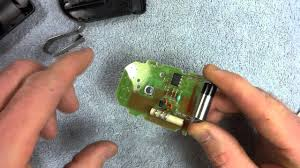
Why Does Your Genie Garage Door Remote Battery Need Replacing?
Garage door remotes rely on small coin-cell or alkaline batteries. Over time, these batteries lose power due to regular use.
Common signs your battery is dying:
- Reduced operating range (you must stand very close)
- Delayed response or no response
- LED light is dim or not lighting up
Read too: Tc1 Tricode Garage Door Opener Remote W/ Clip Chamberlain: Complete Guide
According to home maintenance experts, battery-related issues account for nearly 60% of garage remote failures.
For technical insight into how remote systems work, visit Wikipedia:
https://en.wikipedia.org/wiki/Garage_door_opener
How To Change Battery In Genie Garage Door Remote (Step-by-Step)
Step 1: Identify Your Remote Model
Genie remotes come in different designs:
- Keychain remotes (small, compact)
- Visor remotes (larger, clipped to car visor)
Most use either:
- CR2032 coin battery
- CR2016 coin battery
- AAA alkaline battery
💡 Tip: Check the back of your remote or manual for the exact battery type.
Step 2: Gather Tools and Replacement Battery
You’ll need:
- A small flathead screwdriver or coin
- New battery (matching type exactly)
⚠️ Important: Use the same voltage and size to avoid damage.
Step 3: Open the Remote Case
- Locate the small notch or seam on the remote
- Insert a screwdriver or coin gently
- Twist slightly to open the case
✔️ Be careful not to damage the plastic housing.
Step 4: Remove the Old Battery
- Take out the old battery carefully
- Note the positive (+) and negative (-) orientation
💡 Tip: Take a quick photo before removing it to avoid confusion.
Step 5: Insert the New Battery
- Place the new battery in the same position
- Ensure correct polarity (+ side facing up or down as required)
- Press it firmly into place
Step 6: Reassemble the Remote
- Snap the case back together
- Ensure all edges are sealed properly
Step 7: Test the Remote
- Press any button
- Check if the LED lights up clearly
- Test the garage door from a distance of 3–10 meters (10–30 feet)
✔️ If it works, you’re done!
What If My Genie Remote Still Doesn’t Work?
Troubleshooting Guide
| Problem | Possible Cause | Solution |
|---|---|---|
| No LED light | Dead or wrong battery | Replace with correct type |
| Weak signal | Poor battery contact | Adjust battery position |
| No response | Lost programming | Reprogram remote |
| Intermittent use | Dirty contacts | Clean with dry cloth |
Types of Batteries Used in Genie Remotes
Comparison Table
| Battery Type | Common Models | Lifespan | Pros | Cons |
|---|---|---|---|---|
| CR2032 | Newer remotes | 2–3 years | Long-lasting | Slightly larger |
| CR2016 | Compact remotes | 1–2 years | Slim design | Shorter lifespan |
| AAA | Older remotes | 1–1.5 years | Easy to find | Bulkier |
Advantages vs Disadvantages of Replacing the Battery Yourself
Advantages
- Saves money (no technician needed)
- Takes less than 5 minutes
- Easy for beginners
- Immediate results
Disadvantages
- Requires correct battery type
- Risk of incorrect installation
- Small parts can be lost
Expert Tips for Longer Battery Life
- Avoid pressing buttons unnecessarily
- Store remote in a cool, dry place
- Replace batteries every 1–2 years proactively
- Keep spare batteries at home
Experts recommend checking your remote battery during routine home maintenance to avoid unexpected failures.
How Often Should You Change the Battery?
- Average lifespan: 1–3 years
- Heavy usage: replace every 12 months
- Low usage: up to 3 years
Do You Need to Reprogram After Changing the Battery?
In most cases, no reprogramming is required. The remote retains its settings even after battery replacement.
However, if the remote stops working:
- Reprogram using the Learn button on the opener
FAQ: How To Change Battery In Genie Garage Door Remote
1. What battery does a Genie garage remote use?
Most use CR2032 or CR2016 coin batteries, but some older models use AAA.
2. How long does it take to replace the battery?
Typically 2–5 minutes.
3. Why is my remote still not working after battery replacement?
It may need reprogramming or have internal damage.
4. Can I use a different battery brand?
Yes, as long as the type and voltage match exactly.
5. Is it safe to replace the battery myself?
Yes. It’s a simple and safe process if done carefully.
6. How do I know the battery is installed correctly?
Check the polarity symbols (+/-) and ensure the LED lights up when pressed.
Conclusion
Learning how to change battery in Genie garage door remote is a simple but essential skill for any homeowner. In just a few minutes, you can restore your remote’s performance and avoid unnecessary hassle.
Don’t wait until your remote stops working—replace the battery proactively and keep your garage running smoothly.
If this guide helped you, feel free to share it with friends or family who might need a quick fix for their garage remote 🔋🚪
Leave a Reply