If your garage door remote suddenly stops working or becomes unreliable, the issue is often a dead battery. Knowing How To Change Battery In Genie Garage Door Opener can save you time, money, and frustration. The process is quick, simple, and requires no technical skills—perfect for beginners.
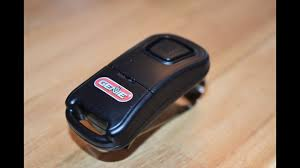
Why Does Your Genie Garage Door Battery Need Replacement?
Garage door openers and remotes rely on small batteries that wear out over time.
Common Signs of a Weak Battery:
- Reduced signal range
- Delayed response
- LED light not turning on
- Door not opening consistently
Read too: Tc1 Tricode Garage Door Opener Remote W/ Clip Chamberlain: Complete Guide
According to industry estimates, most garage remote batteries last 1–2 years, depending on usage.
What Type of Battery Does a Genie Garage Door Opener Use?
Different Genie devices use different batteries.
Common Battery Types:
- CR2032 coin battery (most remotes)
- AAA or AA batteries (keypads)
- Backup battery (12V) for opener units
💡 Tip: Always check your device model before buying a replacement.
Tools You Need Before Starting
You don’t need much, but having these ready helps:
Checklist:
- Replacement battery (correct type)
- Small flathead screwdriver
- Clean dry cloth
Optional:
- Gloves (for safety)
- Ladder (if accessing wall unit)
How To Change Battery In Genie Garage Door Opener (Step-by-Step)
Follow these simple steps to replace your battery correctly.
Step 1: Identify Your Device Type
Determine whether you are replacing the battery in:
- Remote control
- Keypad
- Main opener backup battery
Each has a slightly different method.
Step 2: Open the Battery Compartment
For most remotes:
- Locate the seam on the back
- Use a flathead screwdriver to gently pry it open
- Apply light pressure to avoid damage
For keypads:
- Slide the cover down or remove screws
Step 3: Remove the Old Battery
- Carefully take out the old battery
- Note the polarity (+ and – direction)
⚠️ Incorrect placement can prevent the device from working.
Step 4: Insert the New Battery
- Place the new battery in the same orientation
- Ensure it sits securely
Example:
- Use 1 CR2032 battery for standard Genie remotes
- Voltage: 3V lithium coin cell
Step 5: Close the Compartment
- Snap or screw the cover back into place
- Make sure it is tightly sealed
Step 6: Test the Device
- Press the remote button
- Check if the garage door responds
✅ If it works smoothly, the replacement is successful.
Battery Replacement Time and Cost
| Factor | Details |
|---|---|
| Time required | 2–5 minutes |
| Battery cost | $2–$10 |
| Difficulty level | Easy |
How Often Should You Change the Battery?
Experts recommend replacing your garage remote battery:
- Every 12–18 months
- Immediately when performance drops
Regular maintenance helps avoid sudden failures.
Troubleshooting After Battery Replacement
Sometimes the issue isn’t fully solved.
Common Problems & Solutions
1. Remote Still Not Working
- Reinsert battery correctly
- Try a new battery
2. Weak Signal
- Clean battery contacts
- Check for corrosion
3. Remote Needs Reprogramming
- Some models require syncing after battery change
Backup Battery in Genie Opener Units
Some Genie openers include a backup battery for power outages.
When to Replace:
- Beeping sound from opener
- Backup not working during outage
Replacement Steps:
- Disconnect power
- Open battery compartment on unit
- Replace with 12V battery
- Reconnect power
Understanding Battery Technology
Most Genie remotes use lithium batteries due to their efficiency and long life.
You can learn more about how these batteries work here:
https://en.wikipedia.org/wiki/Lithium_battery
Advantages vs Disadvantages of DIY Battery Replacement
✅ Advantages
- Saves money
- Quick and easy
- No technician required
❌ Disadvantages
- Risk of incorrect installation
- Using wrong battery type
- Possible need for reprogramming
Pro Tips for Longer Battery Life
- Avoid pressing buttons unnecessarily
- Store remote in moderate temperature (20–25°C / 68–77°F)
- Replace batteries before they fully drain
- Use high-quality brands
FAQ: How To Change Battery In Genie Garage Door Opener
1. How long does a Genie garage door battery last?
Typically 1–2 years, depending on usage frequency.
2. Do I need to reprogram my remote after changing the battery?
Usually no, but some models may require reprogramming.
3. What happens if I use the wrong battery type?
The remote may not work or could be damaged.
4. Can I use rechargeable batteries?
Not recommended for coin-cell remotes, as voltage may differ.
5. Why is my opener beeping after battery replacement?
This may indicate a backup battery issue or improper installation.
6. Is it safe to replace the battery myself?
Yes, as long as you follow basic safety steps.
Conclusion
Learning How To Change Battery In Genie Garage Door Opener is a simple yet essential skill for every homeowner. In just a few minutes, you can restore your remote’s performance and avoid unnecessary service calls.
If this guide helped you, feel free to share it with others who might need a quick and easy fix. 🔧🚪
Leave a Reply