If your keypad suddenly stops responding or the backlight fades, you’re likely dealing with a dead battery. Many homeowners search How To Change Battery In Garage Door Opener Keypad when they can’t access their garage easily. The good news? Replacing the battery is quick, simple, and requires minimal tools.
Why Does Your Garage Door Keypad Battery Need Replacing?
Garage door keypads rely entirely on battery power. Over time, batteries weaken and eventually fail.
Read too: How Do You Change Code On Garage Door Keypad Fast?
Common Signs of a Dead Battery:
- Keypad not lighting up
- Delayed response when entering PIN
- Door not opening consistently
- LED indicator dim or off
💡 Fact: Most keypad batteries last 1–2 years, depending on usage and weather conditions.
What Type of Battery Does a Garage Door Keypad Use?
Different brands use different battery types, but the most common are:
| Battery Type | Voltage | Common Use |
|---|---|---|
| 9V | 9 volts | Older keypads |
| AA | 1.5V | Some universal models |
| AAA | 1.5V | Compact keypads |
| Coin Cell | 3V | Slim modern designs |
👉 Always check your keypad model or open the compartment to confirm.
For more information about battery types, visit:
https://en.wikipedia.org/wiki/Battery_(electricity)
How To Change Battery In Garage Door Opener Keypad (Step-by-Step)
Tools You May Need:
- Screwdriver (Phillips or flathead)
- Replacement battery
- Clean cloth
Step 1: Locate the Keypad
The keypad is usually mounted outside your garage door.
Step 2: Open the Battery Compartment
- Slide the cover down or remove screws
- Some models have a flip-up cover
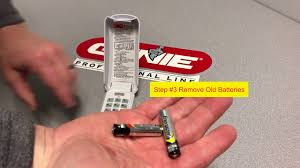
Step 3: Remove the Old Battery
- Carefully take out the battery
- Note the positive (+) and negative (–) orientation
Step 4: Insert the New Battery
- Place the new battery correctly
- Ensure it fits snugly
Step 5: Close the Compartment
- Slide or screw the cover back in place
- Make sure it’s secure
Step 6: Test the Keypad
- Enter your PIN
- Confirm the garage door opens
✅ Total time: 5–10 minutes
Do You Need to Reprogram the Keypad After Battery Replacement?
In most cases, no reprogramming is required. Your PIN is stored in memory.
However, you may need to reprogram if:
- Battery was removed for a long time
- Keypad memory resets
- Device is older
Common Problems After Battery Replacement
Keypad Still Not Working
Possible Causes:
- Incorrect battery installation
- Wrong battery type
- Internal damage
Fix:
- Double-check polarity
- Replace with correct battery
- Reset the keypad
Keypad Lights Up But Doesn’t Open Door
Possible Causes:
- Lost connection with opener
- Signal interference
Fix:
- Reprogram the keypad
- Move closer to the door
Battery Drains Quickly
Possible Causes:
- Low-quality batteries
- Extreme temperatures
Fix:
- Use high-quality alkaline batteries
- Protect keypad from weather
Benefits vs Drawbacks of Replacing Keypad Batteries
Benefits
- Restores full functionality
- Improves security
- Quick and inexpensive fix
Drawbacks
- Requires periodic replacement
- May need reprogramming occasionally
Expert Tips for Longer Battery Life
- Use alkaline or lithium batteries
- Avoid mixing old and new batteries
- Replace batteries annually
- Keep keypad clean and dry
💡 Pro Tip: Extreme cold can reduce battery performance by up to 30%.
How Often Should You Change the Battery?
Experts recommend:
- Every 12–18 months
- Immediately after signs of failure
- Before winter or extreme weather seasons
How to Reset Your Garage Door Keypad
If needed, follow these steps:
- Locate the Learn button on your opener
- Press and hold for 6–10 seconds
- Re-enter a new PIN on the keypad
- Test the connection
Safety Tips During Battery Replacement
- Do not force open the keypad cover
- Avoid touching internal wiring
- Keep batteries away from children
- Dispose of old batteries properly
FAQ: How To Change Battery In Garage Door Opener Keypad
Q1: How long does it take to replace the battery?
Typically 5–10 minutes.
Q2: Will I lose my PIN after changing the battery?
Usually no, unless the keypad resets.
Q3: What happens if I use the wrong battery?
The keypad may not work or could be damaged.
Q4: Can I use rechargeable batteries?
Yes, but alkaline batteries often last longer.
Q5: Why is my keypad still not working after replacement?
Check battery orientation, compatibility, or reprogram the device.
Q6: How do I know which battery to buy?
Check your keypad manual or remove the old battery for reference.
Conclusion
Knowing How To Change Battery In Garage Door Opener Keypad is a simple but essential skill that keeps your garage accessible and secure. With just a few minutes and the right battery, you can restore full functionality without calling a professional.
Don’t wait until your keypad stops working completely—replace the battery regularly and stay ahead of the problem. If this guide helped you, share it on social media so others can keep their garage doors working smoothly too!
Leave a Reply