If you’re wondering how to change a Genie garage door opener code, you’re likely thinking about improving your home’s security—or fixing a code that no longer works. The good news? Updating your garage code is simple and only takes a few minutes with the right steps.
What Does Changing a Genie Garage Door Opener Code Do?
Changing your code updates the security access for your garage. This is especially important if:
- You’ve recently moved into a new home
- You lost a remote or keypad access
- You want to prevent unauthorized entry
Read too: Tc1 Tricode Garage Door Opener Remote W/ Clip Chamberlain: Complete Guide
Modern Genie openers use rolling code technology, meaning the access code changes after every use to prevent hacking attempts.
For more background on how garage systems work, you can visit Wikipedia:
https://en.wikipedia.org/wiki/Garage_door_opener
How To Change A Genie Garage Door Opener Code (Step-by-Step)
Step 1: Locate the “Learn” Button on the Opener
The Learn button is typically found on the motor unit mounted on your garage ceiling.
Common locations:
- Behind the light cover
- On the back panel
- Near the antenna wire
💡 Tip: Use a stable ladder and ensure proper lighting.
Step 2: Clear Existing Codes (Optional but Recommended)
If you want a full reset:
- Press and hold the Learn button
- Hold for 6–10 seconds
- Wait until the LED light turns off
✔️ This erases all old remotes and keypad codes.
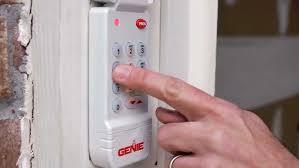
Step 3: Set a New Keypad Code
If you have a wireless keypad:
- Press the Learn button once
- Enter your desired PIN (3–8 digits) on the keypad
- Press the Up/Down or Enter button
- Wait for the opener light to blink
✔️ This confirms your new code is saved.
Step 4: Reprogram Remote Controls
After changing the code:
- Press the Learn button again
- Within 30 seconds, press the remote button
- Wait for the light to blink or hear a click
Repeat for all remotes.
Step 5: Test Your New Code
- Enter your new PIN on the keypad
- Press Enter
- Confirm the garage door opens/closes smoothly
Why Won’t My Genie Code Change Work?
Common Problems and Solutions
| Problem | Cause | Fix |
|---|---|---|
| Keypad not responding | Dead battery | Replace battery |
| Code not accepted | Wrong sequence | Repeat steps carefully |
| No LED light | Power issue | Check outlet |
| Door not moving | Not synced | Reprogram remote |
Types of Genie Garage Door Systems
1. Intellicode Systems (Modern)
- Uses rolling codes
- Highly secure
- Requires Learn button
2. Older Fixed Code Systems
- Uses DIP switches
- Less secure
- Manual code setting
Advantages vs Disadvantages of Changing Your Code
Advantages
- Improves home security
- Prevents unauthorized access
- Resets unknown remotes
- Gives peace of mind
Disadvantages
- Requires reprogramming all devices
- Can be confusing for beginners
- Needs access to motor unit
Expert Tips for a Smooth Code Change
- Choose a unique 4–6 digit PIN (avoid 1234 or birthdays)
- Complete steps within 30 seconds after pressing Learn
- Keep your opener manual nearby for model-specific instructions
- Test all remotes immediately after setup
Security experts recommend changing your garage code at least once a year or after any security concern.
How Long Does It Take to Change the Code?
- Full reset and reprogramming: 5–10 minutes
- Simple keypad update: 2–3 minutes
Once done, your system is immediately active.
When Should You Change Your Garage Code?
You should update your code if:
- You lost a remote
- You moved into a new home
- A tenant or guest moved out
- Your keypad shows unusual activity
FAQ: How To Change A Genie Garage Door Opener Code
1. Do I need to reset everything to change the code?
No. You can update just the keypad code, but resetting ensures maximum security.
2. How many digits should my code be?
Most Genie systems allow 3–8 digits, but 4–6 digits is recommended.
3. Will changing the code affect my remotes?
Yes, if you reset the system, you’ll need to reprogram all remotes.
4. Can I change the code without the Learn button?
No. The Learn button is required for modern Genie systems.
5. What if I forgot my current code?
You can reset the system using the Learn button and create a new one.
6. Can multiple users have different codes?
Some advanced keypads allow multiple PINs, but most standard models use one.
Conclusion
Learning how to change a Genie garage door opener code is one of the easiest ways to boost your home’s security. With just a few simple steps, you can protect your garage and ensure only authorized access.
Take a few minutes today to update your code—it’s a small step that makes a big difference.
If this guide helped you, don’t forget to share it with friends or family who might need a quick and reliable solution 🔐
Leave a Reply