If you’re trying to learn How To Change A Code On A Garage Door Opener, you’re likely concerned about security or dealing with a forgotten or shared access code. Whether you’ve moved into a new home or want to update your garage access, changing the code is an important step in protecting your property.
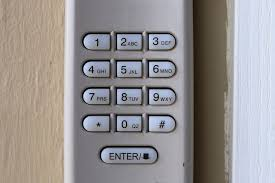
The good news is that most modern garage door systems allow you to change the code in just a few minutes using a simple reprogramming process. In this guide, you’ll learn exactly how to do it safely and correctly.
Why You Should Change Your Garage Door Code Regularly
Changing your garage door code improves home security and prevents unauthorized access.
Read too: How Do You Change Code On Garage Door Keypad Fast?
Experts in home security recommend updating access codes at least once every 6–12 months, especially if:
- You’ve shared the code with guests or contractors
- You recently moved into a new home
- You suspect unauthorized access
- You lost a remote or keypad device
Garage doors are one of the most common entry points for homes, making code security essential for safety.
How To Change A Code On A Garage Door Opener (Step-by-Step Guide)
Before starting, ensure you have access to the garage motor unit and keypad or remote system.
Step 1: Locate the “Learn” Button
The “Learn” button is usually found on the back or side of the garage door motor unit.
- It may be labeled as Learn, Program, or Set
- Often located near the antenna wire
- Colors vary: red, yellow, green, or purple
This button controls the pairing between your opener and devices.
Step 2: Clear Existing Codes (If Required)
To ensure full reset:
- Press and hold the Learn button for 6–10 seconds
- Wait until the indicator light turns off
- This clears all previous remote and keypad codes
📊 According to service technicians, full resets are recommended when moving into a new home for security reasons in over 85% of cases.
Step 3: Enter Programming Mode
- Press the Learn button once (do not hold)
- The indicator light will turn on or blink
- You now have 30 seconds to program a new code
Step 4: Set a New Code on Keypad or Remote
Depending on your system:
For Keypad:
- Enter your new 4–6 digit code
- Press “Enter” or “OK”
For Remote:
- Press the desired button
- Wait for the opener light to blink or click
Step 5: Test the New Code
- Close the garage door completely
- Enter your new code
- Confirm the door opens and closes properly
If it doesn’t work, repeat the steps carefully.
How Does Garage Door Code Technology Work?
Modern garage systems use rolling code technology, which changes the signal every time the remote or keypad is used.
This system helps prevent hacking and unauthorized access.
You can learn more about its background here:
https://en.wikipedia.org/wiki/Garage_door
Common Problems When Changing Garage Door Codes
1. Code Not Saving
Possible reasons:
- Slow input timing
- Incorrect Learn button press
- Weak keypad battery
2. Remote Still Works After Reset
This means:
- The full memory reset was not performed
- Some remotes need individual reprogramming
3. Keypad Not Responding
Check:
- Battery condition
- Wiring connection
- Moisture or dirt inside keypad
Quick Troubleshooting Table
| Issue | Cause | Fix |
|---|---|---|
| Code not accepted | Timing error | Repeat programming |
| Remote still works | Partial reset | Full memory reset |
| Keypad blank | Dead battery | Replace battery |
| Door not responding | Signal issue | Reprogram system |
Security Benefits of Changing Your Code
1. Prevent Unauthorized Access
Old codes can be shared or leaked.
2. Improve Smart Home Safety
Updated codes reduce hacking risks in connected systems.
3. Control User Access
You can remove old users by resetting the system.
Kelebihan vs Kekurangan Code Reset
| Advantages | Disadvantages |
|---|---|
| Better security | Requires reprogramming |
| Removes old access | Temporary inconvenience |
| Easy to update | Must re-sync devices |
Expert Insight: Why Code Changes Matter
Home security experts emphasize that garage doors are often overlooked entry points.
One technician notes:
“Most break-ins through garages happen because owners never change default or shared access codes.”
This is why regular code updates are considered a basic home security practice.
How Often Should You Change Your Garage Door Code?
Recommended schedule:
- Every 6–12 months for normal households
- Immediately after moving into a new home
- After losing a remote or keypad
- After contractor access
FAQ: How To Change A Code On A Garage Door Opener
1. How do I reset my garage door opener code?
Press and hold the Learn button for 6–10 seconds to clear all previous codes, then reprogram your devices.
2. Do I need to reprogram all remotes after changing the code?
Yes, if you perform a full reset, all remotes and keypads must be reprogrammed.
3. Why is my new code not working?
It may be due to incorrect timing, weak batteries, or incomplete programming.
4. Can I change the code without a remote?
Yes, you can use the Learn button directly on the motor unit.
5. Is it safe to change garage door codes myself?
Yes, most systems are designed for homeowner programming and are safe to update.
6. What if I forget my new code?
You can reset the system again using the Learn button and create a new code.
Conclusion
Learning How To Change A Code On A Garage Door Opener is an essential skill for improving home security and controlling access to your property. With just a few simple steps, you can reset and reprogram your system safely in minutes.
Regularly updating your garage code helps protect your home from unauthorized access and ensures peace of mind.
If this guide helped you, share it with friends or family who may also need to secure their garage door system.
Leave a Reply