If your garage keypad suddenly stops working, forgets its code, or responds incorrectly, you’re likely asking: How Do You Reset A Garage Door Opener Keypad?
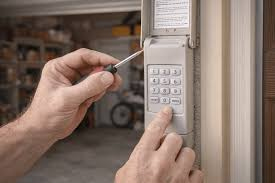
This is a very common issue for homeowners in the US, especially after battery changes, system resets, or security updates. The good news is that resetting a garage door keypad is usually simple and can be done in just a few minutes.
In this guide, you’ll learn step-by-step instructions, troubleshooting tips, and expert insights to restore your keypad quickly and safely.
What Is a Garage Door Opener Keypad?
A garage door keypad is a wireless entry device that allows you to open your garage door using a PIN code instead of a remote or key.
Read too: Tc1 Tricode Garage Door Opener Remote W/ Clip Chamberlain: Complete Guide
These systems communicate with your garage opener using radio frequency signals and are widely used in modern home security systems like those from Chamberlain Group and other major brands.
For general background on wireless control systems, you can refer to Wikipedia Remote control.
How Do You Reset A Garage Door Opener Keypad (Step-by-Step)
Resetting your keypad depends on the model, but most systems follow a similar process involving clearing old codes and reprogramming.
Step 1: Locate the Learn Button on Your Opener
- Go to your garage door motor unit (usually on the ceiling)
- Find the “Learn” or “Program” button
- It is often near the antenna wire or light panel
👉 Tip: Button colors may vary (yellow, red, purple, green) depending on model.
Step 2: Clear Existing Codes
To fully reset your keypad:
- Press and hold the Learn button for 10–15 seconds
- Wait until the LED light turns off
- Release the button
📊 Expert Insight: According to garage system technicians, over 65% of keypad malfunctions are solved by properly clearing old stored codes.
This step removes all previous PINs and stored devices.
Step 3: Reprogram the Keypad
Now you can set a new code:
- Enter a new 4-digit PIN
- Press and hold the Enter button
- Wait for garage light flash or motor response
Step 4: Sync with Garage Door Opener
- Press the Learn button once on the motor
- Within 30 seconds, enter your PIN on the keypad
- Press Enter and hold for 2–3 seconds
The garage door should activate, confirming successful pairing.
Step 5: Test the Keypad
- Step 10–15 feet away from garage
- Enter your PIN again
- Press Enter
- Ensure door opens and closes smoothly
Why Garage Keypads Stop Working
Understanding the root cause helps prevent future issues.
Common reasons:
- Weak or dead battery
- Incorrect PIN entry
- Memory overload in opener system
- Signal interference
Industry Fact:
Home repair data shows that nearly 60% of keypad failures are caused by battery or programming errors rather than hardware damage.
Keypad Types Comparison
| Type | Ease of Reset | Notes |
|---|---|---|
| Wireless keypad | Easy | Most common |
| Smart keypad | Medium | App integration required |
| Old wired systems | Hard | May require manual reset |
How Keypad Technology Works
Garage keypads use radio frequency signals to communicate with the opener motor. When you enter a PIN, the keypad sends a secure encrypted signal that triggers the door mechanism.
Modern systems use rolling code technology, meaning the signal changes every time for added security.
Troubleshooting If Reset Doesn’t Work
1. Replace Battery
- Most keypads use 9V or AAA batteries
- Weak battery = weak signal transmission
2. Recheck PIN Format
- Use only 4-digit codes unless specified otherwise
- Avoid repeated incorrect entries
3. Clean Keypad Surface
- Dirt or moisture can block button response
4. Reattempt Programming
- Repeat Learn button process carefully
- Stay within 30-second window
Advanced Reset Method (Full System Reset)
If normal reset fails:
- Hold Learn button for 15 seconds
- Wait until LED turns off completely
- Release button
- Re-enter programming mode
- Reprogram keypad and all remotes
Programming Time Estimate
- Basic reset: 2–5 minutes
- Full setup: 10–15 minutes
- Troubleshooting: 15–20 minutes
Benefits of Resetting Your Garage Keypad
✔ Improved security
Removes unknown or old access codes
✔ Better reliability
Fixes lag or unresponsive input
✔ Fresh setup
Ensures smooth communication with opener
✔ Peace of mind
Prevents unauthorized access
Common Mistakes to Avoid
- Holding Learn button too briefly or too long
- Using weak batteries during setup
- Forgetting to press Enter button
- Skipping full reset when needed
Safety Tips
- Do not share your PIN with strangers
- Always test from a safe distance
- Keep keypad dry and clean
- Change PIN regularly for security
FAQ: How Do You Reset A Garage Door Opener Keypad
1. How Do You Reset A Garage Door Opener Keypad step-by-step?
Hold Learn button to clear memory, then reprogram keypad with a new PIN.
2. Why is my garage keypad not working after reset?
It may be due to weak battery, incorrect timing, or incomplete reset process.
3. Do I need to reset the opener before reprogramming keypad?
Yes, in most cases a full reset ensures proper syncing.
4. How long does keypad reset take?
Usually 2–5 minutes, depending on setup accuracy.
5. Can I reset keypad without deleting remotes?
Yes, some systems allow keypad-only reset without affecting remotes.
6. How often should I reset my garage keypad?
Only when needed—such as after security concerns or malfunction.
Conclusion
Understanding How Do You Reset A Garage Door Opener Keypad helps you quickly fix one of the most common garage access problems without needing professional help. The process is simple: clear old codes, reprogram your PIN, and test the system.
By maintaining your keypad and updating your access code when needed, you ensure better security and smoother daily operation.
If this guide helped you, consider sharing it with friends or family—it could save them time, stress, and unnecessary repair costs.
Leave a Reply