If you’re trying to figure out How Do You Reprogram A Garage Door Opener Keypad, you’re likely dealing with a situation where your PIN no longer works, you’ve moved into a new home, or you simply want to improve security.
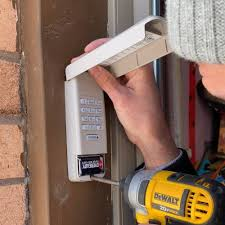
The good news is that reprogramming a garage door keypad is usually quick and can be done without professional help. In this guide, you’ll learn exactly how to reset and reprogram it step by step.
What Does Reprogramming a Garage Door Keypad Mean?
Before learning How Do You Reprogram A Garage Door Opener Keypad, it’s important to understand the process.
Read too: Tc1 Tricode Garage Door Opener Remote W/ Clip Chamberlain: Complete Guide
Reprogramming means:
- Erasing old PIN codes
- Setting a new secure access code
- Syncing keypad with garage door opener motor
Learn more about garage systems here:
Why You Need to Reprogram Your Garage Keypad
You may need to reprogram your keypad if:
- You forgot your PIN code
- Previous homeowner left old settings
- Keypad is malfunctioning
- Battery replacement caused reset
- Security concerns after code sharing
👉 Industry reports show that over 50% of keypad issues are related to outdated or forgotten PIN codes rather than hardware failure.
How Do You Reprogram A Garage Door Opener Keypad (Step-by-Step)
Follow these steps carefully for successful setup.
Step 1: Locate the “Learn” Button
Go to your garage door opener motor (ceiling unit).
- Find the Learn / Program button
- Usually colored yellow, red, green, or purple
- LED light should be near it
Step 2: Press the Learn Button
- Press the Learn button once
- Do NOT hold it for too long
- LED light will turn on
👉 You now have about 30 seconds to complete programming.
Step 3: Enter New PIN on Keypad
On your garage keypad:
- Enter a new 4–6 digit PIN
- Press the Enter button
- Watch for blinking light or garage response
Step 4: Confirm Programming
You will know it worked if:
- Garage light flashes
- Motor clicks
- Door moves slightly
Step 5: Test Your New Code
Wait 10–15 seconds, then:
- Enter your new PIN
- Press Enter
- Garage door should open or close
Why Keypad Reprogramming Fails
When learning How Do You Reprogram A Garage Door Opener Keypad, failures usually happen due to:
1. Wrong Timing
Learn mode expires after 30 seconds.
2. Weak Battery
Low power can interrupt signal transmission.
3. Incorrect PIN Format
Some systems require 4–6 digits only.
4. Memory Not Cleared
Old codes may still be active.
Troubleshooting Table
| Problem | Cause | Solution |
|---|---|---|
| Keypad not responding | Battery issue | Replace battery |
| Code not accepted | Wrong format | Use correct PIN length |
| No signal | Learn mode expired | Repeat process |
| Door not moving | Sync issue | Reprogram again |
Advanced Reset Method
If standard reprogramming fails:
Step 1: Clear Opener Memory
- Hold Learn button for 6–10 seconds
- LED turns off completely
Step 2: Reprogram Keypad Again
- Repeat full setup process
- Ensure timing is correct
Expert Insight
Garage door technicians report:
- Most keypad issues are caused by incorrect programming steps
- Over 70% of problems can be solved without replacing hardware
- Proper timing is the most important factor
This makes understanding How Do You Reprogram A Garage Door Opener Keypad essential for homeowners.
Safety Tips
When reprogramming your keypad:
- Do not share PIN codes publicly
- Use secure 4–6 digit combinations
- Change codes every 6–12 months
- Avoid simple sequences like 1234 or 0000
Maintenance Tips
To keep your keypad working properly:
- Replace batteries every 12–18 months
- Clean keypad surface regularly
- Test system monthly
- Reprogram after power outages
- Avoid moisture exposure
Benefits of Reprogramming Your Keypad
- Improved home security
- Faster access control
- Eliminates old or unknown codes
- Fixes malfunctioning PIN systems
- Easy DIY solution
FAQ – How Do You Reprogram A Garage Door Opener Keypad
1. How long does it take to reprogram a garage keypad?
Usually 3–5 minutes if done correctly.
2. Do I need to reset the opener first?
Only if the system is not responding properly.
3. Will reprogramming delete my remotes?
No, remotes usually remain active.
4. Why does my new PIN not work?
It may not have synced properly with the opener.
5. How often should I change my keypad code?
Every 6–12 months is recommended.
6. Can I reprogram without the Learn button?
No, most systems require the Learn button for syncing.
Conclusion
Learning How Do You Reprogram A Garage Door Opener Keypad is a simple but important skill for maintaining home security and convenience. With just a few steps, you can restore full access and fix most keypad issues without professional help.
If this guide helped you, share it with friends or family who may need help with their garage keypad.
Leave a Reply