Struggling to connect your car to your garage door opener? You’re not alone. Many drivers want the convenience of controlling their garage directly from their vehicle. In this guide, you’ll learn exactly How Do You Program Your Car Garage Door Opener quickly, safely, and without confusion.
What Is a Car Garage Door Opener System?
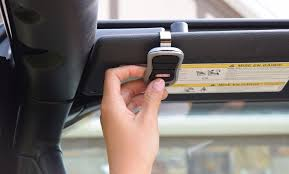
A car garage door opener—often called HomeLink or Car2U—is a built-in system in your vehicle that allows you to open and close your garage door without a handheld remote.
Read too: How Do You Change Code On Garage Door Keypad Fast?
Why It’s Useful:
- Eliminates the need for extra remotes
- Provides seamless access
- Enhances convenience and security
💡 Most modern vehicles in the U.S. come equipped with this feature.
How Do You Program Your Car Garage Door Opener (Step-by-Step)
Follow these steps carefully to sync your car with your garage system.
Step 1: Clear Existing Codes
Before programming:
- Turn your car ignition to ON
- Press and hold the first and third buttons on your car system
- Hold for 10–20 seconds until the indicator light flashes
✔️ This clears old codes.
Step 2: Pair Your Remote With the Car
- Hold your garage remote 1–3 inches (2–7 cm) from the car buttons
- Press and hold both the remote button and the car button
- Wait until the indicator light changes (slow to rapid blink)
⏱ This usually takes 15–30 seconds.
Step 3: Program the Garage Door Opener (Learn Button Method)
Now sync with the garage opener:
- Go to your garage motor unit
- Press the Learn button
- Return to your car within 30 seconds
- Press the programmed car button 2–3 times
✔️ The garage door should activate.
Step 4: Test the System
- Press the programmed button in your car
- Ensure the garage opens and closes smoothly
✅ If successful, you’re done!
Why Isn’t My Car Garage Door Opener Programming?
Sometimes things don’t go as planned.
Common Issues:
- Weak remote battery
- Incorrect distance during pairing
- Missed 30-second window
- Incompatible opener system
Does Your Garage Opener Use Rolling Code Technology?
Most modern openers use rolling codes for security.
What This Means:
- Codes change every time you use the opener
- Prevents hacking or duplication
- Requires Learn button programming
📊 Rolling code systems can generate billions of combinations.
Which Cars Support Built-In Garage Door Openers?
Most vehicles from major manufacturers include this feature.
Common Brands:
- Ford
- Toyota
- Honda
- Chevrolet
- BMW
💡 Usually found on the overhead console or rearview mirror.
Advantages vs Disadvantages of Car Garage Door Openers
Pros and Cons
| Advantages | Disadvantages |
|---|---|
| Convenient access | Initial setup required |
| No extra remote needed | Compatibility issues |
| Cleaner interior | Learning curve |
| Secure rolling codes | Limited button slots |
How Long Does Programming Take?
- Average time: 5–10 minutes
- First-time setup may take slightly longer
👉 Most users complete it in one attempt.
Can You Program Multiple Garage Doors?
Yes, most systems support multiple doors.
How It Works:
- Each button controls a different door
- Typically supports up to 3 devices
Expert Insight: Why Built-In Openers Are Popular
Home automation experts highlight that built-in garage systems reduce clutter and improve daily convenience. As smart homes evolve, integrating your car with your garage is becoming standard practice.
Maintenance Tips After Programming
Keep your system working smoothly:
- Replace remote batteries regularly
- Reprogram after changing opener codes
- Test monthly
- Keep sensors clean
Common Mistakes to Avoid
❌ Mistakes:
- Skipping the code reset step
- Holding buttons too briefly
- Standing too far from the remote
- Ignoring Learn button timing
What If Your Car Doesn’t Support This Feature?
If your car lacks built-in controls:
Alternatives:
- Use a universal remote
- Install a smart garage hub
- Upgrade your opener system
Understanding Garage Door Opener Technology
Garage door systems rely on radio frequencies and secure communication to function.
To learn more, visit:
https://en.wikipedia.org/wiki/Garage_door_opener
FAQ: How Do You Program Your Car Garage Door Opener
Q1: Can I program my car without a remote?
Answer: Usually no—you need the original remote for initial pairing.
Q2: How many buttons can I program?
Answer: Most systems allow up to 3 devices.
Q3: Why does my car opener light blink but not work?
Answer: It may not be synced with the garage opener yet.
Q4: Do I need to reprogram after replacing my opener?
Answer: Yes, new systems require fresh pairing.
Q5: How far should the remote be from the car?
Answer: About 1–3 inches (2–7 cm) for best results.
Q6: Is this feature secure?
Answer: Yes, especially with rolling code technology.
Conclusion
Learning How Do You Program Your Car Garage Door Opener is a simple process that delivers long-term convenience and security. With just a few steps, you can eliminate the need for extra remotes and enjoy seamless access every day.
Take a few minutes to set it up properly—it’s a small effort with a big payoff. If this guide helped you, share it on social media so others can program their systems with ease!
Leave a Reply