If you’ve just installed a new system or lost connection with your remote, you might be asking: how do you program a Chamberlain garage door opener? The process is simpler than it sounds—and most homeowners can do it in just a few minutes.
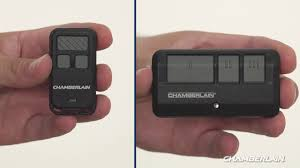
In this guide, you’ll learn exactly how to program your opener, fix common issues, and ensure everything works smoothly.
Read too: Tc1 Tricode Garage Door Opener Remote W/ Clip Chamberlain: Complete Guide
How Do You Program A Chamberlain Garage Door Opener (Quick Overview)
Programming a Chamberlain garage door opener typically involves:
- Locating the Learn button
- Activating programming mode
- Syncing your remote or keypad
- Testing the connection
👉 Let’s walk through each step in detail.
What Is the “Learn Button” and Where Is It Located?
The Learn button is the key to programming your opener.
Where to find it:
- On the motor unit (ceiling-mounted opener)
- Usually under a light cover
Common colors:
- Yellow
- Purple
- Red/Orange
- Green
👉 The color indicates the frequency and technology used.
Step-by-Step: How to Program a Remote
Follow these steps to program a handheld remote.
Step 1: Locate the Learn Button
Climb a ladder and find the Learn button on your opener.
Step 2: Press the Learn Button
- Press and release it (don’t hold)
- A light will turn on or blink
⏱ You now have 30 seconds to complete the next step.
Step 3: Press the Remote Button
- Press and hold the button on your remote
- Wait for the opener light to blink or click
Step 4: Test the Remote
- Press the remote again
- The garage door should open or close
📊 Fact: Over 80% of programming issues are caused by timing errors during this step.
How to Program a Keypad (Wireless Entry System)
If you have a keypad outside your garage, follow this method:
Step 1: Press the Learn Button
Activate programming mode.
Step 2: Enter Your Desired PIN
- Use a 4-digit code (e.g., 1234)
- Press Enter
Step 3: Wait for Confirmation
- The opener light will blink
- The door may move slightly
Step 4: Test the Keypad
Enter your PIN and press Enter again.
How to Program Multiple Remotes
Chamberlain openers can store multiple devices.
Steps:
- Repeat the same process for each remote
- Most units support 5–10 remotes
What If Your Opener Has a Smart System?
Modern Chamberlain models support smartphone control.
Benefits:
- Remote access from anywhere
- Notifications and alerts
- Integration with smart home systems
👉 Learn more about Remote control.
Troubleshooting Programming Issues
If your remote isn’t working, try these fixes:
1. Check the Battery
Replace with a new battery.
2. Stay Within Range
Stand within 10–20 feet of the opener.
3. Reprogram Again
Repeat the process carefully.
4. Clear Memory (Reset System)
To erase all remotes:
- Press and hold the Learn button for 6–10 seconds
- Release when the light turns off
- Reprogram all devices
Common Mistakes to Avoid
❌ Holding the Learn button too long
❌ Waiting too long after pressing Learn
❌ Using incompatible remotes
❌ Ignoring battery issues
How Long Does Programming Take?
- Remote programming: 2–5 minutes
- Keypad setup: 5–10 minutes
👉 Total setup time is usually under 10 minutes.
Compatibility Guide
📊 Chamberlain System Compatibility
| Learn Button Color | Frequency | Compatible Devices |
|---|---|---|
| Yellow | 310/315 MHz | New Security+ 2.0 |
| Purple | 315 MHz | Security+ |
| Red/Orange | 390 MHz | Older models |
| Green | 390 MHz | Very old systems |
Why Programming Matters
Proper programming ensures:
- Secure access
- Reliable performance
- Smooth operation
👉 According to Wikipedia, modern systems use rolling code technology to prevent unauthorized entry.
Security Tips When Programming
✔ Delete old remotes regularly
✔ Use unique keypad PINs
✔ Avoid sharing access codes
✔ Upgrade outdated systems
Real-Life Example
Scenario:
A homeowner couldn’t program their remote.
Issue:
- Pressed Learn button too long (reset system unintentionally)
Solution:
- Reprogrammed correctly → worked instantly
👉 Lesson: Timing is critical.
FAQ: How Do You Program A Chamberlain Garage Door Opener
1. How long do I have after pressing the Learn button?
You have about 30 seconds to program your device.
2. Can I program multiple remotes?
Yes, most systems support up to 10 devices.
3. Why is my remote not connecting?
Possible causes include low battery, wrong frequency, or timing issues.
4. How do I reset my Chamberlain opener?
Hold the Learn button for 6–10 seconds to erase all codes.
5. Do all Chamberlain openers use the same method?
Most follow the same process, but button colors may differ.
6. Can I program without the Learn button?
No, the Learn button is required for syncing devices.
Conclusion
So, how do you program a Chamberlain garage door opener? In most cases, it’s as simple as pressing the Learn button, syncing your remote, and testing the connection.
With just a few minutes of setup, you can restore full control of your garage door and ensure reliable, secure operation. Whether you’re adding a new remote or resetting your system, this guide gives you everything you need to get it done quickly.
👉 Found this helpful? Share it on social media so others can easily program their garage door opener too!
Leave a Reply