If you’ve just moved into a new home, lost control of your old PIN, or simply want better security, you’re probably asking how do you change your garage door opener code. This is one of the most important steps in keeping your home secure. Fortunately, changing your garage door code is simple and only takes a few minutes when you follow the right steps.
Why Changing Your Garage Door Opener Code Matters
Your garage door code is the first line of defense for your home. If it’s old, shared, or compromised, your security is at risk.
Read too: How Do You Change Code On Garage Door Keypad Fast?
Key Reasons to Update Your Code:
- Previous owners may still know the code
- Shared codes can be misused
- Enhances overall home security
- Prevents unauthorized access
📊 Security Insight: According to home security studies, nearly 9% of break-ins involve garage entry points, often due to weak or unchanged access codes.
How Do You Change Your Garage Door Opener Code (Step-by-Step)
The process varies slightly depending on your opener brand, but most systems follow similar steps.
Step 1: Locate the Learn Button
- Find the Learn/Program button on your garage door opener motor
- Usually located on the back or side panel
- Often near a small LED light
💡 This button controls all code programming functions.
Step 2: Clear Existing Codes (Optional but Recommended)
To ensure full security:
- Press and hold the Learn button for 6–10 seconds
- Wait until the LED light turns off
- This erases all previous codes
✔️ This ensures no old remotes or keypads still work.
Step 3: Activate Programming Mode
- Press the Learn button once
- The LED light will turn on or blink
- You now have 30 seconds to set a new code
Step 4: Enter Your New Code
Depending on your device:
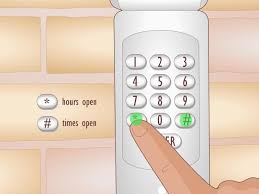
For Keypad:
- Enter a 4-digit PIN (example: 4829)
- Avoid predictable codes like 1234 or birth years
For Remote:
- Press the button you want to program
- Hold for 1–2 seconds
Step 5: Confirm the New Code
- Wait for the garage light to blink or click
- This confirms successful programming
- Test the new code immediately
✔️ If the door responds, your new code is active.
Common Garage Door Opener Types and Code Systems
| System Type | Code Method | Security Level |
|---|---|---|
| Keypad Entry | PIN Code | Medium–High |
| Remote Control | Rolling Code | High |
| Smart Opener | App-Based Code | Very High |
📌 Modern systems use rolling code technology, which changes the signal every time for added protection.
Learn more here:
https://en.wikipedia.org/wiki/Rolling_code
Troubleshooting Code Change Issues
1. Code Not Saving
- Ensure you are within the 30-second window
- Repeat programming steps
2. Keypad Not Responding
- Replace batteries
- Check signal range
3. Remote Not Working
- Reprogram the remote after clearing memory
4. Opener Not Entering Programming Mode
- Check power supply
- Inspect Learn button functionality
How Often Should You Change Your Garage Door Code?
Recommended Frequency:
- Every 6–12 months
- Immediately after moving into a new home
- After losing a remote or keypad access
- If you suspect unauthorized access
🔒 Expert Tip: Regular code changes significantly reduce security risks.
Advantages vs Disadvantages of Changing Your Code
Advantages:
- Improved home security
- Eliminates old or unused access
- Prevents unauthorized entry
- Easy and quick process
Disadvantages:
- Must reprogram all devices
- Requires manual setup time
- Possible temporary access disruption
Real-Life Example
A homeowner recently moved into a house and discovered the garage code was still active:
- Time to reset code: 5 minutes
- Cost: $0
- Result: Fully secured garage access
✔️ A simple reset prevented potential security issues.
Pro Tips for Strong Garage Door Codes
Best Practices:
- Avoid simple sequences (0000, 1234)
- Use random combinations
- Do not share codes unnecessarily
- Update codes regularly
🔐 Security Tip: Combine keypad codes with smart garage monitoring systems for maximum protection.
Common Mistakes to Avoid
Avoid These Errors:
- Forgetting to clear old codes
- Not testing the new code
- Using predictable PINs
- Skipping reprogramming steps
FAQ: How Do You Change Your Garage Door Opener Code
1. How long does it take to change a garage code?
Usually 2–5 minutes.
2. Do I need to reset all remotes when changing the code?
Only if you clear the memory using the Learn button.
3. Can I change the code myself?
Yes, it is a simple DIY process.
4. Why won’t my new code work?
It may not have been saved correctly or was entered outside the programming window.
5. Should I change my garage code after moving in?
Yes, always change it immediately for security reasons.
6. Are garage door codes secure?
Yes, especially systems using rolling code technology.
Conclusion
Understanding how do you change your garage door opener code is essential for maintaining strong home security. With just a few simple steps, you can reset old access codes, set new ones, and protect your property effectively.
This quick DIY process gives you peace of mind and full control over who can access your garage. If you found this guide helpful, share it on social media to help others secure their homes too!
Leave a Reply