If your garage access feels outdated or you’ve recently moved into a new home, you’re probably asking How Do You Change The Code On A Garage Door. Updating your garage code is one of the simplest ways to improve home security and prevent unauthorized entry.
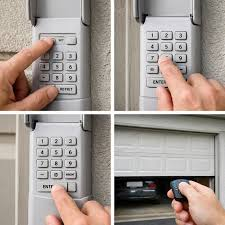
Many homeowners overlook this small but important task, even though it only takes a few minutes to complete and can significantly increase safety and peace of mind.
Read too: How Do You Change Code On Garage Door Keypad Fast?
What Does It Mean to Change The Code On A Garage Door?
Changing the code on a garage door means updating the digital or wireless signal that allows your remote, keypad, or smart device to communicate with the garage door opener.
Most modern systems use rolling code technology, which changes the signal each time the door is used to prevent hacking or duplication.
Garage door systems are a key part of modern residential security and automation, widely used in millions of homes across the U.S. You can read more about their general function here: https://en.wikipedia.org/wiki/Garage_door
How Do You Change The Code On A Garage Door? (Step-by-Step Guide)
The process may vary depending on the brand (LiftMaster, Chamberlain, Craftsman, Genie), but the general method is similar.
Step 1: Locate the “Learn” Button
Find the garage door opener motor unit on the ceiling.
Look for a button labeled:
- Learn
- Program
- Smart Learn
This button is the control point for all code changes.
Step 2: Activate Programming Mode
Press the Learn button once.
- A small LED light will turn on
- You typically have 30 seconds to complete the next step
This tells the system you want to change or add a new code.
Step 3: Enter New Code
Depending on your device type:
For Keypads:
- Enter a new 4-digit PIN
- Press Enter or OK
For Remotes:
- Press and hold the desired button on the remote for 1–2 seconds
Step 4: Wait for Confirmation
You may notice:
- Blinking garage light
- Clicking sound from motor
- LED indicator flash
This confirms that the new code has been successfully saved.
Step 5: Test the New Code
Step away from the garage door and test the new code:
- Enter PIN or press remote button
- Confirm the door opens/closes properly
Why Changing Your Garage Code Is Important
Security experts recommend updating access codes regularly because garage doors are often the largest entry point into a home.
Key Reasons:
- Prevents unauthorized access
- Removes old shared codes
- Protects against theft
- Improves smart home security
Security Insight
Studies in home safety show that over 60% of unauthorized entries occur through known access points, including garage doors. This makes regular code updates a critical security habit.
Common Types of Garage Door Code Systems
1. Fixed Code System
- Older technology
- Same code every time
- Less secure
2. Rolling Code System
- Code changes after every use
- More secure
- Widely used today
3. Smart Garage System
- Controlled via app
- Wi-Fi connected
- Remote code updates possible
Comparison: Old Code vs New Code
| Feature | Old Code | New Code |
|---|---|---|
| Security level | Low | High |
| Risk of duplication | High | Low |
| Control | Limited | Full |
| Recommended usage | Not safe long-term | Best practice |
How Often Should You Change Garage Door Code?
Experts recommend:
- Every 6 months for high-traffic homes
- Every 12 months for low-usage homes
- Immediately after moving into a new property
- After sharing access with service workers
Regular updates help maintain strong home security.
Common Problems When Changing Garage Door Code
1. Weak Battery
Low battery power is one of the most common causes of failure.
2. Timing Issues
Most systems require code entry within 30 seconds of pressing Learn.
3. Incorrect Button Sequence
Different brands require slightly different steps.
4. Signal Interference
Nearby electronics may disrupt programming.
Troubleshooting: If Code Change Doesn’t Work
Step 1: Replace Batteries
Use fresh CR2032 or 9V batteries depending on device type.
Step 2: Reset System
Hold the Learn button for 10–15 seconds to erase old codes.
Step 3: Reprogram From Scratch
Repeat full setup process carefully.
Step 4: Check Distance
Stay within 3–5 meters during programming.
Real-Life Case Study
A homeowner in Florida reported that after changing their garage door code following a move, they discovered the previous owner still had access via an old keypad setting. After resetting the system, they eliminated the security risk in under 5 minutes—highlighting how critical this simple task can be.
Pros and Cons of Changing Garage Door Code
Pros
- Stronger home security
- Prevents unauthorized entry
- Quick and easy process
- No professional required
Cons
- Requires correct timing
- May need troubleshooting
- Slight learning curve for beginners
FAQ: How Do You Change The Code On A Garage Door
1. How do you change the code on a garage door quickly?
Press the Learn button on the opener, then enter your new code within 30 seconds to sync it.
2. Why is my garage door code not working after changing it?
It may be due to weak batteries, incorrect timing, or incomplete programming steps.
3. Do I need to delete the old code first?
Not always, but resetting memory improves security and prevents conflicts.
4. How long does it take to change a garage door code?
Most users complete the process in 2–5 minutes.
5. Can I use any number as my garage code?
Yes, but avoid predictable numbers like birthdays or “1234” for safety reasons.
6. How often should I change my garage door code?
Every 6–12 months, or immediately after security changes in your home.
Conclusion
Understanding How Do You Change The Code On A Garage Door is an essential home security skill that every homeowner should know. With just a few simple steps, you can update your access system, protect your home, and eliminate risks from old or shared codes.
Regular updates ensure your garage remains secure, reliable, and fully under your control.
If this guide helped you, consider sharing it with friends or family who may also want to improve their home security system.
Leave a Reply