If your remote suddenly stops working or you’ve forgotten your access code, you’re probably wondering how do I reprogram my LiftMaster garage door opener. This is a common issue for homeowners, especially after battery changes or moving into a new home. The good news? Reprogramming your LiftMaster opener is quick, safe, and requires no technical experience.
What Does Reprogramming a LiftMaster Garage Door Opener Mean?
Reprogramming means resetting and reconnecting your garage door opener with remotes, keypads, or vehicles. This process ensures:
- Only authorized devices can access your garage
- Old or lost remotes are removed
- Your system remains secure
Read too: How Do You Change Code On Garage Door Keypad Fast?
Modern LiftMaster systems use rolling code technology, which changes the access code each time you use it, improving security.
For more on this technology, visit:
https://en.wikipedia.org/wiki/Rolling_code
How Do I Reprogram My LiftMaster Garage Door Opener (Step-by-Step)
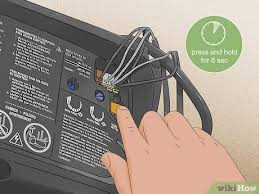
Step 1: Locate the “Learn” Button
- Find the Learn button on the motor unit
- Usually located near the antenna wire
- Common colors: yellow, red/orange, purple, or green
💡 Tip: Use a ladder if needed for safe access.
Step 2: Clear Existing Codes (Optional but Recommended)
If you want a full reset:
- Press and hold the Learn button
- Hold for 6–10 seconds
- Release when the LED light turns off
✔️ This deletes all previous remotes and keypads.
Step 3: Program Your Remote Control
- Press and release the Learn button
- Within 30 seconds, press the remote button
- Wait for the opener light to blink or hear a click
✔️ Your remote is now programmed.
Step 4: Program a Keypad (If Applicable)
- Press the Learn button
- Enter a 4-digit PIN on the keypad
- Press the Enter button
- Wait for the light to blink
📌 Example PIN: 2580 (avoid common codes like 1234)
Step 5: Test All Devices
- Test remote control
- Test keypad
- Ensure smooth opening and closing
✔️ If everything works, the process is complete.
Common LiftMaster Learn Button Colors and Meaning
| Color | Frequency Type | Notes |
|---|---|---|
| Yellow | Security+ 2.0 | Newer models |
| Purple | 315 MHz | Older systems |
| Red/Orange | 390 MHz | Common in mid-range models |
| Green | 390 MHz | Older LiftMaster units |
💡 Knowing your button color helps ensure correct programming steps.
Why Your LiftMaster Opener Needs Reprogramming
Common Situations:
- Remote stops working
- Battery replacement
- Moving into a new home
- Lost or stolen remote
- System malfunction
🔧 Expert Insight: Reprogramming improves security by removing unauthorized access devices.
Troubleshooting: Reprogramming Not Working?
1. Remote Battery Is Dead
- Replace with a new CR2032 battery
2. You Missed the 30-Second Window
- Repeat the process quickly
3. Signal Interference
- Move closer to the opener
4. Memory Is Full
- Clear all codes and reprogram
Advantages vs Disadvantages of Reprogramming
Advantages:
- Improves security instantly
- Removes unauthorized devices
- Easy DIY process
- No cost involved
Disadvantages:
- All remotes must be reprogrammed
- Temporary inconvenience
- Requires access to the motor unit
Pro Tips for Successful Reprogramming
Follow These Best Practices:
- Use strong, unique PIN codes
- Replace remote batteries before programming
- Keep a backup remote
- Test each device after setup
🔒 Security Tip: Change your code every 3–6 months for maximum protection.
When Should You Call a Professional?
While most cases are DIY-friendly, consider professional help if:
- The Learn button doesn’t respond
- Wiring or circuit issues are suspected
- Opener is older than 10–15 years
- Reprogramming repeatedly fails
Real-World Example
A homeowner experienced remote failure after replacing batteries. Instead of replacing the opener, they simply reprogrammed the system:
- Time spent: 5 minutes
- Cost: $0
- Result: Fully functional garage door
✔️ This highlights how simple fixes can save money.
FAQ: How Do I Reprogram My LiftMaster Garage Door Opener
1. How long does it take to reprogram a LiftMaster opener?
Typically 2–5 minutes, depending on the number of devices.
2. Will reprogramming erase all remotes?
Only if you perform a full reset by holding the Learn button for 6–10 seconds.
3. Can I program multiple remotes?
Yes, most LiftMaster systems support multiple remotes and keypads.
4. Why is my remote not syncing?
Possible causes include dead batteries, interference, or incorrect timing.
5. Do I need the original remote to reprogram?
No, you can program new remotes directly using the Learn button.
6. Is reprogramming safe to do myself?
Yes, it’s a simple and safe process when following instructions.
Conclusion
Understanding how do I reprogram my LiftMaster garage door opener gives you control over your home’s convenience and security. With just a few simple steps, you can reset your system, connect new devices, and eliminate access from old remotes.
This quick DIY task can save you time, money, and frustration. If you found this guide helpful, share it on social media so others can easily fix their garage door issues too!
Leave a Reply