If you’re wondering, “How Do I Replace A Garage Door Opener Remote”, you’re likely dealing with a lost, broken, or outdated remote. It’s a common issue—and fortunately, replacing it is usually quick and simple.
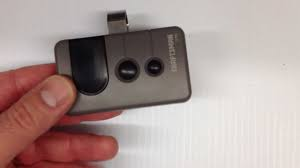
In this guide, you’ll learn exactly how to choose the right remote and program it step-by-step, even if you’re a beginner.
How Do I Replace A Garage Door Opener Remote? (Step-by-Step Guide)
Replacing a garage door opener remote involves two main steps: buying the correct remote and programming it properly
Read too: Tc1 Tricode Garage Door Opener Remote W/ Clip Chamberlain: Complete Guide
Step 1: Identify Your Garage Door Opener Model
Before buying a replacement, you must know your opener’s brand and model.
Where to find it:
- On the motor unit (ceiling-mounted)
- Inside the light cover
- In the original manual
Popular brands include:
- Chamberlain
- LiftMaster
- Genie
- Craftsman
Pro Tip:
Take a photo of the label to avoid mistakes when purchasing.
Step 2: Choose the Right Replacement Remote
You have two options:
1. Original Manufacturer Remote
- Designed specifically for your opener
- Higher compatibility
- Slightly more expensive
2. Universal Remote
- Works with multiple brands
- More affordable
- Requires extra setup
Comparison Table:
| Feature | Original Remote | Universal Remote |
|---|---|---|
| Compatibility | High | Medium–High |
| Setup Difficulty | Easy | Moderate |
| Price | $$ | $ |
| Reliability | Excellent | Good |
Step 3: Clear Old Remote Codes (Optional but Recommended)
If your old remote was lost or stolen, erase previous codes for security.
How to do it:
- Locate the “Learn” button on the opener.
- Press and hold it for 6–10 seconds.
- LED light will turn off—this means all remotes are erased.
Step 4: Program the New Remote
This is the most important step.
Standard Programming Process:
- Press the “Learn” button on the opener.
- The LED light will turn on (you have about 30 seconds).
- Press the button on your new remote.
- Hold for 2–3 seconds.
- Wait for confirmation:
- Light blinks or door moves slightly
- Test the remote from a distance of 1–3 meters (3–10 feet)
✅ Done! Your new remote should now work.
Why Isn’t My New Remote Working?
Even after programming, issues can happen.
Common Causes:
- Wrong remote model
- Dead battery
- Interference from nearby devices
- Memory not cleared properly
Quick Fix Checklist:
- Replace battery (CR2032 is common)
- Reprogram within 30 seconds
- Move closer to opener
- Check antenna wire on motor unit
Expert Insight: Remote Technology Explained
Garage door remotes use radio frequencies to communicate with the opener. Modern systems use rolling code technology, which changes the signal every time you press the button.
This improves security and prevents hacking. You can learn more about this system here:
https://en.wikipedia.org/wiki/Garage_door_opener
How Long Does It Take to Replace a Remote?
On average:
- Buying the remote: 5–15 minutes (online or in-store)
- Programming: 2–5 minutes
👉 Total time: Under 20 minutes
Signs You Need a New Garage Remote
You might need a replacement if:
- Buttons are unresponsive
- Range is very short
- Remote casing is damaged
- You lost the remote
- Opener doesn’t respond consistently
DIY vs Professional Help
When DIY Works Best:
- Remote replacement
- Programming
- Battery change
When to Call a Technician:
- Opener not responding at all
- Wiring issues
- Circuit board failure
Pros and Cons of Replacing Your Garage Remote
Advantages:
- Quick and affordable fix
- Improves security (with reprogramming)
- Easy for beginners
Disadvantages:
- Compatibility confusion
- Universal remotes may require extra setup
- Older systems may not support new remotes
Maintenance Tips to Extend Remote Life
Keep your remote working longer with these tips:
- Replace batteries every 12–18 months
- Avoid dropping the remote
- Store in a dry place
- Clean buttons regularly
FAQ: How Do I Replace A Garage Door Opener Remote?
1. Can I replace my garage remote with any universal remote?
Not always. Make sure the universal remote supports your opener’s brand and frequency.
2. Do I need to reprogram all remotes after replacing one?
Only if you reset the system. Otherwise, existing remotes will still work.
3. Why does my remote work sometimes but not always?
This is usually due to a weak battery or signal interference.
4. How many remotes can I program to one opener?
Most systems allow 3–7 remotes, depending on the model.
5. Can I use my smartphone instead of a remote?
Yes, many modern openers support apps like MyQ or similar systems.
6. What battery does a garage remote use?
Most use CR2032 or CR2016 coin batteries.
Conclusion
Replacing your garage door opener remote doesn’t have to be complicated. If you’ve been asking, “How Do I Replace A Garage Door Opener Remote”, the answer is simple: identify your model, choose the right remote, and program it in minutes.
This small upgrade can restore convenience, improve security, and save you time daily.
If this guide helped you, consider sharing it on social media—someone else might need this quick fix too! 🚪
Leave a Reply