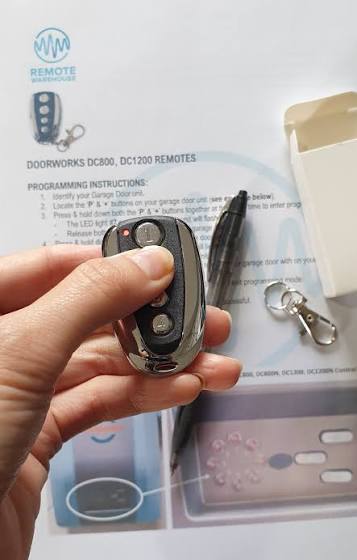
We’ve all been there: sitting in the driveway, clicking the visor button, and realizing your vehicle won’t open the gate. If you are asking yourself, “How Do I Program My Car To My Garage Door”, you are in the right place to solve this exact problem. Let’s get your vehicle synced up safely and quickly so you can enjoy seamless access!
How Do I Program My Car To My Garage Door? The Basics
Before diving into the steps, it helps to understand the technology connecting your vehicle to your home. Most modern vehicles use integrated systems like HomeLink or Car2U.
These systems replace the need for a traditional universal garage remote by using radio frequencies to communicate directly with your overhead motor.
According to a 2025 Smart Home Industry report, over 75% of new vehicles sold in the US come equipped with built-in transmitters. Yet, nearly 40% of owners never successfully program them.
The main challenge usually boils down to understanding rolling code technology. Unlike older fixed-code remotes, modern security systems change the access code every single time the door is used to prevent hacking.
Because of this, the pairing process requires a specific sequence to sync the car’s transmitter with the receiver on your ceiling unit.
If you want a deeper technical dive into how these mechanisms work, you can read more about the history and mechanics of the garage door opener on Wikipedia.
But for now, let’s focus on getting your car synced up!
Step-by-Step Guide: Syncing Your Vehicle
Here is the exact process to link your car’s built-in system to your home’s receiver. Please ensure your vehicle is parked outside, at least 10 feet away from the door, to avoid accidental closures during testing.
Note: The exact steps may vary slightly depending on whether you have a HomeLink or Car2U system, and the brand of your opener (e.g., LiftMaster, Chamberlain, Genie).
Step 0: Identify Your System Type
Before you begin, figure out if your car uses HomeLink (indicated by a house icon) or Car2U (usually found in older Subaru or Nissan models).
Knowing your system ensures you press the correct sequence of buttons and prevents frustrating errors.
Step 1: Clear Previous Codes (If Applicable)
If you bought a used car, the previous owner’s codes might still be stored in the system memory.
Press and hold the two outer buttons on your car’s visor console for exactly 10 seconds until the indicator light flashes rapidly. This wipes the memory completely clean.
Step 2: Locate the “Learn” Button on Your Opener
Grab a sturdy stepladder and locate the motor unit on your ceiling. Look for a brightly colored button near the antenna wire.
This is the garage door opener learn button. It is usually yellow, purple, red, or orange depending on the manufacturing year.
Caution: Never pull the emergency release cord while the door is open, as this can cause the heavy door to slam shut dangerously.
Step 3: Initiate the Pairing Mode
Press and release the learn button on the motor unit. You will see an LED light turn on or begin blinking.
You now have exactly 30 seconds to complete the next step, so move quickly but safely back to your vehicle.
Step 4: Program the Car Button
Go back to your vehicle. Press and hold the desired button on your visor console for 2 seconds, then release.
Repeat this press-and-release cycle three times. On the third press, hold the button down continuously.
Concrete Detail: Keep the ambient temperature in mind; extreme cold (below 20°F) can sometimes delay the LED response time, so hold the button for an extra 3 seconds if it’s winter.
Step 5: Verify the Sync
Watch your car’s indicator light closely. It will flash slowly at first, then transition to a rapid flash or stay solid.
This means the rolling codes have successfully synced. Test the system by pressing the button once to open and close the door.
Comparison: Integrated Car Systems vs. Traditional Remotes
To help you decide if using your car’s built-in system is worth the effort, check out this quick comparison table.
It highlights why making the switch is a massive upgrade for your daily routine.
| Feature | Integrated Car System (HomeLink/Car2U) | Traditional “Clicker” Remote | Smart Wi-Fi Opener |
|---|---|---|---|
| Convenience | High (Built directly into the vehicle) | Medium (Can get lost in the car) | High (Controlled via smartphone app) |
| Upfront Cost | Free (Included in your car’s MSRP) | $20 – $40 per replacement | $200 – $350 (Requires new hardware) |
| Security Level | High (Rolling code encryption) | Medium to High | Highest (End-to-end encrypted Wi-Fi) |
| Battery Needs | None (Powered by the car) | Requires CR2032 battery changes | Plugged into home power |
Troubleshooting Common Pairing Issues
Even with the perfect step-by-step guide, technology can be stubborn. Here is how to solve the most frequent hiccups users face.
The Light Won’t Flash Rapidly
If your car’s LED only flashes slowly and never pairs, you likely have a frequency mismatch. Older openers operate at 315 MHz, while newer ones use 390 MHz or dual-band frequencies.
Solution: You may need to purchase a “HomeLink Compatibility Bridge” (usually around $30) to translate the signals between your modern car and older opener.
The Door Opens, But Won’t Close
This is almost always a safety sensor issue, not a programming error. Check the two small laser sensors at the bottom of your garage door tracks.
Solution: If they are bumped out of alignment, wipe the lenses with a microfiber cloth and adjust them until both show a solid green light.
The System Works Intermittently
Intermittent failures are usually tied to signal interference. LED light bulbs installed in the motor unit are notorious for emitting radio frequency (RF) noise that disrupts the signal.
Solution: Swap out the LED bulbs for rough-service incandescent bulbs or specialized “RF-friendly” garage door opener bulbs.
Pro-Tip: If you live in an area with heavy snow, make sure to clear any ice buildup off your car’s visor console. Extreme moisture can block the radio frequency signal from reaching the overhead motor.
Maintaining Your Synced System for Longevity
Once you have successfully programmed your vehicle, keeping the system running smoothly requires minimal but consistent effort.
First, always keep the tracks and sensors clean. Dust, spider webs, and dirt can easily block the infrared beams that keep your door operating safely. Wipe them down with a soft cloth once a month.
Second, test the auto-reverse safety feature. Place a roll of paper towels or a 2×4 piece of wood flat on the ground under the door.
Close the door using your car’s button. If the door touches the object and doesn’t immediately reverse, your opener’s force settings need to be adjusted via the dials on the motor unit.
Finally, keep an eye on your vehicle’s battery health. Because the visor console draws power directly from the car, a failing alternator or weak battery can cause the transmitter to send a weaker signal, resulting in delayed responses.
Frequently Asked Questions (FAQ)
Q: Can I program multiple cars to one garage door opener?
Yes! Most modern openers have a memory capacity of up to 30 different remotes or vehicle transmitters.
However, if you reach the limit, you will need to hold down the learn button on the motor unit for 10 seconds to wipe the memory and start fresh.
Q: Why did my car’s garage door button suddenly stop working?
If your system was working perfectly and suddenly failed, check the garage door opener’s antenna. It is usually a single wire hanging from the motor unit.
If it got tucked up into the casing, the signal range drops dramatically. Also, check if a power outage recently reset the opener’s internal memory.
Q: Do I need a special remote for newer cars?
No, newer cars do not require special external remotes. In fact, vehicles manufactured after 2020 usually feature advanced dual-band HomeLink systems.
These systems automatically detect and sync with both old and new frequencies without needing a compatibility bridge.
Q: Is it safe to program my car to my garage door?
Absolutely. Modern systems use advanced rolling code security, which generates billions of unique code combinations.
Every time you press the button, the code changes. Even if a hacker intercepts the signal, that specific code is instantly invalidated and can never be used again.
Q: Can I program my car to open community gates or apartment barriers?
Yes. The exact same programming steps used for your home apply to most commercial gates, community barriers, and even some apartment entry doors.
This works perfectly provided they use standard radio-frequency receivers commonly found in residential areas.
Q: What if my garage door opener doesn’t have a learn button?
If your opener was manufactured before 1993, it might use DIP switches instead of a learn button. These are tiny sliding switches inside the remote and the motor unit.
To sync them, you must open both casings and manually slide the tiny switches to match the exact same pattern. However, for security reasons, experts highly recommend upgrading to a modern rolling-code system.
Conclusion
Learning how to sync your vehicle to your home’s entry system is one of the most rewarding DIY upgrades you can do this weekend.
It eliminates the clutter of dangling remotes, enhances your home security with rolling codes, and adds a touch of modern convenience to your daily routine.
By following these clear steps, you’ve successfully transformed your daily commute into a seamless experience.
Did this guide help you solve your problem? Share this article on your favorite social media platforms like Facebook, X (Twitter), or Pinterest to help your friends and family ditch their old clickers for good!
Leave a Reply