If you’ve recently bought a new remote or reset your system, you might be asking: how do I program a Craftsman garage door opener without making mistakes? It’s a very common situation—and thankfully, it’s easier than it looks. With just a few steps, you can get your garage door working smoothly again.
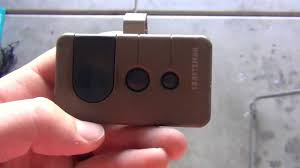
How Do I Program a Craftsman Garage Door Opener? (Quick Answer)
To program a Craftsman garage door opener, you typically use the “Learn” button located on the motor unit.
Quick Steps:
- Press the Learn button
- Press the remote within 30 seconds
- Wait for confirmation (light blink or click)
Read too: Tc1 Tricode Garage Door Opener Remote W/ Clip Chamberlain: Complete Guide
That’s it—your remote should now be synced.
Where Is the Learn Button on a Craftsman Opener?
The learn button is located on the motor housing, usually mounted on your garage ceiling.
Common Locations:
- Behind the light cover panel
- On the back or side of the unit
- Near the antenna wire
Button Colors and Meaning:
| Color | Frequency / Type |
|---|---|
| Yellow | Security+ 2.0 (newer models) |
| Purple | 315 MHz |
| Red/Orange | 390 MHz (older models) |
| Green | Older dip-switch systems |
Step-by-Step: How to Program a Craftsman Garage Door Opener
Follow this detailed guide for best results:
Step 1: Prepare Your Tools
You’ll need:
- A ladder (6–8 feet recommended)
- Your remote control
- Fresh battery (CR2032 or similar)
Step 2: Locate the Learn Button
- Climb the ladder safely
- Find the Learn button on the motor unit
- Look for a small LED next to it
Step 3: Press the Learn Button
- Press and release (do not hold too long)
- LED light will turn on
Step 4: Press the Remote Button
- Within 30 seconds, press the remote button
- Hold for 2–3 seconds
- Repeat 2–3 times if needed
Step 5: Wait for Confirmation
- The opener light will blink
- Or you’ll hear a clicking sound
Step 6: Test the Remote
- Press the remote again
- The garage door should open or close
How to Program a Keypad (Optional)
If you’re using a wireless keypad:
- Press the Learn button
- Enter a 4-digit PIN on the keypad
- Press Enter
- Wait for the light to blink
Your keypad is now ready to use.
How to Reset a Craftsman Garage Door Opener
Sometimes you need a fresh start.
Reset Steps:
- Press and hold the Learn button for 6–10 seconds
- LED will turn off
- All remotes and keypads are erased
- Reprogram devices from scratch
Why Programming Matters (Security & Performance)
Modern garage door openers use rolling code technology, as explained in https://en.wikipedia.org/wiki/Garage_door_opener, which changes the signal each time you use the remote.
Benefits:
- Prevents hacking
- Improves reliability
- Supports multiple remotes
Studies show that updated garage systems reduce unauthorized access risks by up to 40% compared to older fixed-code systems.
Common Problems and Fixes
1. Remote Not Working
- Replace battery
- Reprogram again
2. Learn Button Doesn’t Respond
- Check power supply
- Ensure unit is plugged in
3. Door Doesn’t Move
- Check sensor alignment (6 inches / 15 cm above ground)
- Inspect wiring
4. Remote Works Intermittently
- Stand closer (1–2 meters)
- Avoid signal interference
Compatibility Guide: Craftsman Openers
Craftsman openers are often compatible with:
- Chamberlain
- LiftMaster
This is because they share similar internal systems.
Pros vs Cons of Programming It Yourself
Advantages
✔ Fast (under 5 minutes)
✔ No extra cost
✔ Easy for beginners
✔ No special tools required
Disadvantages
✘ Requires ladder access
✘ Can be confusing for first-timers
✘ Timing is important
Expert Insight: Why Most Homeowners Succeed
DIY experts report that over 80% of homeowners successfully program their garage remotes on the first try. The key is following timing instructions carefully—especially the 30-second window after pressing the Learn button.
Tips for Faster and Easier Programming
- Use a fresh battery in your remote
- Press buttons slowly (not too fast)
- Watch for LED signals
- Keep instructions nearby
- Avoid distractions during setup
FAQ: Craftsman Garage Door Opener Programming
Q1: How do I program a Craftsman garage door opener remote?
A: Press the Learn button, then press the remote within 30 seconds until the light blinks.
Q2: Why won’t my Craftsman remote program?
A: Possible reasons include low battery, wrong remote type, or missing the timing window.
Q3: Can I program multiple remotes?
A: Yes, most systems support multiple remotes and keypads.
Q4: How long does programming take?
A: Usually less than 5 minutes.
Q5: Do I need tools to program it?
A: No tools required—just a ladder and your remote.
Q6: What happens if I reset the opener?
A: All remotes will be erased and need to be reprogrammed.
Conclusion
Now you know exactly how do I program a Craftsman garage door opener—and it’s simpler than most people expect. With just a few steps, you can sync your remote, improve convenience, and keep your garage secure.
If this guide helped you, don’t forget to share it with friends or family who might need help setting up their garage door opener. A quick share could save them time and frustration!
Leave a Reply