If you’ve been asking yourself, “How Do I Change My Garage Door Opener Code”, you’re already taking an important step toward improving your home’s security. Whether you lost a remote, moved into a new home, or just want peace of mind, updating your code is quick and essential.
In this guide, you’ll learn exactly how to reset and program your garage door opener code step-by-step—even if you’re a complete beginner.
Read too: Tc1 Tricode Garage Door Opener Remote W/ Clip Chamberlain: Complete Guide
How Do I Change My Garage Door Opener Code? (Step-by-Step Guide)
Let’s start with the most practical question: how to actually change the code safely and correctly.
Step 1: Locate the “Learn” Button on the Opener
The “Learn” button is the key to resetting your system.
Where to find it:
- On the motor unit (ceiling-mounted opener)
- Behind the light cover
- On the back or side panel
Common colors:
- Yellow, red, purple, or green
Step 2: Clear the Existing Codes
If you want a full reset (recommended for security), follow these steps:
- Press and hold the “Learn” button
- Hold for 6–10 seconds
- Release when the LED light turns off
✅ This erases all remotes and keypad codes.
Step 3: Reprogram Your Remote
After resetting, you’ll need to reconnect your remote.
Steps:
- Press the “Learn” button once
- LED light will turn on (you have ~30 seconds)
- Press and hold the remote button for 2–3 seconds
- Wait for the light to blink or the door to move
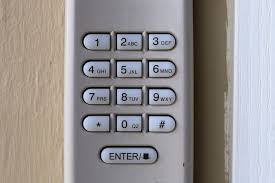
Step 4: Set a New Keypad Code (Optional)
If your system includes a keypad:
- Press the “Learn” button again
- Enter a new PIN (3–8 digits)
- Press “Enter”
- Wait for confirmation
📌 Example:
Enter 7391 → Press Enter → Door responds → Code saved
Step 5: Test All Devices
- Test remote from 3–10 feet (1–3 meters)
- Test keypad entry
- Ensure smooth door operation
Why Should You Change Your Garage Door Code?
Changing your opener code is not just routine—it’s critical for safety.
Top Reasons:
- Lost or stolen remote
- Moving into a new home
- Preventing unauthorized access
- Regular security updates
Security Insight:
Modern openers use rolling code technology, which generates a new code after every use to prevent hacking.
Learn more here:
https://en.wikipedia.org/wiki/Garage_door_opener
Common Problems When Changing Garage Door Code
1. Remote Not Working After Reset
Cause: Not reprogrammed properly
Fix: Repeat within 30-second window
2. Keypad Not Responding
Cause: Dead battery or wrong PIN
Fix: Replace battery and re-enter code
3. LED Light Not Turning On
Cause: Power issue
Fix: Check outlet and breaker
4. Door Doesn’t Respond
Cause: Signal interference or wiring issue
Fix: Move closer and retry
Types of Garage Door Code Systems
Understanding your system helps you troubleshoot faster.
1. Fixed Code Systems (Older Models)
- Same code every time
- Less secure
- Easier to hack
2. Rolling Code Systems (Modern Models)
- Changes code automatically
- Highly secure
- Industry standard
Quick Comparison: Reset vs Reprogram
| Action | What It Does | When to Use |
|---|---|---|
| Reset | Erases all codes | Lost remote, new home |
| Reprogram | Adds new devices | Adding remote/keypad |
Best Practices for Garage Door Security
Use Strong PIN Codes
Avoid:
- 1234
- 0000
- Birthdates
Choose:
- Random 4–6 digit combinations
Change Codes Regularly
- Every 6–12 months
- Immediately after losing a remote
Keep Remotes Secure
- Don’t leave in parked cars
- Store inside home
Upgrade Old Systems
Older systems lack modern encryption—consider upgrading if needed.
How Long Does It Take?
| Task | Time |
|---|---|
| Reset system | 1–2 minutes |
| Program remote | 2–3 minutes |
| Set keypad | 3–5 minutes |
👉 Total time: Under 10 minutes
Real-Life Example
Scenario:
A homeowner loses their garage remote at a public parking lot.
Solution:
- Reset system
- Reprogram new remote
- Set new keypad PIN
Result:
Unauthorized access prevented within minutes.
Advantages vs Disadvantages
Advantages:
- Improves home security
- Quick and easy process
- No special tools required
Disadvantages:
- Must reconnect all devices
- Temporary inconvenience
Maintenance Tips After Changing Code
Keep your system running smoothly:
- Replace batteries every 12–18 months
- Test remotes monthly
- Inspect opener annually
- Keep sensors clean
FAQ: How Do I Change My Garage Door Opener Code?
1. How often should I change my garage door code?
Every 6–12 months, or immediately after losing a remote.
2. Will changing the code erase all remotes?
Yes, a full reset removes all previously programmed devices.
3. Can I change the code without a remote?
Yes, you can use the opener unit and keypad to set a new code.
4. Why is my remote not working after changing the code?
You likely need to reprogram it after resetting the system.
5. How many remotes can I connect?
Most systems support 3–7 remotes, depending on the model.
6. Is it safe to keep the same code for years?
No, it’s recommended to update regularly for better security.
Conclusion
Now you have a complete answer to “How Do I Change My Garage Door Opener Code”—and as you’ve seen, it’s a simple process that takes just a few minutes. By resetting and updating your code, you can significantly improve your home’s safety and control who has access.
Don’t wait until there’s a problem—take a few minutes today to secure your garage.
If this guide helped you, feel free to share it on social media—someone else might need this quick and important fix! 🚪
Leave a Reply