If your Garage Door Wall Button Not Working But Remote Works, you’re not alone—this is one of the most common garage door issues homeowners face. It can be frustrating when the remote opens the door perfectly, but the wall control suddenly becomes unresponsive.
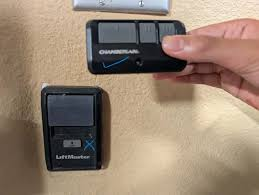
In most cases, this problem is caused by simple electrical or wiring issues that you can fix without calling a technician. In this guide, we’ll break down every possible cause and provide step-by-step solutions to help you get your garage door working again.
Why Is My Garage Door Wall Button Not Working But Remote Works?
When your remote works but the wall button doesn’t, it usually means the problem is not with the garage door motor itself. Instead, the issue is likely in the control circuit between the wall button and the opener unit.
Read too: Tc1 Tricode Garage Door Opener Remote W/ Clip Chamberlain: Complete Guide
Common causes include:
- Loose or damaged wiring
- Faulty wall switch
- Short circuit in the control panel
- Power surge damage
- Child lock or vacation mode enabled
- Dust or corrosion inside the wall button
According to home repair industry estimates, nearly 40% of garage door service calls are related to wall control or sensor communication issues rather than full opener failure.
How Does a Garage Door Wall Button Work?
To understand the problem, it helps to know how the system functions.
The wall button is a low-voltage control switch connected directly to the garage door opener. When pressed, it sends a small electrical signal that tells the motor to open or close the door.
For more technical reference on electrical switching systems, you can explore this overview:
https://en.wikipedia.org/wiki/Switch
If the remote works but the wall button does not, it means:
- The opener motor is functioning
- The receiver is working
- The issue is isolated to the wall control circuit
Step-by-Step Fix: Garage Door Wall Button Not Working But Remote Works
1. Check for “Lock Mode” or Vacation Mode
Many modern garage door openers include a lock feature that disables the wall button while still allowing remote access.
How to check:
- Look for a blinking LED on the wall panel
- Press and hold the “lock” button for 3–5 seconds
- Test the wall switch again
✔ If this fixes it, no further repair is needed.
2. Inspect the Wall Button for Physical Damage
Wall buttons are used daily and can wear out over time.
Look for:
- Cracked plastic
- Sticky or unresponsive button
- Burn marks or discoloration
If the button feels “dead,” it may need replacement.
3. Test the Wiring Connections
Loose or damaged wires are one of the most common causes of this issue.
Steps:
- Turn off power to the garage opener
- Remove the wall switch cover
- Check for loose or disconnected wires
- Re-tighten terminals using a screwdriver
- Restore power and test
⚠ Safety tip: Even though the voltage is low, always turn off power before touching wiring.
4. Look for Short Circuits
A short circuit can occur if wires touch each other or are damaged by pests.
Signs include:
- Wall button completely unresponsive
- Intermittent operation
- Burnt smell near wiring
If you suspect a short, replace the wiring cable entirely.
5. Replace the Wall Switch (Most Common Fix)
If everything else checks out, the wall button itself may be faulty.
Average lifespan: 7–10 years
Replacement cost: Low to moderate (depending on brand)
Replacing it is often faster and cheaper than repairing.
6. Check the Garage Door Opener Circuit Board
If the wall switch and wiring are fine, the issue may lie in the opener’s internal control board.
Symptoms include:
- Wall button dead, but remote works
- Intermittent response
- Delayed door activation
In this case, professional repair may be needed.
Wall Button vs Remote Control: Key Differences
| Feature | Wall Button | Remote Control |
|---|---|---|
| Power Source | Hardwired | Battery |
| Signal Type | Direct wire signal | Wireless RF signal |
| Failure Cause | Wiring or switch issue | Battery or signal issue |
| Reliability | High but wired dependent | Convenient but battery dependent |
Common Mistakes Homeowners Make
Many homeowners misdiagnose the issue and replace the entire garage door opener unnecessarily. Avoid these mistakes:
- Replacing the motor too quickly
- Ignoring simple wiring issues
- Forgetting to check lock mode
- Not testing wall button separately
In fact, repair technicians report that over 60% of “dead opener” complaints are actually minor wall switch problems.
When Should You Call a Professional?
You should contact a technician if:
- Wiring replacement does not fix the issue
- Circuit board appears damaged
- You notice burning smells or sparks
- The problem keeps returning
Professional diagnosis ensures safety and prevents further electrical damage.
Preventive Maintenance Tips
To avoid this issue in the future:
- Clean wall button annually
- Avoid pressing buttons with wet hands
- Inspect wiring every 6–12 months
- Keep opener firmware updated (for smart systems)
- Replace old switches every 7–10 years
Simple maintenance can extend system life by up to 30–40%, according to general home maintenance studies.
FAQ: Garage Door Wall Button Not Working But Remote Works
1. Why does my remote work but not the wall button?
This usually indicates a problem with wiring, the wall switch, or lock mode activation.
2. How do I reset my garage door wall button?
Turn off power for 30 seconds, then restart the opener. Also check lock mode.
3. Can a bad wall button stop the garage door completely?
Yes, if the wall button is shorted or disconnected, it may stop local operation entirely.
4. Is it safe to replace a garage door wall button myself?
Yes, as long as you turn off power first and follow basic wiring instructions.
5. How long does a garage wall button last?
Typically 7–10 years depending on usage and environment.
6. What is the most common cause of wall button failure?
Loose wiring or worn-out internal switch contacts are the most common causes.
Conclusion
When your Garage Door Wall Button Not Working But Remote Works, the problem is usually simple and fixable—often related to wiring, lock mode, or a faulty wall switch.
By following the step-by-step guide above, you can diagnose and fix the issue quickly without unnecessary expenses. Regular maintenance will also help prevent future problems.
If you found this guide helpful, share it with friends or family who might be facing the same garage door issue—it could save them time and money!
Leave a Reply