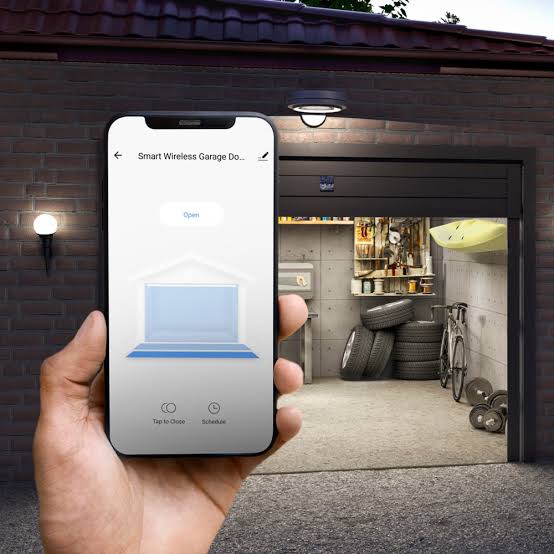
Imagine rushing out the door in the morning, only to realize you’re not sure if you closed the garage. Or perhaps you’re halfway to work when a nagging doubt creeps in: Did I lock up? For decades, this was a source of genuine anxiety for homeowners. Today, however, technology has offered a seamless solution. With a modern garage door opener you can open with your phone, you gain peace of mind, enhanced security, and unparalleled convenience right from your pocket.
Gone are the days of fumbling for clunky plastic remotes or worrying about lost clickers. Smart garage technology has evolved from a luxury novelty into a practical necessity for the modern American home. Whether you want to let a delivery driver drop off a package inside or simply check your status while on vacation, smartphone-controlled openers put you in command.
Why Upgrade to a Smartphone-Controlled Garage Opener?
The transition from traditional radio-frequency remotes to Wi-Fi-enabled systems represents a significant leap in home automation. But why exactly should you make the switch? The benefits extend far beyond mere novelty.
Enhanced Security and Real-Time Alerts
Traditional openers operate on fixed codes or rolling codes that, while secure, offer no visibility. You press the button, and the door moves. With a smart opener, you receive instant notifications on your smartphone every time the door opens or closes. This feature is crucial for monitoring household activity. If your children arrive home from school, you’ll know the moment they enter. If an unexpected opening occurs while you’re at work, you can investigate immediately.
Unmatched Convenience for Delivery and Guests
One of the most cited reasons for upgrading is delivery management. Porch piracy is a growing concern in the US. By granting temporary access to trusted delivery services via your phone app, you can have packages placed securely inside your garage. Furthermore, if you have house sitters, dog walkers, or family members visiting, you can grant them access without needing to hand over a physical key or remote. You can even revoke access instantly if needed.
Integration with Smart Home Ecosystems
A garage door opener you can open with your phone rarely works in isolation. Most top-tier models integrate seamlessly with major smart home platforms like Amazon Alexa, Google Assistant, and Apple HomeKit. This allows for voice control (“Alexa, close the garage door”) and automation routines. For instance, you can set your lights to turn on automatically when the garage door opens after sunset.
How Does a Smart Garage Door Opener Work?
Understanding the mechanics behind these devices helps demystify the technology. At its core, a smart garage door opener functions similarly to a traditional one but includes a Wi-Fi module and a connection to a cloud server.
- The Hardware: The motor unit contains a Wi-Fi chip that connects to your home’s wireless network.
- The App: You download a proprietary app (e.g., myQ, Chamberlain, or Genie) to your smartphone.
- The Connection: When you tap “Open” in the app, the signal travels from your phone to the cloud, then down to your home Wi-Fi, and finally to the opener motor.
- The Action: The motor activates the trolley to move the door along the tracks.
This process usually takes 2–5 seconds, depending on your internet speed. It is essential to have a stable Wi-Fi signal in your garage for optimal performance. If your router is far away, consider installing a Wi-Fi extender to ensure consistent connectivity.
Top Features to Look for When Choosing a Model
Not all smart openers are created equal. When shopping for a garage door opener you can open with your phone, prioritize these critical features to ensure you get the best value and security.
| Feature | Why It Matters |
|---|---|
| Wi-Fi Connectivity | Essential for remote access. Look for dual-band support (2.4GHz) for better range through walls. |
| Battery Backup | Power outages happen. A built-in battery ensures you can still open/close the door during blackouts. |
| Security Encryption | Look for AES-128 or higher encryption to prevent hacking or signal interception. |
| Camera Integration | Some models include built-in cameras or allow pairing with external ones for visual verification. |
| Voice Control Compatibility | Ensures seamless integration with Alexa, Google, or Siri for hands-free operation. |
The Importance of Battery Backup
According to industry data, power fluctuations are common in many US regions. A smart opener without battery backup becomes useless during an outage unless you have a manual release cord handy—and even then, lifting a heavy door manually is difficult. Top models now offer rechargeable battery backups that can last for several days, ensuring you never get locked out or stuck.
Installation: DIY vs. Professional Help
Many homeowners wonder if they can install these units themselves. The answer depends on your comfort level with basic tools and electrical wiring.
Step-by-Step DIY Overview
If you choose to install it yourself, follow these general steps. Note: Always refer to the specific manufacturer’s manual for detailed instructions.
- Preparation: Disconnect the power to the existing opener. Clear the area around the motor unit.
- Removal: Unbolt the old motor from the ceiling bracket. Detach the rail and trolley if necessary.
- Assembly: Assemble the new rail according to the manual. Attach the trolley and connect the spring cable.
- Mounting: Secure the new motor unit to the ceiling joists using heavy-duty lag screws. Ensure it is level.
- Wiring: Connect the wall console, safety sensors, and door control buttons. Pay close attention to wire color coding.
- Programming: Plug in the unit. Download the app and follow the on-screen prompts to connect to your Wi-Fi.
- Testing: Test the safety reversal system by placing a 2×4 piece of wood on the floor under the door. The door should reverse upon contact.
When to Call a Pro
If your garage door uses torsion springs (the large springs above the door), exercise extreme caution. These springs are under high tension and can cause severe injury if mishandled. In such cases, hiring a professional installer is highly recommended. Additionally, if your current setup is older than 10 years, the tracks and rollers may need adjustment, which a pro can handle efficiently.
Security Concerns: Is It Safe?
A common question among users is whether connecting their garage to the internet exposes them to hacking risks. While no digital system is 100% immune, modern smart openers employ robust security measures.
Most reputable brands use end-to-end encryption. This means the signal sent from your phone is scrambled and can only be read by your specific opener. Furthermore, two-factor authentication (2FA) is now standard in most apps, adding an extra layer of protection. To maximize security, always keep your app updated, use strong, unique passwords, and enable 2FA.
For more detailed information on home network security protocols, you can refer to general cybersecurity guidelines on Wikipedia.
Frequently Asked Questions (FAQ)
1. Do I need to replace my entire garage door to get a smart opener?
No. In most cases, you can retrofit a smart controller to your existing opener if it is compatible. Alternatively, you can replace just the motor unit while keeping the rails and door intact. Check your current model’s compatibility with smart add-ons like the myQ Smart Garage Hub.
2. What happens if my Wi-Fi goes down?
If your Wi-Fi is down, you cannot control the door remotely via your phone. However, you can still use the physical wall button inside the garage or the traditional remote control. The local radio frequency signals do not rely on the internet.
3. Can multiple family members control the same garage door?
Yes. Most apps allow you to invite multiple users to your “home.” Each person downloads the app and creates their own account. You can assign different permission levels, such as full access or view-only status, depending on your needs.
4. Does a smart garage door opener work with Apple HomeKit?
Many newer models are HomeKit-compatible, allowing you to control them via the Apple Home app and Siri. However, some brands require a specific bridge or hub to enable this functionality. Always check the product specifications for “Works with Apple HomeKit” certification.
5. How much does a smart garage door opener cost?
Prices vary widely. A simple Wi-Fi hub that retrofits your existing opener can cost between $30 and $100. A complete new smart motor unit typically ranges from $250 to $500, depending on horsepower, battery backup, and additional features like built-in cameras.
6. Can I schedule my garage door to close automatically?
Yes. One of the most popular features is the auto-close timer. You can set the door to automatically close after a specified period (e.g., 5, 10, or 30 minutes) if it was left open. This is an excellent safeguard against forgetfulness.
Conclusion
Upgrading to a garage door opener you can open with your phone is more than just a tech upgrade; it’s a lifestyle improvement. It offers peace of mind through real-time monitoring, enhances security with encrypted connections, and provides unmatched convenience for managing deliveries and guest access. With easy integration into existing smart home ecosystems and straightforward installation options, there has never been a better time to make the switch.
Don’t let the anxiety of an open garage door ruin your day. Take control of your home’s entry point today. If you found this guide helpful, please share it with your friends and family on social media to help them discover the convenience of smart garage technology!
Leave a Reply