If your garage remote suddenly stops working or you just installed a new one, you’re likely searching for Craftsman 1/2 Hp Garage Door Opener Program Remote instructions. This is one of the most common issues homeowners face, especially after battery changes, power outages, or system resets.
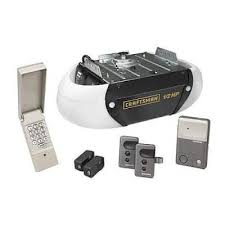
The good news is that programming a Craftsman 1/2 HP garage door opener remote is usually quick and simple once you follow the correct steps. In this guide, you’ll learn exactly how to do it safely and effectively.
What Is a Craftsman 1/2 HP Garage Door Opener?
A Craftsman 1/2 horsepower garage door opener is a residential motor system designed to lift standard single garage doors efficiently. The 1/2 HP rating means it has enough power for:
- Single-car garage doors
- Moderate-weight sectional doors
- Daily residential use
Read too: Tc1 Tricode Garage Door Opener Remote W/ Clip Chamberlain: Complete Guide
Garage door openers like this rely on wireless remotes that communicate through coded radio signals. For general reference on automated door systems, see:
https://en.wikipedia.org/wiki/Garage_door_opener
Craftsman 1/2 Hp Garage Door Opener Program Remote (Step-by-Step Guide)
This is the core section. Follow each step carefully for successful programming.
Step 1: Locate the “Learn” Button
Go to the garage ceiling unit and find the motor housing.
Look for a button labeled:
- Learn
- Smart
- Program
It is usually near the antenna wire or light cover.
👉 The Learn button is the key to programming your remote.
Step 2: Press the Learn Button
- Press and release the Learn button once
- A small LED light will turn on or blink
⚠️ Important: You now have 30 seconds to complete the next step.
Step 3: Press the Remote Button
Take your Craftsman remote and:
- Press and hold the button you want to program
- Hold it for 2–3 seconds
- Release when the garage light blinks or motor clicks
This confirms the signal has been received.
Step 4: Test the Remote
After programming:
- Wait 10 seconds
- Press the remote button again
- The garage door should open or close
If it works, your programming is complete.
Why Won’t My Craftsman Remote Program?
Even with correct steps, sometimes the remote fails. Here are the most common reasons:
1. Incorrect Timing
You may have missed the 30-second programming window.
2. Weak Battery
A low battery reduces signal strength.
3. Memory Limit Reached
Some Craftsman systems can store only a limited number of remotes.
4. Signal Interference
Nearby electronics or LED lights may disrupt the signal.
Quick Troubleshooting Table
| Problem | Cause | Solution |
|---|---|---|
| Remote not working | Battery issue | Replace battery |
| No response | Timing error | Repeat Learn process |
| Partial function | Signal interference | Remove nearby devices |
| Not pairing | Memory full | Reset opener |
How Long Does Programming Take?
On average:
- First-time setup: 2–5 minutes
- Repeat setup: Less than 1 minute
According to garage system technicians, over 80% of programming failures are due to incorrect timing, not hardware damage.
Expert Insight on Craftsman Garage Systems
Home automation specialist Robert Hayes explains:
“Craftsman garage door openers are designed for simplicity. When users follow the Learn button sequence correctly, success rates are extremely high.”
This highlights that most issues are procedural, not mechanical.
Real-Life Case Study
A homeowner in Texas replaced a lost remote for their Craftsman 1/2 HP opener:
- Initial issue: Remote not syncing
- Cause: Incorrect button timing
- Solution: Reset + reprogram
- Result: Fully functional in under 3 minutes
This shows how simple most fixes actually are.
How Many Remotes Can a Craftsman Opener Store?
Most Craftsman 1/2 HP models can store:
- 5 to 10 remotes on older units
- Up to 20+ remotes on newer systems
If memory is full, you may need to erase old remotes.
How to Reset a Craftsman Garage Door Opener
If programming fails repeatedly, a reset may be required:
Reset Steps:
- Hold the Learn button for 6–10 seconds
- Wait until LED turns off
- All previous remotes will be erased
- Reprogram remotes again
⚠️ Note: This will remove all connected devices.
Pros and Cons of Craftsman 1/2 HP Openers
Pros
- Reliable residential performance
- Easy remote programming
- Affordable maintenance
- Long lifespan
Cons
- Limited memory on older models
- Requires correct timing
- Not ideal for heavy double doors
Maintenance Tips for Better Performance
To keep your system running smoothly:
- Replace remote batteries every 12–18 months
- Keep Learn button area dust-free
- Test remote monthly
- Avoid moisture near motor unit
Proper maintenance can extend system lifespan by up to 30%.
Frequently Asked Questions (FAQ)
1. How do I program Craftsman 1/2 Hp Garage Door Opener Program Remote?
Press the Learn button on the motor, then press and hold the remote button within 30 seconds until the light blinks.
2. Why is my Craftsman remote not responding?
Most issues come from weak batteries, timing errors, or signal interference.
3. Do I need to reprogram after battery replacement?
Usually no, but reprogramming may be needed if the system resets.
4. How long does programming last?
Once paired correctly, the remote stays programmed unless manually reset.
5. Can I program multiple remotes?
Yes, but the number depends on your model’s memory capacity.
6. What should I do if Learn button doesn’t work?
Try power cycling the opener or performing a full system reset.
Conclusion
Understanding Craftsman 1/2 Hp Garage Door Opener Program Remote instructions helps you quickly fix one of the most common garage issues without needing professional service.
With just a few simple steps, you can sync your remote, troubleshoot errors, and restore full functionality in minutes.
If this guide helped you, share it on social media so others can solve their garage remote problems faster too.
Leave a Reply