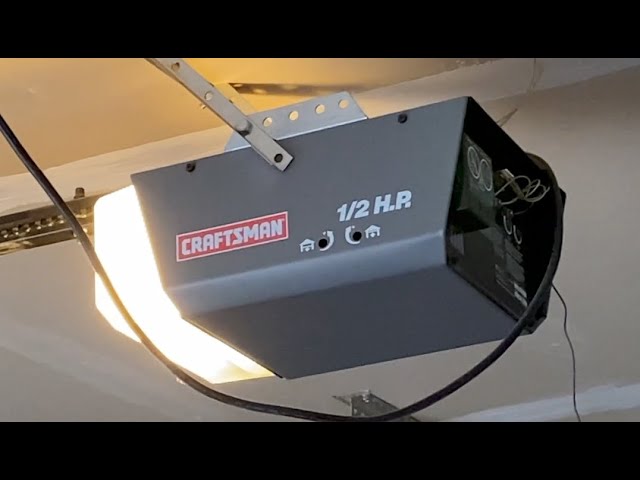
Is the darkness in your garage becoming a safety hazard or just a major inconvenience? You are not alone; many homeowners face the frustrating issue of a Craftsman 1/2 HP garage door opener light not working right when they need it most. Whether it is a burnt-out bulb, a faulty socket, or a setting glitch, this guide will walk you through simple, effective solutions to get your lights back on without calling a professional.
Why Did My Craftsman Garage Door Light Stop Working?
Before diving into repairs, it is essential to understand why this happens. The lighting system in your Craftsman 1/2 HP model is designed to activate automatically when the door opens or when the wall button is pressed. However, several factors can disrupt this function.
According to general maintenance data, bulb failure accounts for nearly 60% of lighting issues in garage door openers. Other common causes include:
- Loose connections in the socket.
- Tripped circuit breakers.
- Incorrect timer settings.
- Faulty logic boards (less common but possible).
Understanding the root cause helps you choose the right fix. Let’s explore the most frequent culprits and how to address them step-by-step.
Step 1: Check and Replace the Light Bulb
The most obvious solution is often the correct one. Over time, vibration from the door movement can loosen bulbs or cause filaments to break prematurely.
How to Replace the Bulb Correctly
- Safety First: Unplug the garage door opener from the power outlet. This prevents accidental activation while you work.
- Remove the Lens: Most Craftsman models have a plastic lens covering the bulb. Gently squeeze the sides or unscrew it, depending on your model.
- Inspect the Bulb: Look for darkening at the base or a broken filament. If you see either, the bulb is dead.
- Replace with the Right Type: Use only A19 standard incandescent bulbs (max 100 watts) or LED bulbs rated for garage door openers.
- Note: Not all LED bulbs work with garage door openers due to interference with radio frequencies. Ensure your LED is labeled “garage door compatible.”
Pro Tip: If you recently switched to an LED bulb and the light stopped working, try reverting to an incandescent bulb to test if the LED was incompatible.
Step 2: Inspect the Light Socket and Connections
If a new bulb doesn’t solve the problem, the issue might lie in the socket itself. The constant vibration from the motor can cause wires to disconnect or the socket contacts to corrode.
What to Look For
- Corrosion: Check for white or green buildup on the metal contacts. Clean it with a dry cloth or fine sandpaper.
- Loose Wires: Open the motor housing (after unplugging!) and check if the wires leading to the light socket are securely connected.
- Burnt Smell: If you notice a burnt odor, the socket may be damaged and require replacement.
For detailed wiring diagrams and safety standards, you can refer to Wikipedia’s article on electrical wiring to understand basic household circuit principles.
Step 3: Adjust the Light Timer Settings
Many Craftsman 1/2 HP openers come with adjustable light timers. If the timer is set to “Off” or a very short duration, the light may appear non-functional.
How to Reset the Light Timer
- Locate the “Light” or “Timer” button on the motor unit or wall control panel.
- Press and hold the button for 3–5 seconds until the light blinks.
- Test the door by opening and closing it. The light should stay on for approximately 2.5 to 5 minutes, depending on your model.
If the light still does not turn on, proceed to the next step.
Step 4: Check the Circuit Breaker and Power Supply
Sometimes, the issue is not with the opener itself but with the power supply. A tripped breaker or a faulty outlet can prevent the light from receiving electricity.
Quick Power Check
- Test the Outlet: Plug a lamp or phone charger into the same outlet used by the garage door opener. If it doesn’t work, the outlet is dead.
- Reset the Breaker: Go to your home’s electrical panel and look for a tripped breaker labeled “Garage” or “Opener.” Flip it off and then back on.
- Check the GFCI: Some garage outlets are protected by Ground Fault Circuit Interrupters (GFCIs). Press the “Reset” button on the outlet if available.
Step 5: Examine the Logic Board and Sensors
If none of the above steps work, the problem may be internal. The logic board controls all functions, including lighting. In rare cases, a power surge can damage the board’s relay responsible for the light.
Signs of Logic Board Failure
- The motor runs, but the light never activates.
- Other features (like remote controls) also malfunction.
- Visible burn marks on the circuit board.
In this scenario, contacting Craftsman support or a certified technician is recommended. Attempting to repair the logic board yourself can void your warranty and pose safety risks.
Comparison: Incandescent vs. LED Bulbs for Garage Openers
Choosing the right bulb can prevent future issues. Here is a quick comparison:
| Feature | Incandescent Bulb | LED Bulb |
|---|---|---|
| Compatibility | High (works with all models) | Variable (check for “garage door safe”) |
| Lifespan | Short (1,000 hours) | Long (25,000+ hours) |
| Heat Output | High | Low |
| Cost | Low | Higher upfront |
| Vibration Resistance | Low (filament breaks easily) | High (solid-state) |
Recommendation: If your opener is older than 10 years, stick with incandescent bulbs. For newer models, use high-quality, shielded LED bulbs designed for garage doors.
FAQ: Common Questions About Craftsman Garage Door Lights
Q1: Why does my Craftsman garage door light flicker?
Flickering is usually caused by a loose bulb or poor contact in the socket. Tighten the bulb firmly. If it persists, inspect the socket for corrosion or damaged wires.
Q2: Can I use any LED bulb in my Craftsman opener?
No. Many standard LED bulbs interfere with the radio frequency of the remote controls. Always use LEDs labeled as “garage door opener compatible” or stick to incandescent bulbs.
Q3: How long should the light stay on after closing the door?
By default, most Craftsman 1/2 HP models keep the light on for 2.5 to 5 minutes. You can adjust this duration using the timer settings on the motor unit or wall console.
Q4: What if the light works but the door doesn’t move?
This indicates a separate issue, likely with the motor, sensors, or drive mechanism. The lighting circuit is independent of the motor’s operation. Focus on troubleshooting the door’s movement separately.
Q5: Is it safe to repair the garage door opener myself?
Basic tasks like replacing bulbs or resetting timers are safe. However, avoid opening the motor housing or touching internal components unless you are experienced with electrical systems. Always unplug the unit before performing any maintenance.
Conclusion
Dealing with a Craftsman 1/2 HP garage door opener light not working is rarely a complex problem. In most cases, a simple bulb replacement or timer adjustment restores functionality quickly and safely. By following the steps outlined above, you can save time and money while ensuring your garage remains well-lit and secure.
Remember, regular maintenance—such as checking bulb tightness and cleaning sockets—can prevent future issues. If you found this guide helpful, please share it with friends or neighbors who might be struggling with similar garage door woes. A well-lit garage is a safer garage!
Leave a Reply