If your remote suddenly stops working or you’ve just bought a new one, it’s normal to feel confused about how to set it up. The Craftsman 1/2 H.P. garage door opener remote is widely used, but programming and troubleshooting can be tricky if you’re new. This guide will walk you through everything step by step—simple, clear, and beginner-friendly.
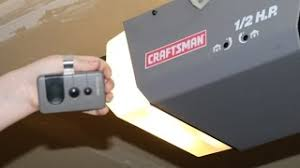
What Is a Craftsman 1/2 H.P. Garage Door Opener Remote?
A Craftsman remote is a wireless device that allows you to open and close your garage door without manually operating it.
Read too: Tc1 Tricode Garage Door Opener Remote W/ Clip Chamberlain: Complete Guide
Key Features:
- Compact and portable
- Uses radio frequency signals
- Works with rolling code security
- Compatible with multiple Craftsman models
Modern remotes use secure signal technology explained in https://en.wikipedia.org/wiki/Garage_door_opener, which prevents unauthorized access by changing the code after each use.
How Do You Program a Craftsman 1/2 H.P. Garage Door Opener Remote?
Programming your remote is easier than it looks.
Step-by-Step Programming Guide
- Locate the Learn Button
- Found on the motor unit
- Usually under the light cover
- Press the Learn Button
- LED light will turn on
- You now have 30 seconds
- Press the Remote Button
- Hold for 2–3 seconds
- Release when the light blinks
- Test the Remote
- Press the button
- Door should open or close
Where Is the Learn Button Located?
The Learn button is essential for syncing your remote.
Common Locations:
- Back panel of the opener
- Near antenna wire
- Under light lens
Colors May Vary:
- Yellow
- Red/orange
- Purple
- Green
Each color may indicate different frequency types.
Why Is My Craftsman Remote Not Working?
This is one of the most common issues homeowners face.
Possible Causes:
- Dead battery
- Outdated programming
- Signal interference
- Faulty remote
Quick Fix Checklist
✔ Replace battery (usually CR2032 or 9V)
✔ Reprogram the remote
✔ Check opener power
✔ Ensure antenna is hanging down
How To Reset a Craftsman Garage Door Remote
Resetting can fix many problems.
Reset Steps:
- Press and hold the Learn button for 6–10 seconds
- LED will turn off (memory cleared)
- Reprogram all remotes
Compatibility: Will Any Remote Work?
Not all remotes are universal.
Compatible With:
- Craftsman openers (1/2 H.P., 3/4 H.P.)
- LiftMaster systems (same parent tech)
- Chamberlain models
Not Compatible With:
- Very old dip-switch models
- Non-standard frequencies
How Far Should the Remote Work?
Typical range:
- 50–150 feet under normal conditions
Factors Affecting Range:
- Battery strength
- Interference (walls, metal)
- Antenna position
Pros vs Cons of Craftsman Garage Door Remotes
Advantages
✔ Easy to use
✔ Reliable performance
✔ Affordable replacement
✔ Strong compatibility
Disadvantages
✘ Battery dependency
✘ Limited range in some conditions
✘ Requires occasional reprogramming
Expert Insight: Why Rolling Codes Matter
Security experts highlight that rolling code technology reduces hacking risks significantly. In fact, modern garage systems are over 90% safer than older fixed-code models.
Common Problems and Solutions
1. Remote Works Intermittently
- Replace battery
- Reduce interference
2. Door Opens but Won’t Close
- Check safety sensors
- Clean sensor lenses
3. Remote Suddenly Stops
- Reprogram
- Check for power outage
4. Multiple Remotes Not Working
- Reset system
- Re-sync all devices
How Long Does Programming Take?
Time Breakdown:
- Locate Learn button: 1–2 minutes
- Programming: 2 minutes
- Testing: 1 minute
Total: 3–5 minutes
Maintenance Tips for Long-Term Use
- Replace batteries every 6–12 months
- Keep remote clean and dry
- Avoid dropping the device
- Test functionality monthly
Comparison: Craftsman Remote vs Universal Remote
| Feature | Craftsman Remote | Universal Remote |
|---|---|---|
| Compatibility | Limited | Broad |
| Setup | Easy | Moderate |
| Reliability | High | Medium |
| Price | Affordable | Slightly higher |
When Should You Replace Your Remote?
Replace your remote if:
- Buttons stop responding
- Range becomes very short
- Physical damage occurs
- Reprogramming fails
FAQ: Craftsman Garage Door Remote
Q1: How do I program a Craftsman 1/2 H.P. garage door opener remote?
A: Press the Learn button, then press the remote button within 30 seconds.
Q2: Why is my Craftsman remote not working?
A: Most commonly due to dead batteries or lost programming.
Q3: Can I use a universal remote?
A: Yes, if it supports Craftsman frequencies.
Q4: How often should I replace the battery?
A: Every 6–12 months.
Q5: What does the Learn button do?
A: It allows devices like remotes to sync with the opener.
Q6: How many remotes can I program?
A: Most systems support 5–7 remotes.
Conclusion
The Craftsman 1/2 H.P. garage door opener remote is a reliable and convenient tool—but like any device, it needs proper setup and maintenance. With the step-by-step instructions in this guide, you can easily program, troubleshoot, and optimize your remote for everyday use.
If this article helped you, don’t forget to share it with friends or family who might be dealing with the same issue. A simple fix can save time, money, and frustration!
Leave a Reply