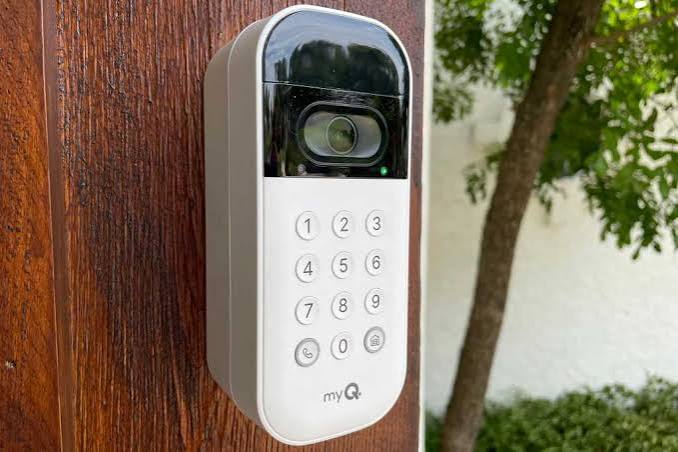
Have you ever worried about who might have a copy of your garage door remote? Or perhaps you’ve struggled with fumbling for keys in the dark while carrying groceries? The Chamberlain MyQ Video Smart Wireless Garage Door Opener Keypad offers a sophisticated solution to these everyday frustrations. By combining video verification with keyless entry, this device transforms your garage from a potential vulnerability into a secure, smart access point for your home.
In this comprehensive guide, we will explore how this innovative keypad works, why it is becoming a staple for US homeowners, and how you can install it to maximize both convenience and security.
Why Upgrade to a Video-Enabled Smart Keypad?
Traditional garage door openers rely on radio frequency remotes that can be lost, stolen, or cloned. A wireless keypad eliminates the need for physical keys, but standard models lack visibility. You press a code, and the door opens—but you don’t know who entered.
The Chamberlain MyQ Video Smart Wireless Garage Door Opener Keypad bridges this gap. It integrates with the MyQ ecosystem to provide real-time video clips whenever the keypad is used. This feature is critical for modern home security, allowing you to verify whether it was a family member, a delivery driver, or an unauthorized individual accessing your property.
According to recent home security studies, visible security measures like video-enabled access points can deter up to 60% of potential intruders. By upgrading to a smart keypad, you are not just adding convenience; you are actively enhancing your home’s defensive perimeter.
Key Features of the Chamberlain MyQ Video Keypad
Understanding the specific capabilities of this device helps you leverage its full potential. Here are the standout features that set it apart from generic wireless keypads:
1. Video Verification
Unlike standard keypads, this model pairs with a MyQ-enabled camera or the built-in video capabilities of newer MyQ hubs. When a code is entered, the system captures a short video clip. You receive a notification on your smartphone, allowing you to see exactly who accessed the garage.
2. Customizable User Codes
You are not limited to a single master code. The system allows you to create unique PINs for different users. For example:
- Family Members: Permanent access.
- Dog Walkers/Cleaners: Temporary codes that expire after a set period.
- Delivery Drivers: One-time use codes for specific time windows.
3. Weather-Resistant Design
Designed for exterior mounting, the keypad boasts an IP54 rating or higher, ensuring it withstands rain, snow, and extreme temperatures common in various US climates. The backlit keys ensure usability even in low-light conditions.
4. Seamless MyQ App Integration
All activity is logged in the MyQ app. You can review history, manage users, and adjust settings remotely. This centralization simplifies home management, especially if you already use MyQ for your garage door opener.
Installation Guide: Step-by-Step Setup
Installing the Chamberlain MyQ Video Smart Wireless Garage Door Opener Keypad is designed to be a DIY-friendly process. However, precision is key to ensuring reliable performance. Follow these steps for a successful installation.
Tools Needed:
- Drill with appropriate bits
- Screwdriver (Phillips head)
- Level
- Pencil
- Lithium batteries (usually 9V or AA, check specific model requirements)
Step 1: Choose the Optimal Location
Select a location near your garage door but out of direct line of sight from the street if possible, to maintain privacy. Ensure it is within range of your Wi-Fi network if it connects directly, or within range of your MyQ hub. The ideal height is between 48 and 54 inches from the ground for easy access.
Step 2: Mount the Backplate
Hold the backplate against the wall or post. Use the level to ensure it is straight. Mark the screw holes with a pencil. Drill pilot holes if mounting into wood or masonry. Secure the backplate using the provided screws.
Step 3: Insert Batteries and Pair
Open the keypad cover and insert the batteries. Observe the polarity indicators carefully. Once powered, the LED indicator should light up. Follow the on-screen prompts or the MyQ app instructions to pair the keypad with your MyQ hub. This usually involves pressing a “Learn” button on your garage door opener motor unit.
Step 4: Program Your PINs
Using the keypad or the MyQ app, set your master PIN. Then, create additional user codes as needed. Test each code to ensure it triggers the door and, crucially, triggers the video recording feature.
Step 5: Final Adjustments
Close the keypad cover securely. Ensure the weather sealing gasket is properly seated to prevent moisture ingress. Clean the lens of any associated camera to ensure clear video quality.
For more detailed technical specifications regarding wireless protocols, you can refer to the general standards outlined on Wikipedia’s page on Home Automation.
Troubleshooting Common Issues
Even with high-quality devices like the Chamberlain MyQ Video Smart Wireless Garage Door Opener Keypad, users may encounter occasional hiccups. Here are solutions to common problems:
| Issue | Possible Cause | Solution |
|---|---|---|
| Keypad Unresponsive | Dead batteries or poor contact | Replace batteries with fresh lithium ones. Clean battery terminals. |
| Video Not Recording | Wi-Fi connectivity issues | Check signal strength. Restart your router and MyQ hub. Ensure camera lens is clean. |
| Code Not Working | Incorrect pairing or expired code | Re-pair the keypad with the opener. Verify if the code is temporary and has expired. |
| Delayed Response | Network latency | Move the MyQ hub closer to the router. Reduce interference from other electronic devices. |
Expert Tips for Maximizing Security
To get the most out of your Chamberlain MyQ Video Smart Wireless Garage Door Opener Keypad, consider these professional recommendations:
- Rotate Codes Regularly: Change user PINs every 3–6 months, especially for temporary users.
- Enable Two-Factor Authentication (2FA): Secure your MyQ account with 2FA to prevent unauthorized digital access to your garage controls.
- Monitor Activity Logs: Review the MyQ app weekly to identify any unusual access patterns.
- Integrate with Smart Home Routines: Link your keypad with other smart devices. For instance, when the garage door opens via the keypad, trigger interior lights to turn on.
FAQ Section
1. Does the Chamberlain MyQ Video Keypad work with all garage door openers?
It is compatible with most Chamberlain, LiftMaster, and Craftsman garage door openers manufactured after 1993 that use security+ technology. Always check the compatibility list on the Chamberlain website before purchasing.
2. How long do the batteries last?
Battery life varies based on usage and temperature. On average, users report 12–18 months of performance with standard usage. Cold weather can reduce battery efficiency, so consider using lithium batteries in colder climates.
3. Can I delete a user code remotely?
Yes, if the keypad is connected to the MyQ ecosystem, you can manage and delete user codes directly through the MyQ mobile app from anywhere with an internet connection.
4. Is the video storage free?
Basic video clips may be stored locally or in the cloud depending on your MyQ subscription plan. Chamberlain often offers basic features for free, but extended video history may require a MyQ Premium subscription.
5. What happens if the Wi-Fi goes down?
The keypad will still function for opening the garage door using pre-programmed codes. However, video verification and remote notifications will be unavailable until the internet connection is restored.
Leave a Reply