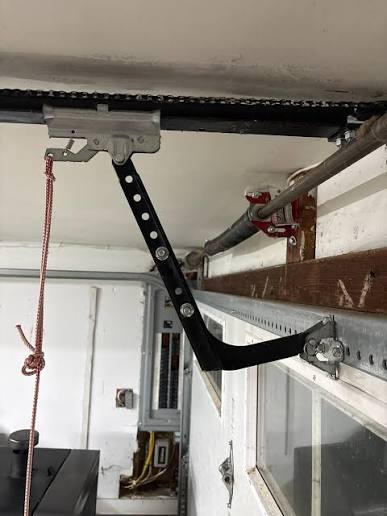
If you have ever stood in your driveway, watching your garage door descend only to stop abruptly or reverse back up, you know how frustrating it can be. This is a common issue where the Chamberlain garage door opener will not close all the way, leaving your home vulnerable and your vehicle exposed to the elements. You are not alone; thousands of homeowners face this glitch annually, often due to minor misalignments or sensor obstructions rather than major mechanical failures.
In this guide, we will walk you through precise, step-by-step solutions to get your door moving smoothly again. We will cover everything from cleaning safety eyes to adjusting travel limits, ensuring you can resolve the issue safely and efficiently without immediately calling a professional.
Why Does My Chamberlain Garage Door Stop Before Closing?
Before diving into fixes, it is crucial to understand why this happens. Modern garage door openers are designed with strict safety protocols. If the system detects any resistance, obstruction, or signal interruption, it will automatically reverse to prevent injury or damage.
According to industry standards, most residential garage doors are equipped with photo-eye sensors and force-limiting mechanisms. When these components are out of sync, the opener interprets normal operation as a hazard. Understanding this logic helps you troubleshoot more effectively because you are not just fixing a motor; you are restoring the safety communication loop between the door and the opener.
Check and Align the Safety Sensors
The most frequent culprit when a Chamberlain garage door opener will not close all the way is the safety sensor system. These small devices, located near the floor on either side of the door track, emit an invisible beam. If the beam is broken, the door refuses to close.
Step-by-Step Sensor Inspection
- Inspect the LED Lights: Look at the small lights on each sensor. Typically, one emits a steady amber or green light (sending unit), and the other shows a steady green light (receiving unit). If the receiving unit’s light is blinking or off, the alignment is incorrect.
- Clean the Lenses: Dust, spiderwebs, or dirt can block the infrared beam. Use a soft, dry cloth to gently wipe both lenses. Avoid using harsh chemicals that might leave a residue.
- Check for Obstructions: Ensure no boxes, bikes, or trash cans are blocking the path between the sensors. Even a thin object can interrupt the signal.
- Realign the Brackets: Loosen the wing nuts on the sensor brackets slightly. Adjust the sensors until they are facing each other directly. You should see the light on the receiving sensor turn solid. Tighten the nuts carefully without shifting the position.
Pro Tip: If the sensors are aligned but still blinking, check the wiring. Look for frayed wires or loose connections at the back of the motor head and at the sensor units themselves.
Adjust the Down Travel Limit Settings
If your sensors are working perfectly (solid lights) but the door still stops short of the ground, the issue likely lies with the down travel limit. This setting tells the motor how far to push the door down before stopping. Over time, vibrations can cause this setting to drift.
Chamberlain openers typically use either dial-based or button-based adjustment systems, depending on the model age.
For Models with Adjustment Dials
- Locate the two dials on the back or side of the motor unit. One is marked “Up” and the other “Down.”
- Identify the “Down” dial. It usually has arrows indicating direction.
- Turn the dial slightly in the direction indicated for “more travel” (often clockwise). Make small adjustments—about 1/8th of a turn at a time.
- Test the door by pressing the wall button. If it still doesn’t close fully, repeat the adjustment.
For Models with Button Controls (MyQ Series)
- Press and hold the “Up” or “Down” arrow buttons on the motor unit to enter programming mode. Refer to your specific manual, as sequences vary.
- Use the arrow keys to adjust the travel distance.
- Save the settings by pressing the “Set” or “Program” button.
| Adjustment Type | Symptom | Solution |
|---|---|---|
| Down Limit Too Short | Door stops 2–6 inches above ground | Increase down travel limit slightly |
| Down Limit Too Long | Door reverses after hitting the floor | Decrease down travel limit slightly |
| Force Setting Too Low | Door stops and reverses on slight resistance | Increase down force setting cautiously |
Inspect the Door Balance and Springs
Sometimes the problem is not the opener at all, but the door itself. If the garage door springs are broken or worn out, the door becomes too heavy for the opener to lift or lower smoothly. The motor detects this excess weight as an obstruction and reverses.
To test this, disconnect the opener by pulling the red emergency release cord. Manually lift the door halfway and let go. A properly balanced door should stay in place. If it slams shut or falls rapidly, your springs are likely faulty.
Warning: Garage door springs are under extreme tension. Never attempt to repair or replace them yourself. Contact a licensed technician for spring issues. For more information on garage door mechanics and safety standards, you can refer to Wikipedia’s entry on Garage Doors.
Clean and Lubricate the Tracks and Rollers
Friction is another silent killer of smooth garage door operation. If the tracks are dirty or the rollers are dry, the door may bind, causing the opener to think it has hit an obstacle.
- Clean the Tracks: Use a damp cloth to wipe out the metal tracks. Remove any built-up grime, rust, or debris.
- Inspect Rollers: Check for cracked or chipped rollers. Nylon rollers are quieter but can crack; steel rollers are durable but noisy. Replace any damaged rollers.
- Lubricate: Apply a silicone-based lubricant or lithium grease to the rollers, hinges, and springs. Avoid WD-40 as it attracts dust and can gum up the mechanism over time. Focus on the moving parts, not the tracks themselves, as lubricating tracks can cause slippage.
Reset the Opener and Reprogram Remotes
Occasionally, the internal logic board of the Chamberlain opener may glitch due to power surges or static electricity. A simple reset can clear temporary errors.
- Unplug the opener from the power source.
- Wait for 30 seconds to allow the capacitors to discharge.
- Plug the unit back in.
- Test the door using the wall control button.
If the door works with the wall button but not the remote, you may need to reprogram the remote. Follow the instructions in your manual to sync the remote again. This ensures that the signal strength is optimal and not causing intermittent commands.
FAQ Section
Q: Why does my Chamberlain garage door close partially and then reverse?
A: This is usually caused by misaligned safety sensors or an incorrect down travel limit. Check if the sensor lights are solid. If they are, adjust the down travel limit slightly to allow the door to reach the floor.
Q: Can weather affect my garage door’s ability to close?
A: Yes. Extreme cold can cause metal tracks to contract, increasing friction. Humidity can cause wooden doors to swell, making them tighter in the frame. In such cases, lubricating the tracks and adjusting the force settings slightly can help.
Q: How do I know if my safety sensors are bad?
A: If the LED light on the receiving sensor is blinking or off despite being aligned and clean, the sensor may be faulty. You can test this by swapping the wires at the motor head. If the problem persists, replace the sensor pair.
Q: Is it safe to increase the force setting to make the door close?
A: Only do this as a last resort and with caution. Increasing the force too much can make the door dangerous, as it may not reverse if it hits an object. Always prioritize fixing the underlying mechanical issue rather than masking it with higher force.
Q: What should I do if the door makes a grinding noise when closing?
A: Grinding noises often indicate worn gears in the motor unit or lack of lubrication in the chain/belt drive. Inspect the drive mechanism and lubricate it. If the gears are stripped, the motor head may need replacement.
Conclusion
Dealing with a Chamberlain garage door opener will not close all the way can be stressful, but it is rarely a catastrophic failure. By systematically checking your safety sensors, adjusting travel limits, and maintaining the physical components of your door, you can restore full functionality in most cases. Remember, regular maintenance—such as cleaning sensors and lubricating rollers—can prevent these issues from recurring.
If you have found this guide helpful, please share it with your neighbors or on social media. Helping others troubleshoot their garage doors not only saves them money but also keeps our communities safer. Stay safe, and keep your garage door running smoothly!
Leave a Reply