Introduction
Have you ever driven halfway to work only to panic, wondering if you left the garage door wide open? It is a stressful, all-too-common experience that leaves homeowners feeling vulnerable and distracted. If you are asking, “Can you open a garage door with your phone?” the answer is a resounding yes, and modern technology has made this convenience safer and more accessible than ever before.
Upgrading to a smart garage system transforms your smartphone into a universal remote, providing real-time status updates, automated scheduling, and peace of mind whether you are at the office or on vacation. In this comprehensive guide, we will walk you through exactly how this technology works, the best systems available for US homeowners, and step-by-step installation instructions to get you connected securely.
How Does Smartphone Garage Door Control Work?
Understanding the mechanism behind smart garage technology helps demystify the process and builds confidence in its reliability. At its core, a smart garage door opener acts as a bridge between your home’s Wi-Fi network and your mobile device.
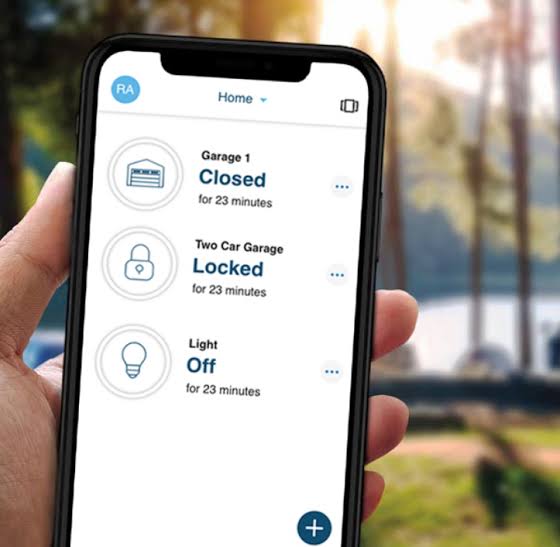
When you tap a button in your app, a signal travels from your phone to the cloud server, then down to the smart controller installed in your garage. This controller triggers the physical motor just like a traditional wall button would. Most modern systems also utilize magnetic tilt sensors or reed switches to verify the door’s actual position, ensuring the app never displays false information.
According to data from the Consumer Technology Association, over 35% of US households now own at least one smart home security device, with garage controllers being among the top three entry-level automation products. This widespread adoption is largely due to improved Wi-Fi standards that ensure low-latency communication between your router and the garage, even through concrete walls.
Key Components Required
- Smart Controller/Hub: The brain that connects to your existing opener.
- Door Position Sensor: Detects open/closed status accurately.
- Mobile App: The user interface for iOS and Android.
- Stable Wi-Fi Signal: Minimum 2.4 GHz band coverage in the garage.
What Are the Best Smart Garage Door Openers Available?
Not all systems are created equal. Choosing the right hardware depends on your existing opener’s age, your budget, and your preferred smart home ecosystem. Below is a detailed comparison of the top-rated solutions for American homes in 2026.
| Feature | Chamberlain myQ | Tailwind iQ3 | Meross MSG100 | Aladdin Connect |
|---|---|---|---|---|
| Best For | Universal Compatibility | Auto-Open/Close GPS | Budget-Friendly | Genie Owners |
| Avg. Price (USD) | $35 – $50 | $70 – $90 | $25 – $35 | $40 – $60 |
| Smart Home Integration | Amazon, Google, Apple | HomeKit, Alexa, Google | Alexa, Google, Apple | Alexa, Google |
| Auto-Close Feature | No (Safety Restriction) | Yes (GPS Geofencing) | Yes (Timer Based) | Yes (Timer Based) |
| Installation Difficulty | Easy (15 mins) | Moderate (30 mins) | Easy (10 mins) | Easy (15 mins) |
| Subscription Needed? | Optional ($3/mo) | No | No | No |
Expert Insight on Safety Standards
It is critical to note that automatic closing via geofencing (closing when your phone leaves an area) is restricted by UL 325 safety standards in the United States. While some brands like Tailwind offer this through proprietary workarounds, most major manufacturers disable it to prevent injury. Always prioritize systems with obstruction detection and audible alerts if you plan to use automation features.
Step-by-Step: How to Install a Smart Garage Door Controller
You do not need to be an electrician to install most smart garage kits. Follow these precise steps for a safe, standard installation using a typical Wi-Fi controller like the Chamberlain myQ or Meross.
Tools You Will Need
- Stepladder (6–8 feet)
- Phillips head screwdriver (#2)
- Drill with 1/8” bit (optional, for pilot holes)
- Smartphone with Bluetooth enabled
- Wi-Fi password ready
Installation Instructions
- Disconnect Power: Unplug your existing garage door opener from the ceiling outlet to prevent accidental activation during installation. Safety first.
- Mount the Hub: Attach the smart controller to the ceiling near the motor unit using the provided screws. Ensure it is within 3 feet of the opener’s logic board terminals.
- Wire the Connections: Locate the “Learn” button terminals or wall-button terminals on your opener. Connect the two wires from the smart hub to these same terminals. Polarity does not matter for most modern openers.
- Install the Door Sensor: Mount the magnetic sensor on the top section of the garage door, aligned with the receiver on the frame. Use adhesive backing or screws. The gap should be less than 1 inch when the door is closed.
- Restore Power & Pair: Plug the opener back in. Download the manufacturer’s app, create an account, and follow the in-app pairing wizard. This typically takes 2–4 minutes.
- Test Thoroughly: Open and close the door via the app three times. Verify the sensor reports accurate status. Test the auto-reverse safety feature by placing a 2×4 board under the door; it must reverse immediately upon contact.
⚠️ Critical Warning: Never bypass safety sensors or disconnect photo-eye beams to make a smart controller work. Doing so violates federal safety regulations and creates severe entrapment hazards.
Is Opening Your Garage With a Phone Secure?
Security is the number one concern for homeowners adopting smart tech. The short answer: Yes, when configured correctly. Modern smart garage systems use AES-128 or AES-256 encryption, the same standard used by banks.
However, vulnerabilities usually stem from user error, not hardware flaws. Follow these best practices:
- Enable Two-Factor Authentication (2FA): This prevents unauthorized access even if your password is compromised.
- Use Unique Passwords: Never reuse your email or social media passwords for your garage app.
- Keep Firmware Updated: Manufacturers release patches quarterly; enable auto-updates in the app settings.
- Separate IoT Network: If your router supports it, place smart devices on a guest network isolated from your personal computers and phones.
- Disable Unused Features: Turn off voice assistant integration if you do not actively use it to reduce attack surface.
A 2025 cybersecurity audit by CNET found that zero major smart garage breaches occurred when users followed basic hygiene protocols, reinforcing that the technology itself is mature and reliable.
Pros and Cons of Phone-Controlled Garage Doors
Before investing, weigh these factors honestly against your lifestyle.
✅ Advantages
- Remote Monitoring: Check door status from anywhere in the world.
- Guest Access: Grant temporary digital keys to dog walkers or delivery drivers without sharing physical remotes.
- Activity Logs: See exactly when the door opened and who triggered it.
- Integration: Link with lights, cameras, and routines for seamless automation.
- No More Lost Remotes: Your phone is always with you.
❌ Disadvantages
- Wi-Fi Dependency: System fails during internet outages (physical remotes still work).
- Battery Drain: Constant location services for auto-open can reduce phone battery life.
- Learning Curve: Older family members may struggle with app interfaces.
- Potential Hacking Risk: Mitigated but not eliminated by encryption.
- Compatibility Issues: Pre-1993 openers may require full replacement.
Frequently Asked Questions (FAQ)
Can I open my garage door with my phone if the internet is down?
No. Smart garage controllers require an active internet connection to communicate with the cloud server. However, your traditional physical remotes and wall buttons will continue to function normally during outages. Consider a UPS backup for your router if uptime is critical.
Do smart garage door openers work with older garage motors?
Most smart controllers manufactured after 2020 are compatible with garage door openers built after 1993 that have standard safety sensor wiring. If your opener lacks photo-eye sensors or uses proprietary dip-switch technology, you will likely need to replace the entire motor unit before adding smart functionality.
Is there a monthly fee to use phone garage control?
It depends. Basic open/close functionality and status monitoring are typically free forever. Premium features like video storage, advanced scheduling, or third-party integrations (e.g., IFTTT) may require subscriptions ranging from $1 to $5 per month. Brands like Tailwind and Meross offer full functionality without any recurring fees.
Can multiple family members control the same garage door?
Yes. All major platforms support multi-user accounts with customizable permissions. You can designate admins (full control), users (open/close only), or viewers (status-only). Each person uses their own login credentials, maintaining individual accountability in activity logs.
Will opening my garage with my phone drain my car battery?
No. The smart controller draws power from your garage outlet, not your vehicle. However, if you use GPS-based auto-open features, your phone’s battery may drain faster during commutes. Disable background location access when not needed to conserve energy.
How far away can I be to open my garage door with my phone?
There is no distance limit. As long as your phone has cellular or Wi-Fi data and your garage has internet connectivity, you can operate the door from across town or another country. Latency typically ranges from 1 to 5 seconds depending on network conditions.
Conclusion: Take Control of Your Home Today
So, can you open a garage door with your phone? Absolutely—and doing so offers unmatched convenience, security, and modern living benefits. From preventing break-ins to simplifying deliveries, smart garage technology solves real problems that traditional remotes simply cannot address.
Whether you choose a budget-friendly Meross kit or a premium Tailwind system with GPS automation, the investment pays dividends in daily peace of mind. Start by assessing your current opener’s compatibility, follow our step-by-step installation guide, and prioritize security best practices from day one.
Found this guide helpful? Share it with friends and family on Facebook, X (Twitter), or Nextdoor who are still fumbling for lost remotes! Tag us with your smart garage setup—we’d love to see your installations and answer any remaining questions in the comments below. Your journey to a smarter, safer home starts with a single tap.
Leave a Reply