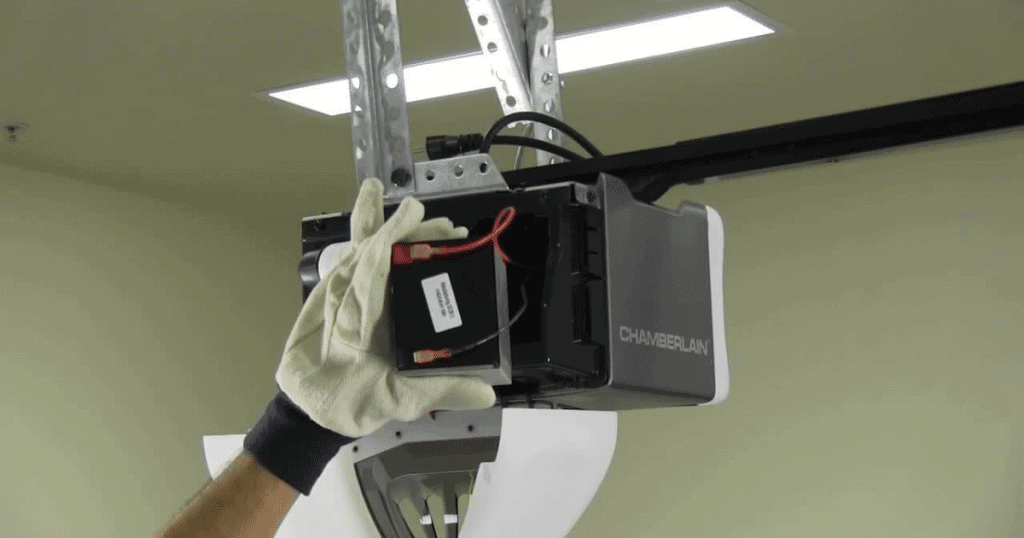
Have you ever been stuck outside your home during a power outage, unable to open your garage door? It’s a frustrating situation that many homeowners face, especially in areas prone to storms or electrical issues. If you’re wondering can you add battery backup to existing garage door opener, the answer is yes—and it’s easier than you might think.
Understanding Garage Door Opener Power Requirements
Before diving into solutions, it’s important to understand how garage door openers work and what they need to function properly. Most residential garage door openers operate on standard 120-volt AC power from your home’s electrical system. When the power goes out, these units simply stop working unless they have a backup power source.
Modern garage door openers typically consume between 5-10 watts during operation, though this can vary depending on the model and age of the unit. Older models may use slightly more power, while newer energy-efficient models use less. Understanding your specific opener’s power requirements is crucial for selecting the right backup solution.
According to the International Door Association, approximately 70% of American homes experience at least one power outage per year lasting more than an hour. This statistic highlights why having a reliable backup system is becoming increasingly important for homeowners.
Types of Battery Backup Solutions Available
When considering can you add battery backup to existing garage door opener, you’ll find several options available on the market. Each solution has its own advantages and considerations.
Uninterruptible Power Supply (UPS) Systems
A UPS system is perhaps the most popular choice for adding battery backup to existing garage door openers. These devices provide immediate power when the main electricity fails, ensuring your garage door opener continues to work seamlessly.
Key Benefits of UPS Systems:
- Instant power transfer with no interruption
- Protects against power surges and voltage fluctuations
- Easy installation process
- Compatible with most garage door opener models
Dedicated Battery Backup Kits
Some manufacturers offer dedicated battery backup kits specifically designed for their garage door opener models. These kits are often integrated directly into the opener system and provide a more streamlined solution.
Advantages of Dedicated Kits:
- Perfect compatibility with specific opener models
- Often include smart features like battery status monitoring
- Professional installation available
- Warranty coverage for both opener and backup system
Portable Power Stations
For those who want flexibility, portable power stations can serve as an excellent backup option. These devices can power not only your garage door opener but also other essential devices during extended outages.
Step-by-Step Installation Guide
Installing a battery backup system for your garage door opener doesn’t require advanced technical skills. Here’s a detailed guide to help you through the process:
Step 1: Choose the Right UPS System
Select a UPS system with at least 600-800 VA capacity. This ensures sufficient power for your garage door opener and provides enough runtime for multiple operations during an outage. Look for models with pure sine wave output for better compatibility with sensitive electronics.
Step 2: Gather Necessary Tools and Materials
You’ll need:
- Phillips head screwdriver
- Wire strippers
- Electrical tape
- Cable ties
- The UPS unit and its power cord
Step 3: Prepare the Installation Area
Choose a location near your garage door opener that’s:
- Dry and well-ventilated
- Away from direct sunlight
- Easily accessible for maintenance
- Within reach of the opener’s power outlet
Step 4: Connect the UPS System
- Plug the UPS into your existing wall outlet
- Connect your garage door opener’s power cord to the UPS outlet
- Ensure all connections are secure
- Test the system by unplugging the UPS from the wall to simulate a power outage
Step 5: Test and Configure
Operate your garage door several times while running on battery power to ensure everything works correctly. Most UPS systems will beep or indicate when they’re running on battery power, which helps you monitor performance.
Comparing Different Backup Solutions
| Feature | UPS System | Dedicated Kit | Portable Station |
|---|---|---|---|
| Cost | $100-300 | $150-400 | $200-500 |
| Installation Difficulty | Easy | Moderate | Easy |
| Runtime | 2-4 hours | 4-8 hours | 6-12 hours |
| Additional Device Support | Limited | None | Multiple devices |
| Maintenance Required | Minimal | Minimal | Regular charging |
Common Challenges and Solutions
While adding battery backup to your existing garage door opener is generally straightforward, you may encounter some challenges:
Space Constraints: If your garage is cluttered, consider mounting the UPS on the wall using appropriate brackets. Ensure proper ventilation around the unit.
Compatibility Issues: Some older garage door openers may not work well with certain UPS systems. Check your opener’s manual or contact the manufacturer for compatibility information.
Battery Life Concerns: Most UPS batteries last 3-5 years before needing replacement. Set reminders to test your system monthly and replace batteries as needed.
Maintenance Tips for Long-Term Reliability
To ensure your battery backup system remains reliable:
- Test Monthly: Simulate a power outage once a month to verify the system works correctly
- Keep Clean: Dust and debris can affect UPS performance; clean the unit regularly
- Monitor Battery Health: Most modern UPS systems have indicators showing battery condition
- Replace Batteries Proactively: Don’t wait for complete failure; replace batteries every 3-5 years
FAQ Section
Q: How long will a battery backup keep my garage door opener running?
A: Most UPS systems provide 2-4 hours of runtime for a typical garage door opener, allowing for 20-30 door operations. Dedicated battery backup kits often provide longer runtime, sometimes up to 8 hours or more.
Q: Can I install a battery backup myself, or do I need a professional?
A: Most homeowners can install a UPS system themselves without professional help. The process typically involves plugging the UPS into an outlet and connecting your garage door opener to it. However, if you’re uncomfortable working with electrical components, hiring a professional is always a safe option.
Q: Will adding a battery backup void my garage door opener warranty?
A: Generally, adding an external UPS system won’t void your warranty since it doesn’t modify the opener itself. However, installing internal battery backup kits may affect warranty terms. Always check with your manufacturer before making modifications.
Q: How much does it cost to add battery backup to an existing garage door opener?
A: Costs vary depending on the solution chosen. Basic UPS systems range from $100-300, while dedicated battery backup kits cost $150-400. Portable power stations are more expensive at $200-500 but offer additional functionality.
Q: Do I need a special type of battery backup for my garage door opener?
A: While any UPS system can work, look for models with pure sine wave output for best compatibility. Avoid modified sine wave UPS units as they may cause issues with some garage door openers’ motors and control boards.
Q: What happens when the battery backup runs out of power?
A: When the battery depletes, your garage door opener will stop functioning until power is restored or the battery recharges. Most UPS systems provide audible alarms when battery levels are low, giving you time to prepare.
Conclusion
Adding battery backup to your existing garage door opener is not only possible but highly recommended for modern homeowners. Whether you choose a UPS system, dedicated backup kit, or portable power station, you’ll gain peace of mind knowing you can access your garage during power outages.
The investment is relatively modest compared to the convenience and security it provides. With proper installation and maintenance, your backup system will serve you reliably for years to come.
Found this guide helpful? Share it with friends and family who might benefit from reliable garage door access during power outages!
Leave a Reply