If you’ve been wondering “Can I add MyQ to my garage door opener”, you’re not alone. Many homeowners want to upgrade their existing garage system into a smart, app-controlled setup without replacing the entire opener.
The good news is: in many cases, you can add MyQ to your garage door opener—but compatibility depends on your model, technology type, and setup requirements. In this guide, you’ll learn exactly how it works, what you need, and whether your system qualifies.
Read too: How Do You Change Code On Garage Door Keypad Fast?
What Is MyQ and How Does It Work?
MyQ is a smart garage door technology developed by Chamberlain Group that allows you to control and monitor your garage door using a smartphone app.
It works by connecting a sensor system to your existing garage opener and communicating through Wi-Fi. Once installed, you can:
- Open or close your garage remotely
- Receive real-time alerts
- Set automatic schedules
- Monitor activity history
MyQ systems are part of the broader smart home ecosystem, often integrated with services like Google Assistant and other automation platforms.
For general background on smart garage technology, you can learn more here:
https://en.wikipedia.org/wiki/Smart_garage_door_opener
Can I Add MyQ To My Garage Door Opener?
Yes — but only if your garage door opener is compatible.
Most garage door openers manufactured after 1993 can work with MyQ, but compatibility depends on:
- Safety sensor type
- Frequency technology (Security+ 2.0 or newer is ideal)
- Wiring compatibility
- Brand support (Chamberlain, LiftMaster, Craftsman often work best)
Quick Compatibility Check
You can usually add MyQ if:
✔ Your opener has photoelectric safety sensors
✔ It uses standard wall control wiring
✔ It is not extremely old (pre-1993 models usually won’t work)
✔ It supports modern rolling-code technology
If your system fails these checks, you may need a MyQ-compatible garage door opener upgrade.
What Devices Do You Need for MyQ Setup?
To add MyQ to your garage door opener, you typically need:
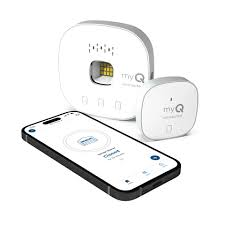
1. MyQ Smart Garage Hub
This is the main device that connects your opener to Wi-Fi.
2. Door Sensor
Tracks whether the garage is open or closed.
3. Wi-Fi Connection (2.4 GHz required)
MyQ does not support 5 GHz networks.
4. Compatible Garage Opener
Not all brands or models are supported.
Step-by-Step: How to Add MyQ to Your Garage Door Opener
If your system is compatible, setup is fairly straightforward.
Step 1: Download the MyQ App
Install the official MyQ app from iOS or Android.
Step 2: Create an Account
Sign up using your email and verify your account.
Step 3: Connect the Hub
Plug in the MyQ Smart Garage Hub near your router for setup.
Step 4: Pair the Door Sensor
Attach the sensor to your garage door using adhesive strips or screws.
Step 5: Connect to Wi-Fi
Ensure you are using a 2.4 GHz network.
Step 6: Sync with Garage Opener
Follow the in-app instructions to pair the system with your opener’s control panel.
Step 7: Test the System
Open and close the garage using the app to confirm functionality.
MyQ Compatibility by Opener Type
Here’s a simplified breakdown:
| Garage Opener Type | MyQ Compatibility |
|---|---|
| Chamberlain | Fully compatible |
| LiftMaster | Fully compatible |
| Craftsman (newer) | Usually compatible |
| Pre-1993 models | Not compatible |
| Smart openers (Wi-Fi built-in) | May not need hub |
Benefits of Adding MyQ
Upgrading your garage opener with MyQ provides several advantages:
1. Remote Access
Control your garage from anywhere in the world.
2. Security Alerts
Get notified if your garage is opened unexpectedly.
3. Smart Home Integration
Works with select smart home systems for automation.
4. Convenience
No more worrying if you left the garage open.
Limitations You Should Know
While MyQ is powerful, it has some limitations:
- Requires stable Wi-Fi connection
- No native support for all smart assistants
- Some features require subscription plans
- Not all garage brands are supported
Pros vs Cons of MyQ
| Pros | Cons |
|---|---|
| Easy remote control | Requires Wi-Fi |
| Real-time alerts | Compatibility limits |
| Smart automation | Some paid features |
| Improved security | Setup can be technical |
Do I Need to Replace My Garage Door Opener?
Not always.
You only need a replacement if:
- Your opener is too old (pre-1993)
- It lacks safety sensors
- It uses outdated fixed-code technology
- It is incompatible with MyQ hardware
Otherwise, adding a MyQ Smart Garage Hub is enough.
Expert Insight: Is MyQ Worth It?
Industry professionals often recommend MyQ for homeowners who want to modernize without replacing the entire system. According to smart home adoption trends, garage automation is one of the fastest-growing segments in home security upgrades.
However, experts also emphasize checking compatibility first to avoid unnecessary purchases.
Troubleshooting Common MyQ Issues
1. MyQ Not Connecting to Wi-Fi
- Ensure 2.4 GHz network is used
- Restart router and hub
2. Door Not Responding
- Check sensor alignment
- Replace batteries if needed
3. App Not Syncing
- Update MyQ app
- Re-pair the device
FAQ: Can I Add MyQ To My Garage Door Opener?
1. Can I add MyQ to any garage door opener?
No. Only compatible models with safety sensors and modern wiring can support MyQ.
2. Does MyQ work without Wi-Fi?
No. MyQ requires a stable 2.4 GHz Wi-Fi connection to function.
3. Is MyQ free to use?
The basic app is free, but some advanced features may require a subscription.
4. Can I install MyQ myself?
Yes. Most homeowners can install it in under 30–60 minutes using the app guide.
5. What if my garage opener is too old?
You will likely need to upgrade to a newer MyQ-compatible opener.
6. Is MyQ safe from hacking?
MyQ uses encrypted communication, but like all IoT devices, strong Wi-Fi security is recommended.
Conclusion
So, can I add MyQ to my garage door opener? In most modern homes, the answer is yes—if your system meets compatibility requirements.
With the right setup, MyQ transforms a standard garage into a smart, secure, and remotely controllable system that improves both convenience and safety.
If you’re planning an upgrade, always check compatibility first, then follow the installation steps carefully for the best results.
If this guide helped you, consider sharing it with others who may be upgrading their garage system too.
Leave a Reply