If you’ve been asking yourself, why does my garage door close and then open again, you’re dealing with one of the most common (and frustrating) garage door problems. It can feel confusing when the door starts closing normally—only to reverse at the last second. The good news? This issue is usually easy to diagnose and fix with the right steps.
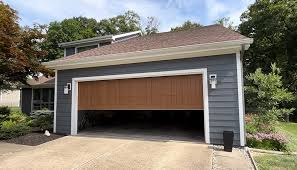
Why Does My Garage Door Close And Then Open Again?
When your garage door reverses after closing, it’s typically a built-in safety feature doing its job. Modern systems are designed to prevent accidents or damage.
Read too: Tc1 Tricode Garage Door Opener Remote W/ Clip Chamberlain: Complete Guide
Most Common Causes
- Misaligned safety sensors
- Obstructions in the door path
- Incorrect limit settings
- Force setting issues
- Track or roller problems
According to industry data, over 70% of reversing garage door issues are related to sensor misalignment or obstruction detection.
How Do Garage Door Safety Systems Work?
Understanding this helps explain why your garage door closes and then opens again.
Modern garage doors use infrared safety sensors placed near the floor. These sensors detect objects in the door’s path.
👉 If something interrupts the beam, the system automatically reverses the door to prevent injury.
For more on safety mechanisms, see: https://en.wikipedia.org/wiki/Garage_door_opener
Is Something Blocking the Door?
Quick Check for Obstructions
Even small objects can trigger the reverse function:
- Tools or boxes in the doorway
- Dirt, leaves, or debris
- Ice buildup (in colder climates)
What to Do
- Inspect the entire door path
- Remove visible obstacles
- Try closing the door again
👉 This is the easiest fix and solves many cases instantly.
Are the Safety Sensors Misaligned?
This is the #1 reason behind why does my garage door close and then open again.
Signs of Sensor Issues
- Blinking LED lights
- Door starts closing but reverses quickly
- Door won’t close unless you hold the button
How to Fix It (Step-by-Step)
- Locate sensors near the bottom of the door tracks
- Ensure both are facing each other directly
- Adjust until both LED lights are solid
- Clean lenses using a soft cloth
📏 Ideal alignment distance: 4–6 inches above the ground
Are the Close Limit Settings Incorrect?
Your garage door opener uses limit settings to determine how far the door should travel.
Symptoms
- Door hits the ground, then reverses
- Door doesn’t fully close
Fix: Adjust the Close Limit
- Locate limit adjustment screws on opener unit
- Turn the “down” limit slightly clockwise
- Test after each adjustment
👉 Make small adjustments (¼ turn at a time)
Is the Close Force Too Sensitive?
If the force setting is too low, the opener may think it hit an obstacle—even when it didn’t.
Signs
- Door reverses without touching anything
- Happens midway or near the floor
How to Adjust Force
- Find force adjustment dial
- Increase closing force slightly
- Test after each change
⚠️ Avoid setting too high—it can be unsafe.
Are the Tracks or Rollers Damaged?
Mechanical issues can also cause reversing.
Check for:
- Bent tracks
- Worn-out rollers
- Dirt buildup
Fix
- Clean tracks with a dry cloth
- Apply lubricant (silicone-based)
- Call a technician if damage is severe
Common Causes vs Solutions
| Problem | Symptoms | Solution |
|---|---|---|
| Sensor misalignment | Blinking lights | Realign sensors |
| Obstruction | Door reverses instantly | Clear path |
| Limit setting wrong | Hits ground then opens | Adjust limit |
| Low force setting | Random reversing | Increase force |
| Track issue | Noisy or jerky motion | Clean or repair |
Step-by-Step Troubleshooting Guide
Follow this full checklist to fix the issue:
Step 1: Clear the Door Path
Remove all objects, even small debris.
Step 2: Clean and Align Sensors
Ensure LEDs are steady and sensors face each other.
Step 3: Check for Ice or Dirt
Especially important during winter.
Step 4: Adjust Close Limit
Turn screws slowly and test.
Step 5: Adjust Force Settings
Increase slightly if needed.
Step 6: Test Multiple Times
Open and close the door 3–5 times to confirm fix.
Preventive Maintenance Tips
To avoid asking why does my garage door close and then open again in the future:
Monthly Checklist
- Clean sensors and tracks
- Test auto-reverse function
- Lubricate moving parts
- Inspect cables and springs
Pro Insight
Experts recommend servicing your garage door once per year, which can reduce unexpected failures by up to 50%.
DIY vs Professional Repair
Pros of DIY
- Saves money
- Quick fixes for simple issues
- Easy to learn
Cons of DIY
- Risk of incorrect adjustments
- Potential safety hazards
- Not suitable for major repairs
👉 Call a professional for spring or motor issues.
FAQ: Why Does My Garage Door Close And Then Open Again
1. Why does my garage door reverse right before closing?
This usually means the close limit is set incorrectly or the sensors are detecting a false obstruction.
2. Why do I have to hold the button to close the door?
This indicates a sensor issue. The system bypasses sensors when you hold the button.
3. Can sunlight affect garage door sensors?
Yes. Direct sunlight can interfere with the infrared beam, causing the door to reverse.
4. How do I know if my sensors are bad?
If the lights won’t stay solid or the door won’t close at all, the sensors may need replacement.
5. Is it safe to adjust garage door force settings?
Yes, but only slightly. Too much force can prevent the safety system from working properly.
6. When should I replace my garage door opener?
If your opener is over 10–15 years old or frequently malfunctions, replacement may be more cost-effective.
Conclusion
So, why does my garage door close and then open again? In most cases, it’s your garage door’s safety system detecting a problem—whether it’s sensor misalignment, incorrect settings, or a minor obstruction.
The best part? Most of these issues are quick and affordable to fix with simple troubleshooting steps.
Take a few minutes today to inspect your system and restore smooth operation.
Leave a Reply