If you’ve been asking yourself “Where is the Learn button on LiftMaster garage door opener?”, you’re not alone. This small but crucial button allows you to program remotes, keypads, and manage security settings efficiently.
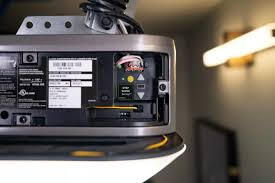
Knowing its exact location saves time, prevents frustration, and allows you to take control of your garage door system without calling a technician. Whether you’re adding a new remote or resetting your opener, the Learn button is the starting point.
Read too: Tc1 Tricode Garage Door Opener Remote W/ Clip Chamberlain: Complete Guide
What is the Learn Button and Why It’s Important
The Learn button on a LiftMaster garage door opener serves as the interface for programming and syncing devices. It’s responsible for:
- Remote control programming
- Keypad setup
- Security updates via rolling codes
LiftMaster manuals highlight that pressing the Learn button opens a brief window (usually 30 seconds) during which the opener can recognize new devices.
Without it, you can’t pair remotes or reset the system, which can be inconvenient and potentially costly.
Where to Locate the Learn Button on LiftMaster Openers
The location of the Learn button varies depending on the LiftMaster model. Most modern units have it on the back or side of the motor housing, often near the light cover or antenna wire.
Common Locations:
- Under Light Cover:
- Remove the protective light lens.
- Look for a small red, yellow, purple, or orange button labeled “Learn.”
- Side Panel or Back of Unit:
- On some belt or chain drive openers, the button is located on the back near the antenna wire.
- Wall-Mount Units:
- Some wall-mounted openers place the Learn button on the front for easier access.
Tip: Use a flashlight for clarity if the opener is installed in a dim area.
Step-by-Step Guide to Programming a Remote
Once you find the Learn button, programming a remote is straightforward.
Step 1: Prepare the Remote
- Ensure it has fresh batteries.
- Verify it is compatible with your LiftMaster opener.
Step 2: Press the Learn Button
- Press and release the Learn button.
- The LED near the button will blink, signaling the opener is ready.
Step 3: Activate the Remote
- Within 30 seconds, press the button on the remote.
- A light flash or click indicates successful programming.
Step 4: Test the Remote
- Stand clear of the door.
- Press the remote button to confirm the door responds properly.
For rolling code models, multiple attempts may be necessary if the first press fails.
How to Program a Keypad
LiftMaster keypads also use the Learn button:
- Press the Learn Button on the motor unit.
- Enter the PIN on the keypad.
- Press the keypad’s enter key.
- Confirm the LED flash or door movement indicates successful programming.
Keypads can also be reprogrammed if a code is lost or compromised, enhancing security.
Troubleshooting Common Issues
| Problem | Possible Cause | Solution |
|---|---|---|
| LED does not blink | Dead battery or faulty button | Replace battery, check power supply |
| Remote not syncing | Wrong model or timing error | Confirm remote compatibility and press within 30 sec |
| Door opens then stops | Sensor misalignment | Adjust safety sensors per manual |
| Learn button stuck | Dust/debris | Clean and gently press button |
Tips for Effective Learn Button Use
- Keep the area clean – Dust can block the button.
- Label your remotes – Avoid confusion with multiple devices.
- Test remotes frequently – Prevent battery issues or missed signals.
- Follow manual instructions – Timing between presses is critical for success.
Safety Precautions
Working with garage doors can be dangerous. Follow these safety steps:
- Disconnect power when accessing wiring.
- Avoid standing under the door while testing.
- Use a stable ladder when reaching the motor unit.
- Do not force the Learn button; gentle pressure is sufficient.
The U.S. Consumer Product Safety Commission reports that thousands of injuries occur annually due to improper garage door maintenance, highlighting the importance of caution.
Advantages and Disadvantages of Knowing the Learn Button Location
Advantages:
- DIY Programming: Add remotes and keypads without professional help.
- Security Control: Reset or remove old remotes if lost or stolen.
- Cost Savings: Avoid service calls that can range from $50–$100.
Disadvantages:
- Confusing for older models or units with multiple openers.
- Rolling code timing requires attention to detail.
Real-Life Case Study
Situation:
Susan, a homeowner in Texas, bought a new LiftMaster remote and was unsure where to program it.
Solution:
- She found the Learn button under the light cover.
- Pressed it and activated the remote within 30 seconds.
- Tested the door with multiple remote presses.
Outcome:
Her remote worked perfectly, and she avoided a $75 technician visit.
Case studies show understanding the Learn button saves time, money, and frustration.
External Reference
For more information about garage door openers, visit Wikipedia: Garage Door.
FAQ: Where Is The Learn Button On LiftMaster Garage Door Opener
Q1: What color is the Learn button on LiftMaster openers?
A: Colors vary by model, including red, yellow, orange, or purple.
Q2: Can I program multiple remotes with one Learn button press?
A: You need to press the Learn button separately for each remote within the 30-second window.
Q3: What if I cannot locate the Learn button?
A: Check behind light covers, side panels, or consult your LiftMaster manual.
Q4: Does pressing the Learn button erase previous remotes?
A: Pressing it briefly adds a remote. Holding it 10+ seconds usually erases all devices.
Q5: Can I program a keypad without a remote?
A: Yes, follow the keypad instructions and use the Learn button to sync.
Q6: Is it safe to press the Learn button while the door is moving?
A: No, always ensure the door is stationary and stand clear when programming.
Conclusion
Knowing where is the Learn button on LiftMaster garage door opener allows you to program remotes, keypads, and secure your garage effectively. By following step-by-step instructions, testing devices, and observing safety measures, you can manage your garage door opener independently, saving both time and money.
Share this guide with friends and family to help them easily locate the Learn button and program their LiftMaster openers safely.
Leave a Reply